00197706-02_VB_SetupCenter7.1_DE_EN.pdf - 第37页
New Functions in Setup Center 7.1 Configuring Menu Func tions at the Barcode Scanner SIPLACE Setup Center 7.1 37 5 5 N e w F u n c t io n s in S e t u p C e n t e r 7 . 1 New Functions in Setup Center 7.1 5.1 5 . 1 C o n…
System Requirements
Supported Hardware
36 SIPLACE Setup Center 7.1
Supported feeder types
Feeder types
▪ All WPC types
▪ MTC 1 & 2
▪ All waffle-pack trays
▪ All standard SIPLACE tape feeders
▪ All standard SIPLACE linear feeders
▪ SIPLACE X adapters
▪ Special feeders (Road Runner, Road Runner
XLF, Multi Stick Feeder: IPTE MSF 60 AX and
IPTE MSF XL80 AX; LED Feeder TE und LED
Feeder HS)
▪ SIPLACE JTF-S, JTF-M and JTF-MW
NOTICE
Restrictions
Please note that the programming system SIPLACE Pro and the hardware used may limit this
selection.
New Functions in Setup Center 7.1
Configuring Menu Functions at the Barcode Scanner
SIPLACE Setup Center 7.1 37
5
5 New Functions in Setup Center 7.1
New Functions in Setup Center 7.1
5.1
5.1 Configuring Menu Functions at the Barcode Scanner
Configuring Menu Functions at the Barcode Scanner
Purpose
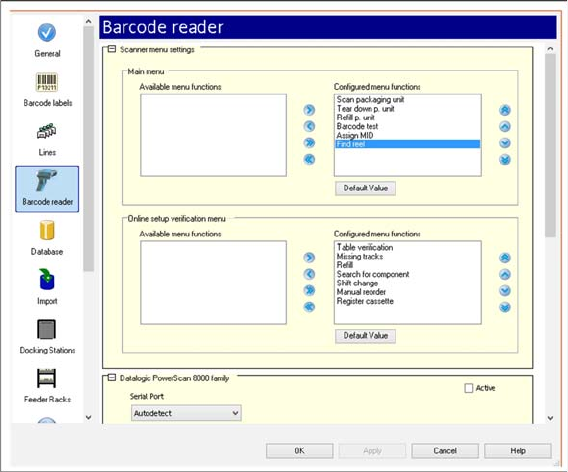
You can configure the menu functions that are to be displayed at the scanner.
Function
► Open with Extras => Settings => Reader.
► Under Scanner menu settings, you can configure the menu functions of the scanner for the Main
menu and for the Online setup verification menu.
► For detailed information, refer to the user manual "Setup Center 7.1" or the Online Help.
5.2
5.2 Teardown of Short Tape Material (Find Reel)
Teardown of Short Tape Material (Find Reel)
Purpose
If the tape in the feeder gets so short that it comes off the tape reel, the corresponding tape reel
may not be recognized without doubt during teardown. Use this function to check if the empty
reel corresponds to the tape end left in the feeder. This function is only possible with a 2D bar-
code scanner.
Function
► Open with Extras => Settings => Reader.
► You configure the Find reel function under Scanner menu settings. See "5.1 Configuring Menu Func-
tions at the Barcode Scanner" [ ➙ 37].
⇨ This scan makes it possible to find the empty reel in the tape container.
► For detailed information, refer to the user manual "Setup Center 7.1" or the Online Help.
New Functions in Setup Center 7.1
Configuring Feeder Racks
38 SIPLACE Setup Center 7.1
5.3
5.3 Configuring Feeder Racks
Configuring Feeder Racks
Purpose
In connection with the SIPLACE Material Setup Assistant, feeders already set up in the pre-setup area
need to be parked for a later reuse. It is recommended to use one or more feeder racks for this.
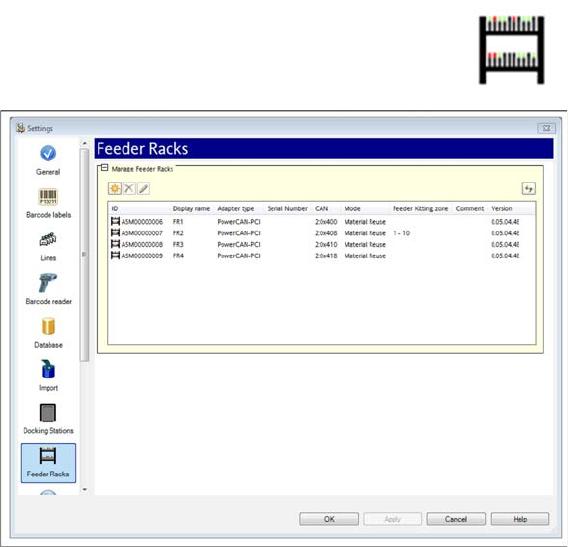
A separate view is available for configuring the feeder racks.
Function
► Open with Extras => Settings => Feeder Racks .
► Use this view to make the settings for the feeder rack. You can edit the settings or add new feeder
racks.
► For detailed information, refer to the user manual "Setup Center 7.1" or the Online Help.
5.4
5.4 Filter Options for Material Search Reworked
Filter Options for Material Search Reworked
Purpose
The view for the material search was reworked. You can select the material to be found via filter options:
▪ Used in Online Setup
▪ Used in Offline Setup
▪ Kitted Material on Docking Station or Feeder Rack
▪ Material Not Set Up
Depending on the filter setting, the search results are shown in tables in the relevant tabs.