00197706-02_VB_SetupCenter7.1_DE_EN.pdf - 第36页
System Requirements Supported Hardware 36 SIPLACE Setup Center 7.1 Supported feeder types Feeder types ▪ All WPC types ▪ MTC 1 & 2 ▪ All waffle-pack trays ▪ All standard SIPLACE tape feeders ▪ All standard SIPLACE li…
System Requirements
Supported Hardware
SIPLACE Setup Center 7.1 35
Supported barcode types
▪ Datalogic 1D barcode scanner:
– Automatic recognition of all standard linear codes and linear GS1 DataBar ™ codes.
– Code 16K; Code 49; GS1 DataBar Expanded Stacked; GS1 DataBar Stacked; GS1 DataBar
Stacked Omnidirectional
▪ Datalogic 2D barcode scanner:
– Automatic recognition of all standard linear codes and linear GS1 DataBar ™ codes.
– Aztec Code; Aztec Mesas; Data Matrix; MaxiCode; QR Code; Post Codes; Australian Post; Brit-
ish Post; Canadian Post; China Post; Japanese Post; KIX Post; Korea Post; Planet Code; Post-
net; Royal Mail; Code (RM4SCC) ; EAN/JAN Composites; GS1 DataBar Composites; GS1
DataBar Expanded Stacked; GS1 DataBar Stacked; GS1 DataBar Stacked Omnidirectional;
MacroPDF; MicroPDF417; PDF417; UPC A/E Composites
▪ Symbol / Motorola 2D barcode scanner:
– AusPostal, Aztec, Chinese_2of5, Codabar, Code11, Code128, Code39, Code93, Composite
AB, Composite C, D2of5, Datamatrix, DutschPostal, EAN13, EAN8, I2of5, JapPostal,
Korean_3of5, MaixiCode, MicroPDF, MicroQR, MSI, PDF417, QRCode, RSS14, RSSExp,
RSSLim TLC39, Trioptic39, UKPostal, UPCA, UPCE0, UPCE1, US4State, US4State_FICS, US-
Planet, USPostnet, WebCode
Supported machines
Machine
SIPLACE 80 F4, F4-6, S20; F5, F5 HM, S23
SIPLACE S25 HM, S27 HM, HS50, HS 50+, HS60, HF,
HF3
SIPLACE X2, X3, X4; D1, D2, D3, D4
SIPLACE CF, CS
SIPLACE X2, X3, X4, X4I
SIPLACE SX1, SX2, SX4, SX1 V2, SX2 V2
SIPLACE DX1, DX2, DX4
SIPLACE X4i S, X4 S, X3 S, X2 S
SIPLACE X4i S micron, X4 S micron
SIPLACE CA
SIPLACE E
NOTICE
Restrictions
Please note that the programming system SIPLACE Pro and the Setup Center station package
may limit this selection.

System Requirements
Supported Hardware
36 SIPLACE Setup Center 7.1
Supported feeder types
Feeder types
▪ All WPC types
▪ MTC 1 & 2
▪ All waffle-pack trays
▪ All standard SIPLACE tape feeders
▪ All standard SIPLACE linear feeders
▪ SIPLACE X adapters
▪ Special feeders (Road Runner, Road Runner
XLF, Multi Stick Feeder: IPTE MSF 60 AX and
IPTE MSF XL80 AX; LED Feeder TE und LED
Feeder HS)
▪ SIPLACE JTF-S, JTF-M and JTF-MW
NOTICE
Restrictions
Please note that the programming system SIPLACE Pro and the hardware used may limit this
selection.
New Functions in Setup Center 7.1
Configuring Menu Functions at the Barcode Scanner
SIPLACE Setup Center 7.1 37
5
5 New Functions in Setup Center 7.1
New Functions in Setup Center 7.1
5.1
5.1 Configuring Menu Functions at the Barcode Scanner
Configuring Menu Functions at the Barcode Scanner
Purpose
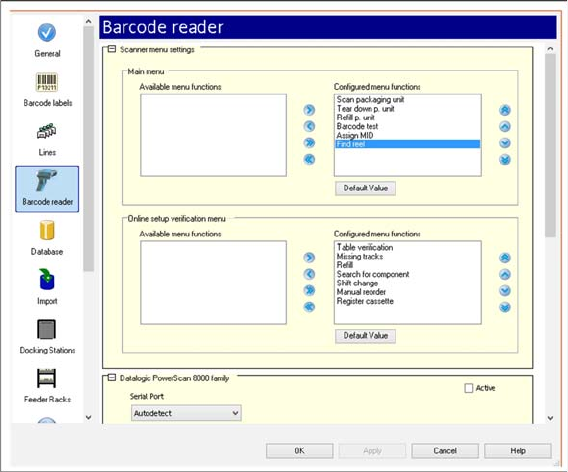
You can configure the menu functions that are to be displayed at the scanner.
Function
► Open with Extras => Settings => Reader.
► Under Scanner menu settings, you can configure the menu functions of the scanner for the Main
menu and for the Online setup verification menu.
► For detailed information, refer to the user manual "Setup Center 7.1" or the Online Help.
5.2
5.2 Teardown of Short Tape Material (Find Reel)
Teardown of Short Tape Material (Find Reel)
Purpose
If the tape in the feeder gets so short that it comes off the tape reel, the corresponding tape reel
may not be recognized without doubt during teardown. Use this function to check if the empty
reel corresponds to the tape end left in the feeder. This function is only possible with a 2D bar-
code scanner.
Function
► Open with Extras => Settings => Reader.
► You configure the Find reel function under Scanner menu settings. See "5.1 Configuring Menu Func-
tions at the Barcode Scanner" [ ➙ 37].
⇨ This scan makes it possible to find the empty reel in the tape container.
► For detailed information, refer to the user manual "Setup Center 7.1" or the Online Help.