00192791-02.pdf - 第54页
2 Ceramic S ubstrate Centering Unit User Manual S IPLACE HS-50 2.6 Utilizi ng Oblique lllumination t o Recognize the Position of a Fiducial S oftware Version SR.502.xx 01/ 01 Issue 54 8WLOL]LQJ2EO LTXHOOOXPLQDWLRQ…
User Manual 2 Ceramic Substrate Centering Unit
Software Version SR.502.xx 01/01 Issue 2.5 Monthly Maintenance
53
0RQWKO\0DLQWHQDQFH
DANGER
In addition to these instructions, you will always need the current edition of the "Maintenance Man-
ual for HS-50", Item no. 00191375-02, to restore the machine to its original safe condition in terms
of maintenance and to perform all of other the jobs specified for this maintenance period.
During all maintenance work, comply with the safety instructions in Chapter 1 of the above-men-
tioned "Maintenance Manual for HS-50". It also contains the explanation for the symbols used.
Perform the maintenance work described while conducting the "Vacuuming Off the PCB Con-
veyor" described below during the monthly maintenance work on the "Mechanical Ceramic Cen-
tering Unit".
The maintenance must be performed on ALL of existing centering units (see Fig. 2.3 - 1).
([SHQGDEOH0DWHULDOV
For the monthly maintenance you need:
– SIPLACE cleaning cloth, Item no. 00315253-01
3UHSDUDWRU\ 6WHSV
Å Establish the maintenance condition of the machine and the accessibility of the work area.
Proceed as described for the cleaning of the PCB conveyor in the section "Weekly Mainte-
nance", in the "Maintenance Manual for HS-50".
&OHDQLQJDQG$SSO\LQJ3 UHVHUYDWLYHWR6OLGH*XLGH
Å Clean the entire length of the contact surfaces of the slide guide for the ceramic substrate cen-
tering unit with a new SIPLACE cleaning cloth. This simultaneously applies a thin coat of oil to
the contact surfaces.
2 Ceramic Substrate Centering Unit User Manual SIPLACE HS-50
2.6 Utilizing Oblique lllumination to Recognize the Position of a Fiducial Software Version SR.502.xx 01/01 Issue
54
8WLOL]LQJ2EOLTXHOOOXPLQDWLRQWR5HFRJQL]HWKH
3RVLWLRQRID)LGXFLDO
*HQHUDO,QIRUPDWLRQ
The particular features of the ceramic substrate must be taken into consideration when trying to
recognize the position of fiducials on ceramic substrates. The contrast depends very highly on
the properties of the surface the fiducials are on, just how unobstructed area around the fiducial
is, and the type of illumination selected.
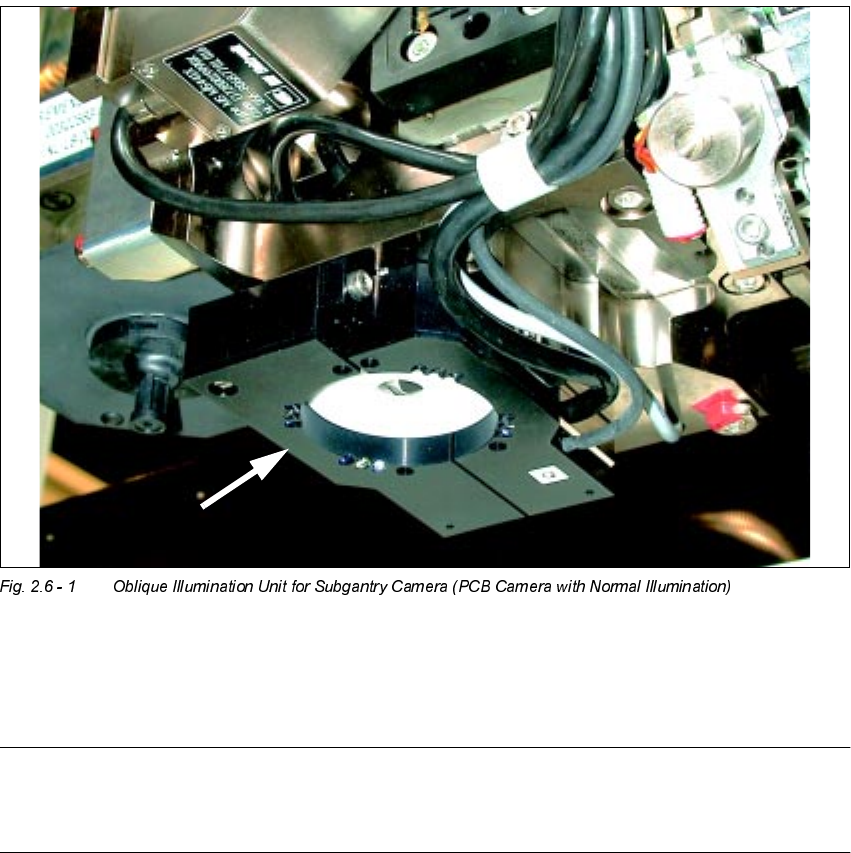
The optional oblique illumination unit is located on the front of the subgantry PCB camera.
As an alternative to the existing illumination of the subgantry PCB camera with normal illumina-
tion, you can switch ON this oblique illumination (see table in Section 2.2 and Section 2.6).
NOTE:
The oblique illumination can only be used on the subgantry PCB camera (with normal illumina-
tion).
User Manual 2 Ceramic Substrate Centering Unit
Software Version SR.502.xx 01/01 Issue 2.6 Utilizing Oblique lllumination to Recognize the Position of a Fiducial
55
5HFRPPHQGDWLRQV IRU)LGXFLDOVRQ&HUD PLF6XEVW UDWHV
With ceramic substrates there is generally very little contrast between carrier material and the
coating on the PCB. For this reason, specific criteria regarding the shape and layout of the fidu-
cial must be taken into account when selecting the fiducials. See the following recommendations
for the shape and layout of fiducials.
)LGXFLDO6KDSH
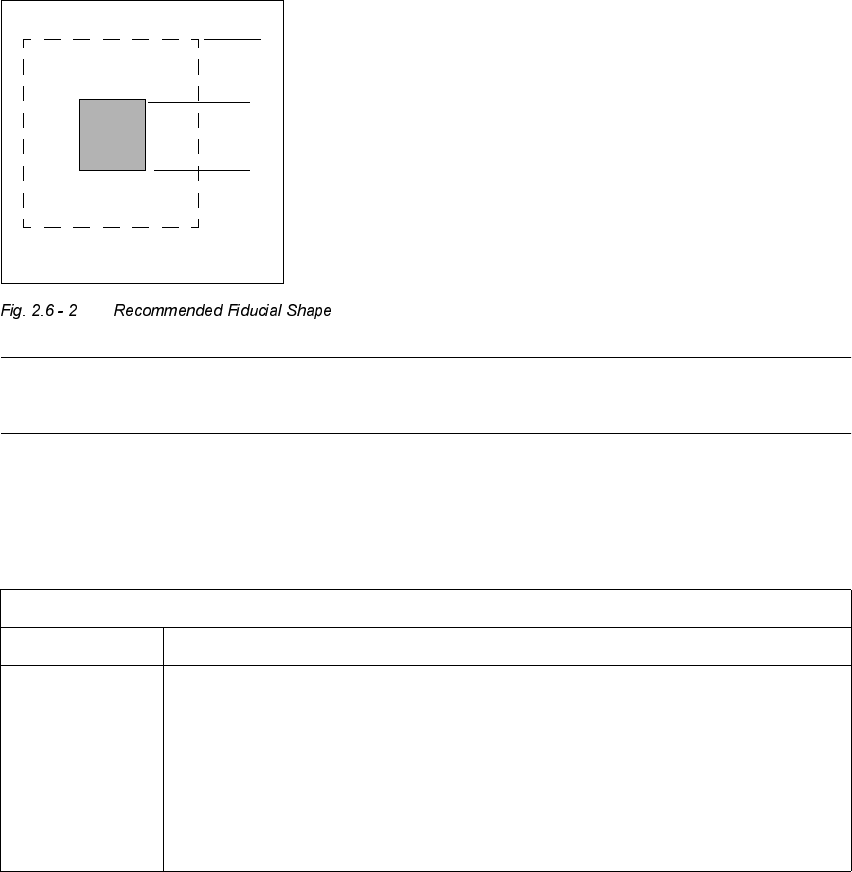
We suggest a rectangular or square with an edge length of > 1 mm and a clearance of > 0.1 mm.
NOTE
Single crosses are also suitable, however they require more space.
/D\RXWRI)LGXFLDOV
1.0 mm
1.0 mm
0DWHULDOHJ5HVLVWRU3DVWH
Fiducial layout Black resistor paste as a background and conductor paste printed on it as a fiducial.
Recommendation Background > 1.0 mm bigger than the fiducial on all sides.
Always use printed conductor layer as a reference -> Accuracy
Generally, sufficient contrast is created with the PCB camera multicolor, except in the
case of AgPt.