00192791-02.pdf - 第56页
2 Ceramic S ubstrate Centering Unit User Manual S IPLACE HS-50 2.7 Screen "Conveyor Functions" Software Version SR.502.xx 01/01 Issue 56 6FUHHQ&R QY H\ R U)XQ FWLRQV The "Co nveyo r funct ions&…
User Manual 2 Ceramic Substrate Centering Unit
Software Version SR.502.xx 01/01 Issue 2.6 Utilizing Oblique lllumination to Recognize the Position of a Fiducial
55
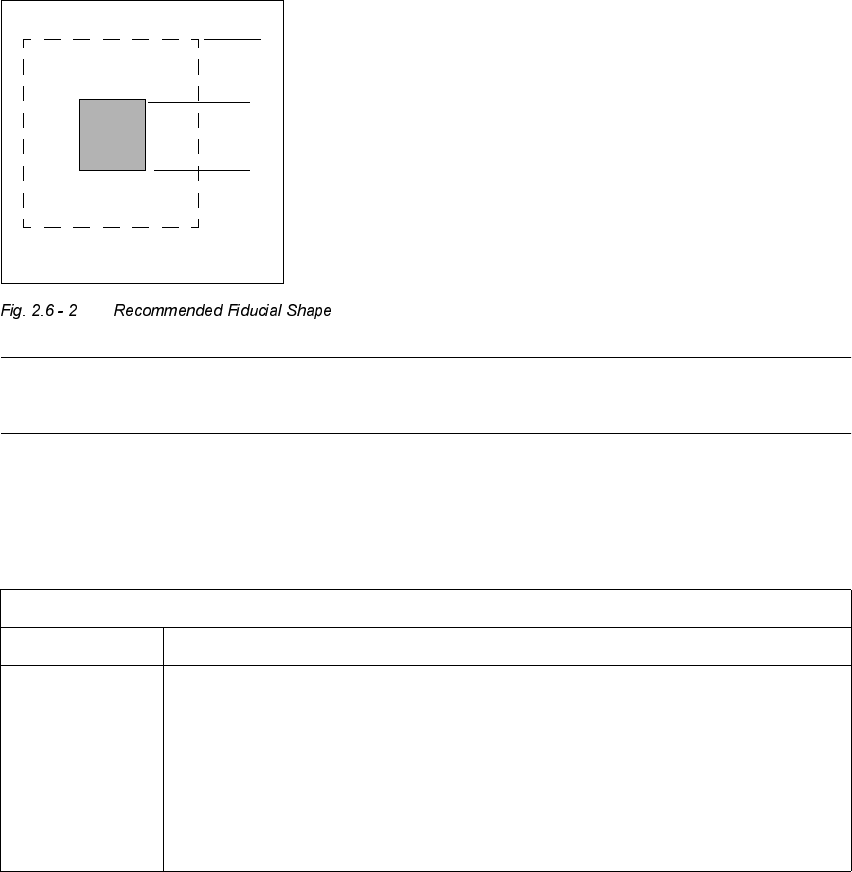
5HFRPPHQGDWLRQV IRU)LGXFLDOVRQ&HUD PLF6XEVW UDWHV
With ceramic substrates there is generally very little contrast between carrier material and the
coating on the PCB. For this reason, specific criteria regarding the shape and layout of the fidu-
cial must be taken into account when selecting the fiducials. See the following recommendations
for the shape and layout of fiducials.
)LGXFLDO6KDSH
We suggest a rectangular or square with an edge length of > 1 mm and a clearance of > 0.1 mm.
NOTE
Single crosses are also suitable, however they require more space.
/D\RXWRI)LGXFLDOV
1.0 mm
1.0 mm
0DWHULDOHJ5HVLVWRU3DVWH
Fiducial layout Black resistor paste as a background and conductor paste printed on it as a fiducial.
Recommendation Background > 1.0 mm bigger than the fiducial on all sides.
Always use printed conductor layer as a reference -> Accuracy
Generally, sufficient contrast is created with the PCB camera multicolor, except in the
case of AgPt.
2 Ceramic Substrate Centering Unit User Manual SIPLACE HS-50
2.7 Screen "Conveyor Functions" Software Version SR.502.xx 01/01 Issue
56
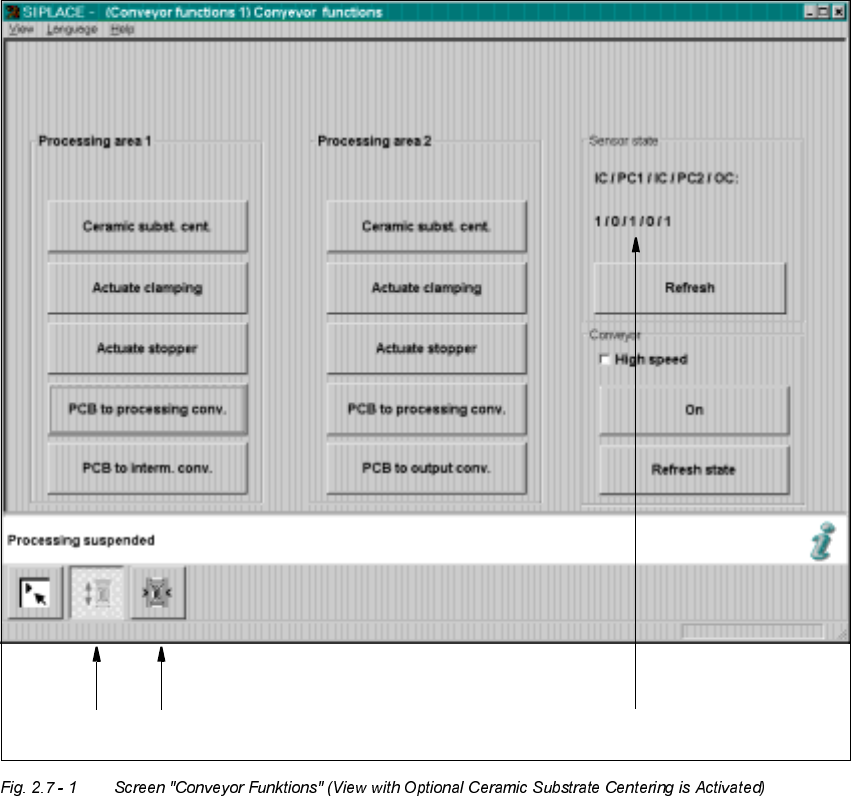
6FUHHQ&RQY H\RU)XQFWLRQV
The "Conveyor functions" (also named "Conveyor functions") are used for checking and adjusting
the functional modules of the PCB conveyor system / of the mechanical ceramic substrate cen-
tering unit.
.H\
(1) Functions for PCB conveyor
(2) Functions to adjust the width of the PCB conveyor
(3) Functions to display the state of the ultrasonic senors
12
3

User Manual 2 Ceramic Substrate Centering Unit
Software Version SR.502.xx 01/01 Issue 2.7 Screen "Conveyor Functions"
57
)XQFWLRQVIRU7HV WLQJWKH&HUD PLF6XEVW UDWH &HQWHULQJ8QLW
NOTE
The function "Ceramic substrate centering" is activated if the optional "Mechanical ceramic sub-
strate centering unit" is installed and is entered in the machine options (activation: see Section 2.8).
With the help of this function which can be found in the fields "Processing area 1" and "Process-
ing area 2", it is possible to check the function open/close the substrate centering unit
ZL WKRXW
VXEVWUDWH
Å Click on the button
&HUDPLFVXEVWUD WHFHQWHULQJ
in the field "Processing area 1".
The ceramic substrate centering unit is opened.
Å Once again, click on the button
&HUDPLFVXEVWUDWH FHQWHULQJ
in the field "Processing area 1".
The ceramic substrate centering unit is closed.
Å Proceed in a like manner for "Processing area 2".
For a trial run with substrate (e.g., after adjusting the substrate size) a substrate of the appropri-
ate size (as set on the substrate centering unit) is placed on the input conveyor. The steps taken
are as follows:
Å Place the substrate on the input conveyor.
Å Click on the button
3&%WRSURFHVVLQJFRQYH\RU
in the field "Processing area 1". The ce-
ramic substrate will be transported to processing conveyor 1.
The lifting table moves upward and the ceramic substrate centering unit closes; the substrate
is centered in X-direction.
Å Click on the button
3&%WRLQWHUPHGLDWHFRQYH\ RU
in the field
"Processing area 2".
The ceramic substrate centering unit opens and the lifting table moves downward.
The ceramic substrate is transported to the intermediate conveyor.
Å Click on the button
3&%WRSURFHVVLQJFRQYH\RU
in the field "Processing area 2". The ce-
ramic substrate is transported to processing conveyor 2.
The lifting table moves upward and the ceramic substrate centering unit is closed; the sub-
strate is centered in X-direction.
Å Click on the button
3&%WRRXWSXWFRQYH\RU
in the field "Processing area 2".
The ceramic substrate centering unit opens and the lifting table moves downward.
The ceramic substrate is transported to the output conveyor.