Infinity EX High Throughput Conveyor Module.pdf - 第15页
INFINITY EX HIGH THROUG HPUT CONVE YOR MODULE DRIV ES AND SEN SORS Chapter Issu e 1 Aug 02 Technical Reference Manual 16.15 Rail Lif ted Sensors The left and right rail lifted sensors are background suppression diffuse t…

INFINITY
EX
HIGH THROUGHPUT CONVEYOR MODULE
DRIVES AND SENSORS
16.14 Technical Reference Manual Chapter Issue 1 Aug 02
DRIVES AND SENSORS
Sensors
Motors
Name Type Inputs Functional Description
Rail Lifted Left Through Beam Opto NextMove
Dig IN 3
Detects premature lifting of rail
Rail Lifted Right Through Beam Opto NextMove
Dig IN 4
Detects premature lifting of rail
Rail Home Through Beam Opto Stepper
Multiplexer
MUX2
Provides home position of moving rail thus
providing accurate board width settings
Board at Left Background Suppressed NextMove
Dig IN 16
Detects left side incoming/outgoing board
dependent upon machine pass through configuration
Board at Right Background Suppressed NextMove
Dig IN 17
Detects right side incoming/outgoing board
dependent upon machine pass through configuration
Left Auxiliary Rail Diffuse Opto M27PLC01-I/P1 Detects left side incoming/outgoing board
dependent upon machine pass through configuration
Right Auxiliary Rail Diffuse Opto M27PLC02-I/P1 Detects right side incoming/outgoing board
dependent upon machine pass through configuration
Name Type Functional Description
Moving Rail Drive Stepper Motor Moves the rear moving rail of the print station
conveyor in the Y direction
Front
Print Area Conveyor
Board Transport Belt Drive
DC Moving Coil Motor Turns the front transport belt, of the print station conveyor in the
clockwise or anti clockwise direction (dependent upon upline/
downline feed direction)
Rear
Print Area Conveyor
Board Transport Belt Drive
DC Moving Coil Motor Turns the rear transport belt, of the print station conveyor in the
clockwise or anti clockwise direction (dependent upon upline/
downline feed direction)
Front Left
Auxiliary Conveyor
Board Transport Belt Drive
DC Moving Coil Motor Turns the front transport belt, of the left auxiliary conveyor in the
clockwise or anti clockwise direction (dependent upon upline/
downline feed direction)
Rear Left
Auxiliary Conveyor
Board Transport Belt Drive
DC Moving Coil Motor Turns the rear transport belt, of the left auxiliary conveyor in the
clockwise or anti clockwise direction (dependent upon upline/
downline feed direction)
Front Right
Auxiliary Conveyor
Board Transport Belt Drive
DC Moving Coil Motor Turns the front transport belt, of the right auxiliary conveyor in
the clockwise or anti clockwise direction (dependent upon
upline/downline feed direction)
Rear Right
Auxiliary Conveyor
Board Transport Belt Drive
DC Moving Coil Motor Turns the rear transport belt, of the right auxiliary conveyor in
the clockwise or anti clockwise direction (dependent upon
upline/downline feed direction)
INFINITY
EX
HIGH THROUGHPUT CONVEYOR MODULE
DRIVES AND SENSORS
Chapter Issue 1 Aug 02 Technical Reference Manual 16.15
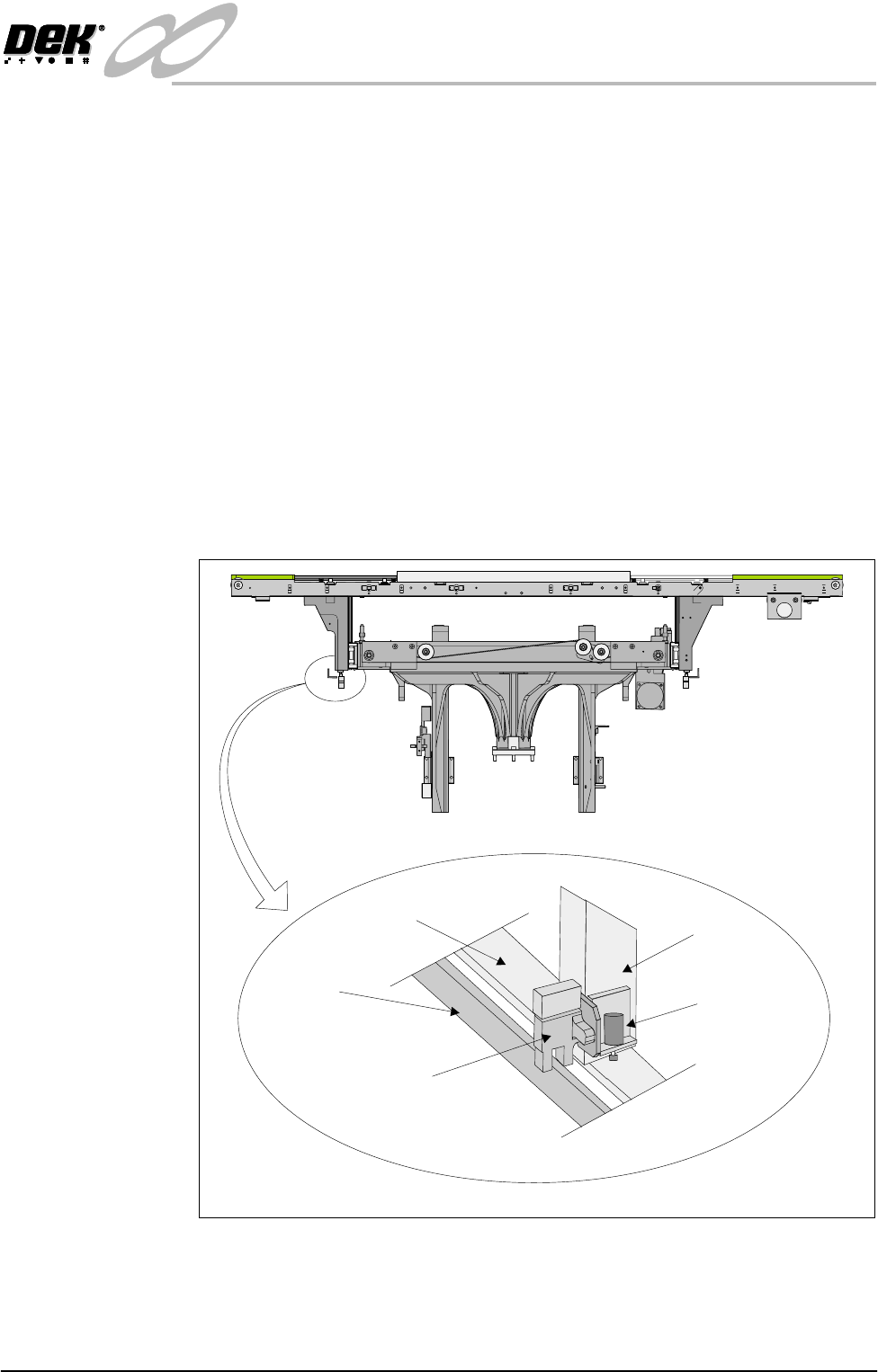
Rail Lifted Sensors The left and right rail lifted sensors are background suppression diffuse type
opto sensors.
These sensors are fitted to the bottom of the left and right moving rail support
arms of the print station rail. The sensor vanes are fitted to the entire length of
the rail stop bars. These sensors feed directly into NextMove card of the
machine PC.
The purpose of the rail lifted sensors is to detect premature lifting of the rail as
the rising table rises. This may occur if tooling or any other object was placed
under the rear rail. They are checked:
1. Immediately after the rail has moved to its new board width following
product file change.
2. When Run is pressed, before the camera moves to board stop position.
3. After printing to check that the rail is fully down before the next print cycle
can commence.
4. When the table moves to rail lift check height before moving to vision height.
Figure 16-11 Rail Lift Sensor Location
Rail Stop Bar
(Clatter Bar)
Opto Vane
Rail Lifted Left
Opto
Left Rail
Transport Leg
Shock Absorber
Enlarged View of Left Rail Opto
View on Front of Machine
INFINITY
EX
HIGH THROUGHPUT CONVEYOR MODULE
DRIVES AND SENSORS
16.16 Technical Reference Manual Chapter Issue 1 Aug 02
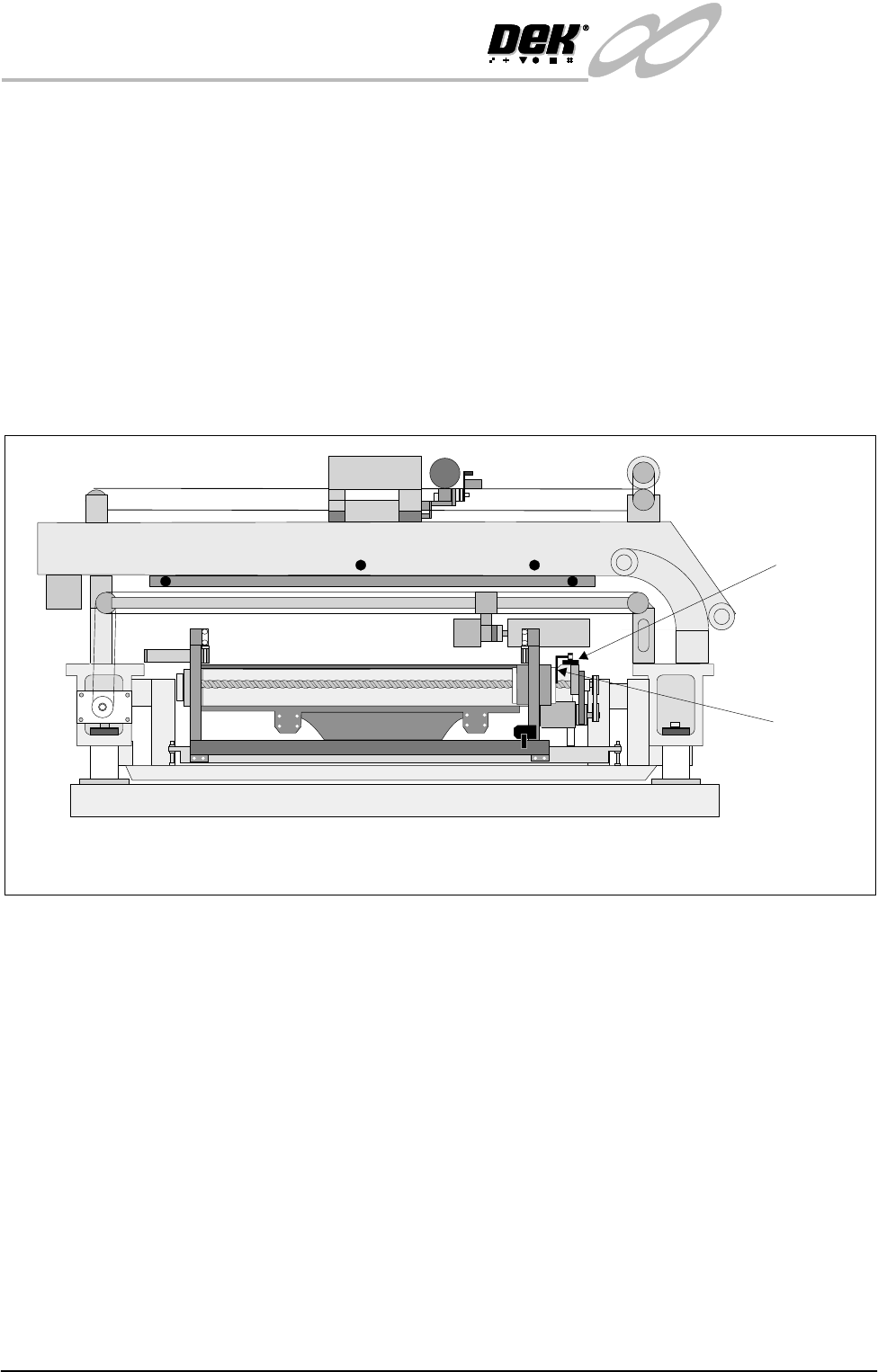
Rail Home Sensor The rail home sensor is a through beam opto type sensor.
The rail home sensor feeds directly to the Multiplexer controller and is used to
set the datum position for the moving rear rail. From this datum position, the
moving rail stepper motor moves the rear rail the amount of steps needed to
obtain the rail width set in the current board file. During machine initialization,
(power-up or upon exiting diagnostics), the rear rail moves to the rear of the
machine until the rail opto vane enters the rail home sensor, the motor is driven
in the opposite direction until the vane clears the home sensor and the motor
stops, the rear rail is now at the home position.
NOTE
Homing Sequence of this chapter refers.
Figure 16-12 Rail Home Sensor Location
Board at Left/Right
Sensors
The board at left and board at right sensors are background suppression opto type
sensors.
These two sensors are used to detect a board at the input and output of the print
station rail. As the machine is bi-directional the functions of both sensors are
reversed when the pass through direction is changed.
The input sensor is used to check for the presence of a board when upline transfer
starts. The board is transported to its position and processed after which it is
transferred to the output sensor where it stops unless the downline conveyor is
free to receive it.
These optos are fitted with a yellow LED along with a sensitivity control. There
is a small amount of positional adjustment in the bracket but generally it is not
necessary to reset it.
NOTE
For sensor sensitivity adjustment refer to Adjustment and Settings section of this
chapter.
Rail Home
Sensor
Rail Home
Opto Flag
(home vane)
View on Right Hand Side of Machine