JUKI_KE-3010A_MAINTE_CH.pdf - 第261页
维修调整要领书 14 - 13 14 -3- 4 . I EEE1394 基板( 40044519 ) 【功能】 IEEE1394 B OARD 是与激光传感器 LNC60 之间的通信板。 经由 IEEE 1394a - 2000 规格 (也被称为 Fi reW ire400 ) 的通信, LN C60 与 CPU BOARD 之间进行 通信。 同时,还通过这一通信电缆向 LNC60 供给电源( DC+12V )。 制造制造商 制造商型…
维修调整要领书
14-12
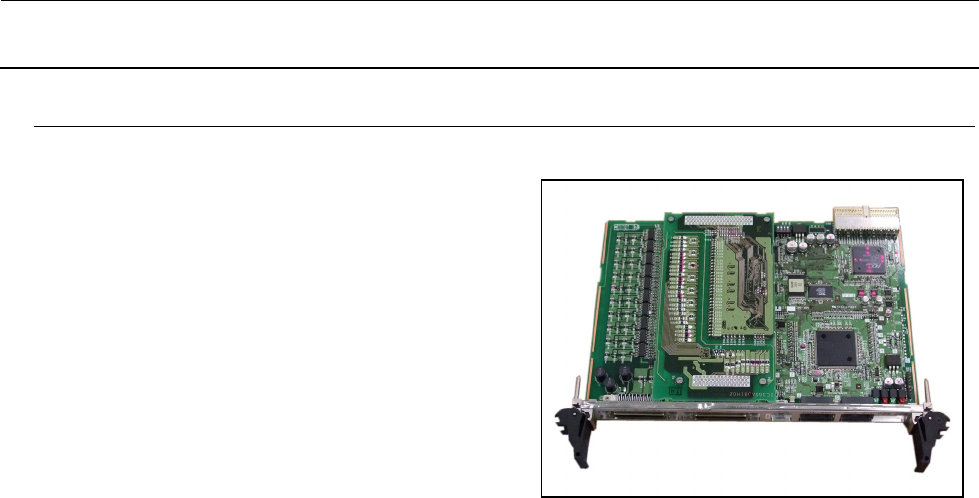
14-3-3.
定位板(
40044540
)
【功能】
POSITION BOARD 是经由 SSCNETⅢ(三菱电
机制造的高速同步通信网络)与控制伺服马达的
CPCI 总线对应的基板。可控制最多 32 轴每 1 张
的马达。
POSITION BOARD 和各轴伺服放大器之间以光
纤电缆进行数据链连接。
① 接受来自 CPU BOARD 软件的指令,控制
XYZθ 轴伺服马达。
② 进行各轴的原点传感器及限位传感器的检
测。
③ 进行伺服驱动器的报警检测、磁尺的报警检测。
④ 进行紧急停止开关的检测,使 XY 轴、Zθ 轴停止。
【开关类的设定】
跨接/开关请保持出厂状态下使用。
【LED 的意义】
动作显示 LED(绿):接通电源时=亮灯、系统启动时=闪烁、电源断开时=熄灯
出错显示 LED(红):通常时=熄灯、错误发生时=亮灯
【更换后的调整项目】
没有特别的。
维修调整要领书
14-13
14-3-4.
IEEE1394
基板(
40044519
)
【功能】
IEEE1394 BOARD 是与激光传感器 LNC60 之间的通信板。
经由 IEEE 1394a-2000 规格(也被称为 FireWire400)的通信,LNC60 与 CPU BOARD 之间进行
通信。
同时,还通过这一通信电缆向 LNC60 供给电源(DC+12V)。
制造制造商
制造商型号
ADLINK cPCI-8273JK/6U
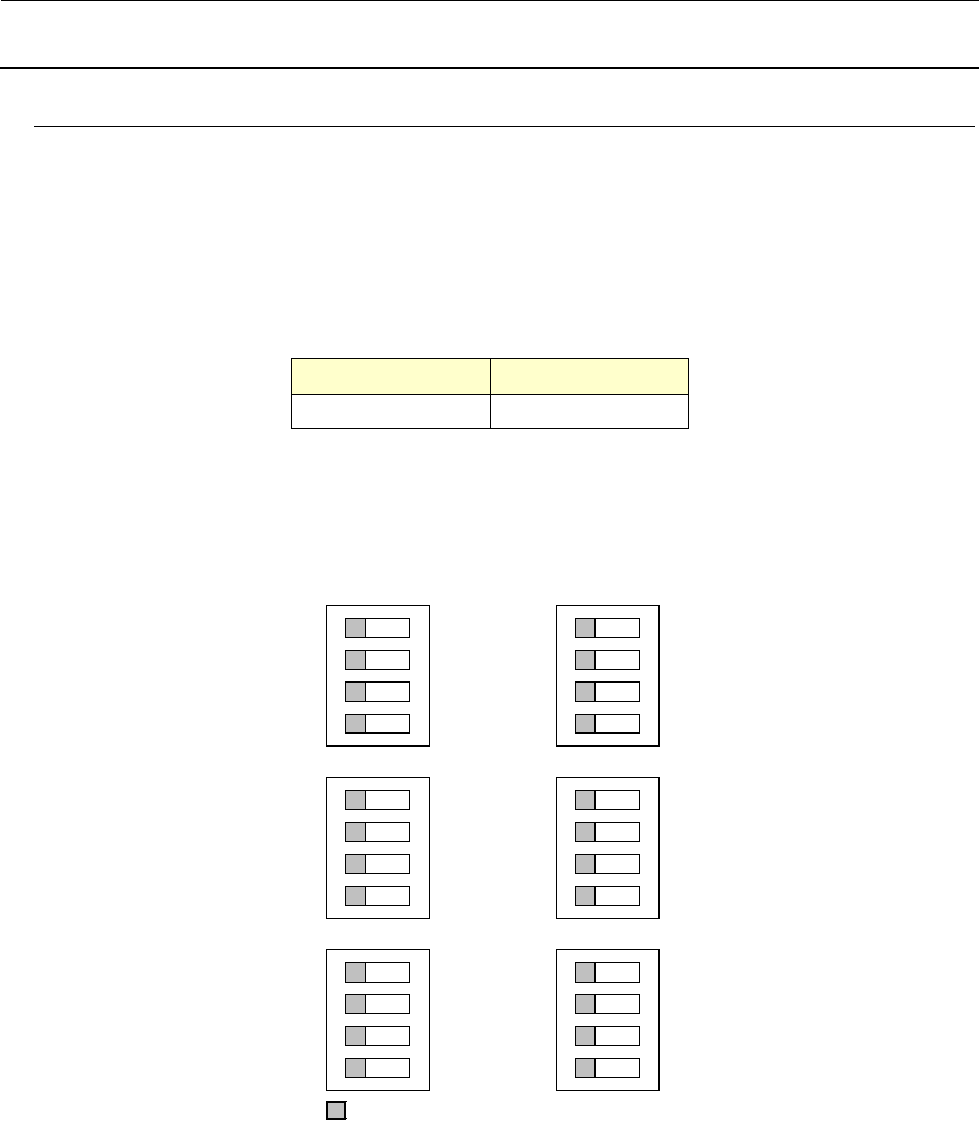
【双列开关的设定】
交货时已经设置好,在安装基板时请进行确认作业。
部がスイッチの設定位置
O N
1
2
3
4
S1
O N
1
2
3
4
S3
O N
1
2
3
4
S5
O N
1
2
3
4
S2
O N
1
2
3
4
S4
O N
1
2
3
4
S6
【LED 的意义】
IEEE1394 基板上没有 LED。
【更换后的调整项目】
没有特别需要调整的项目。
部表示开关的设置位置
Maintenance Guide
14-16
14-3-5. ETHER-MAIN Board (40149647)
[Functions]
This ETHER-MAIN board is a host board used
to communicate with the ETHER-SLAVE board
through the Ethernet.
The board is connected to the Compact PCI
(hereafter referred to as “cPCI”) bus so as to
access each peripheral I/O from the CPU board.
Additionally, the MS parameter backup data is
saved into the FLASH ROM.
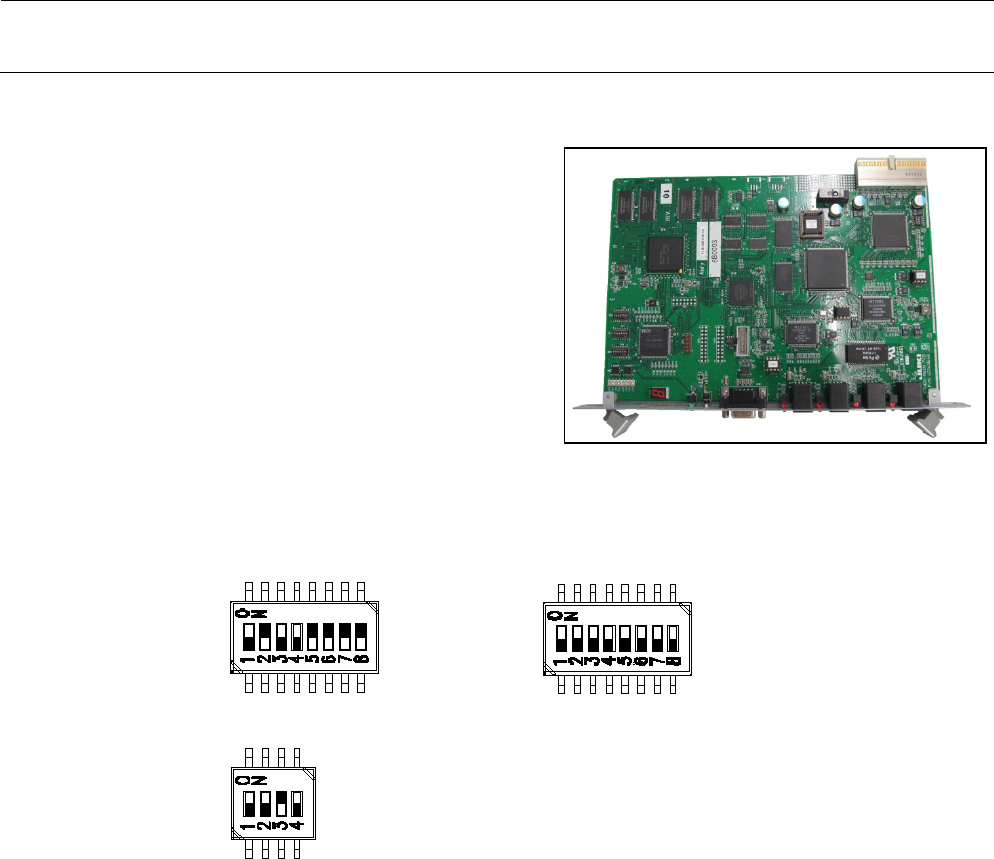
[DIP-switch settings]
The DIP-switches have been set properly at the delivery of the machine. When setting the
board in the control unit, check the DIP-switch settings. ( portions show the switch
positions.)
Figure 14-3-5-1 DIP-Switches on ETHER-MAIN Board Assembly
[Meaning of LED]
7-segment LED: Shows the operation status of this board.
RUN LED: Lights up when the power is supplied.
EN1: Shows Link/Act of EN1. EN1 → Left station
EN2: Shows Link/Act of EN2. EN2 → Right station
EN3: Shows Link/Act of EN3. EN3 → S-XY-RELAY board – BASE CARRY board –
FEEDER board
EN4: Shows Link/Act of EN4.
[Adjustment items after replacement]
After that, follow the steps below to update the FLASH memory.
Select [Options] and [Change User Group], and then select [Serviceman].
Select [Maintenance] and [MS Parameter Setup].
Select [Upgrade] and [Ether Main].
Clicking [Exec.] will start the upgrading process.
Application management> Execute "SSD ====> Flash" from control data management
and back up the control data in the ETHER-MAIN board.
SW2-1 :OFF
SW2-2 :ON
SW2-3 :OFF
SW2-4 :OFF
SW2-5 :ON
SW2-6 :ON
SW2-7 :ON
SW2-8 :ON
SW4-1 :OFF
SW4-2 :OFF
SW4-3 :OFF
SW4-4 :OFF
SW4-5 :OFF
SW4-6 :OFF
SW4-7 :OFF
SW4-8 :OFF
SW1-1 :OFF
SW1-2 :OFF
SW1-3 :ON
SW1-4 :OFF
SW5:OFF