00900068-02_SM_ASM_ProcessLens_EN.pdf - 第71页
ASM Proces sLens Single - l ane 03/2020 Edit ion 71 4.4.1 Table Mapping: Teach Step 1 1. Go to the DiagnosticPage 2. Click System T est . 3. Go to Utility , Table Mapping Calibration 4. Under Option , selec t Teac h . 5.…
ASM ProcessLens Single-lane 03/2020 Edition
70
4.4 Calibrations - Table Mapping
NOTICE
Note
Mapping procedures for Conveyor with option Left-Right or Right-Left has the same
procedures.
● Left-Right Transport - input mapping plate from left
● Right-Left Transport - input mapping plate from right
Preparation
This procedure compares the positions of the camera across the table (work area) against a target
glass plate mapped at a higher level of accuracy and compensates for the positional differences.
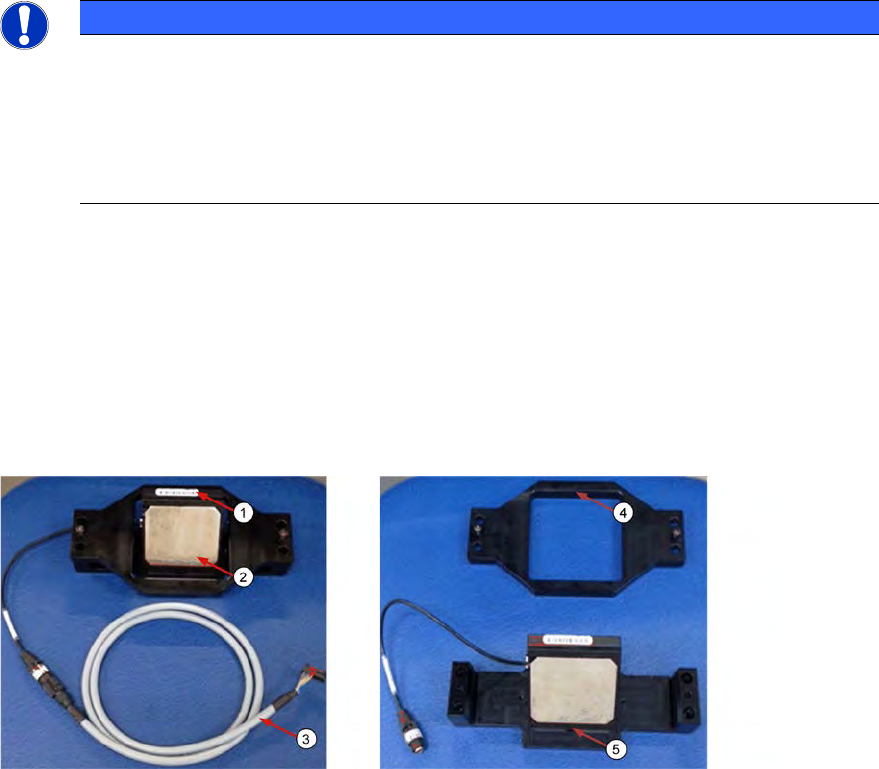
1. Prepare the coaxial light assembly. The Coaxial light consists of a cable (3), a bracket (4) and
a lighting assembly (5). The glass surfaces are protected by 2 clip-on covers.
2. Remove the 2 clip-on metal protective covers (2).
3. Clean the glass surfaces of the lighting assembly if necessary with a lint free cloth.
1. The ProcessLens uses the SIPLACE SX-Series mapping plate version 5 (1). Each Mapping
glass plate has its own unique positional data map saved in a CD or in a Flash drive.
The data is in stored in a file named mp_mess.dat.
2. Open the mp_mess.dat file in the mapping CD or flash drive that comes with the mapping
plate. Compare the plate reference number (2) against the number labeled on the plate.
They should be the same.
ASM ProcessLens Single-lane 03/2020 Edition
71
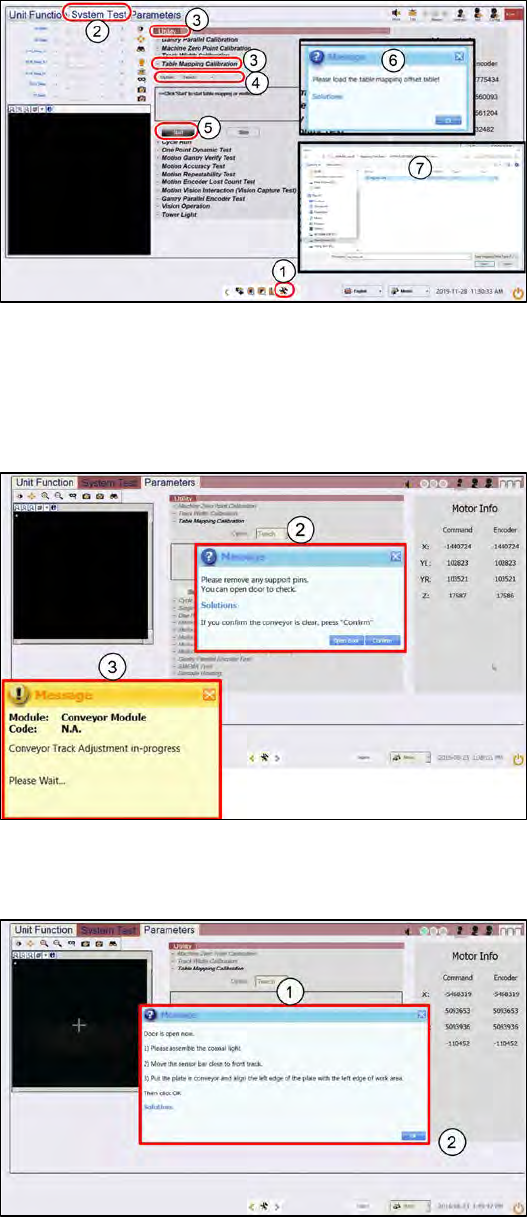
4.4.1 Table Mapping: Teach
Step 1
1.
Go to the DiagnosticPage
2.
Click System Test.
3.
Go to Utility, Table Mapping
Calibration
4.
Under Option, select Teach.
5.
Click Start.
6.
A message asking for the
mapping data file pops up.
7.
Copy the "mp_mess.dat" file to
the "c:\system\AS Table
Map Offset\" folder.
Switch back to ProcessLens GUI,
click Yes.
Step 2
1.
Open the cover and remove any
support pins from the table.
2.
Close the cover then click
Confirm to continue.
3.
Wait while the conveyor adjust to
a width of 560mm.
Step 3
1.
A message pops up after the
conveyor width reaches 560mm.
Open the machine cover.
ASM ProcessLens Single-lane 03/2020 Edition
72
Step 4
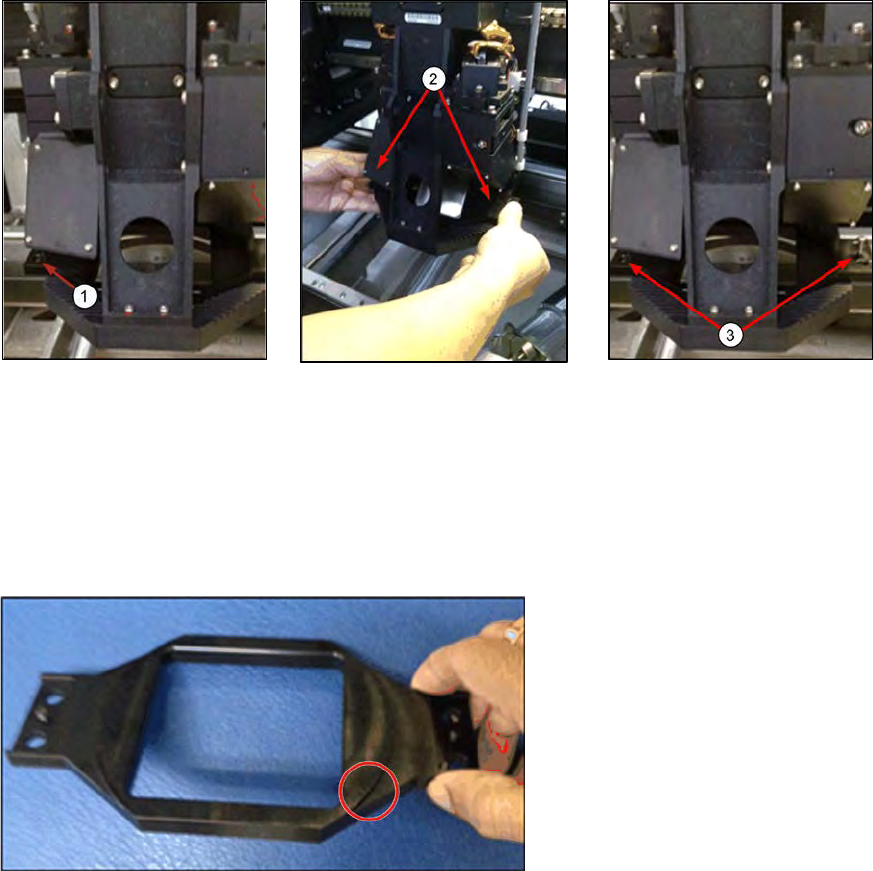
Install the Coaxial Light assembly onto the camera module as shown below.
1. Place the bracket over the
camera ring frame.
2. Attach the coaxial lighting
assembly from below the
camera ring frame to the
bracket above the ring
frame with the 2 screws.
The camera ring frame is
sandwiched by this
assembly.
3. Tighten the 2 screws.
The coaxial light assembly
should be secured to the
camera ring light frame with
no movement.
4. The circular protrusion at the
bottom side of the bracket should
sit face down snugly inside the
ling light assembly.