00900068-02_SM_ASM_ProcessLens_EN.pdf - 第78页
ASM Proces sLens Single - l ane 03/2020 Edit ion 78 Step 5 1. Click on Focus ic on . 2. Adjust Focus b etween 5 0 ~ 60 (recomm ended). C lic k Continue to start the t each tab le m apping process . The progr ess of the m…
ASM ProcessLens Single-lane 03/2020 Edition
77
Step 2
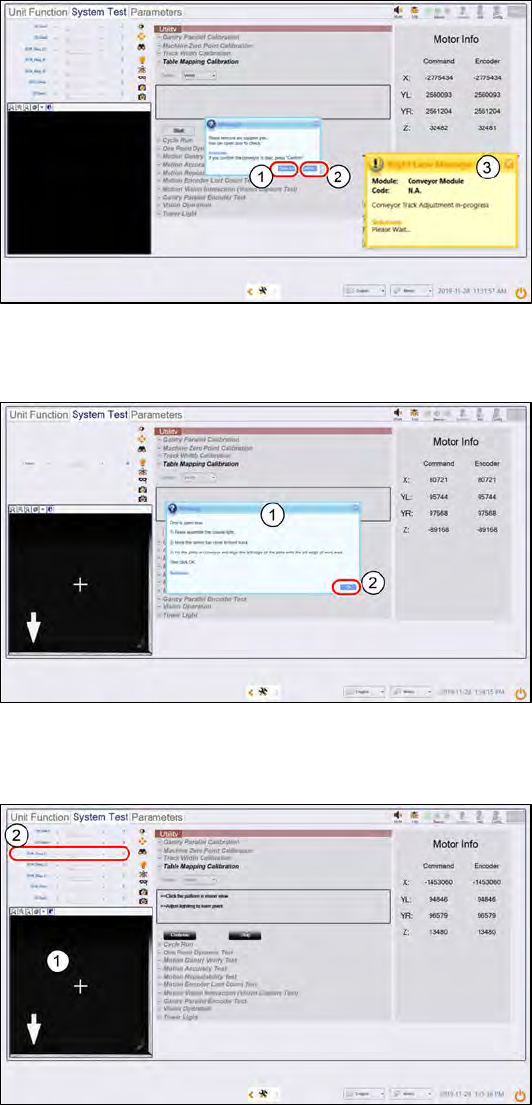
1.
Click Open Door.
Open the cover
and remove any support pins from
the table.
2.
Close the cover then click
Confirm to continue.
3.
Wait while the conveyor adjust to
a width of 560mm.
Step 3
1.
A message pops up after the
conveyor width reaches 560mm.
Open the machine cover.
2.
Install the Coaxial Light Assembly
and position the Mapping Plate on
the conveyor.
3.
Click OK.
Step 4
1.
The plate´s bottom right hand
cross fiducial comes into view.
Click on the cross to centre the
cross to the FOV.
2.
Set 2D M_Ring_G light to 15
(recommendation) and all other
lighting values to 0.
ASM ProcessLens Single-lane 03/2020 Edition
78
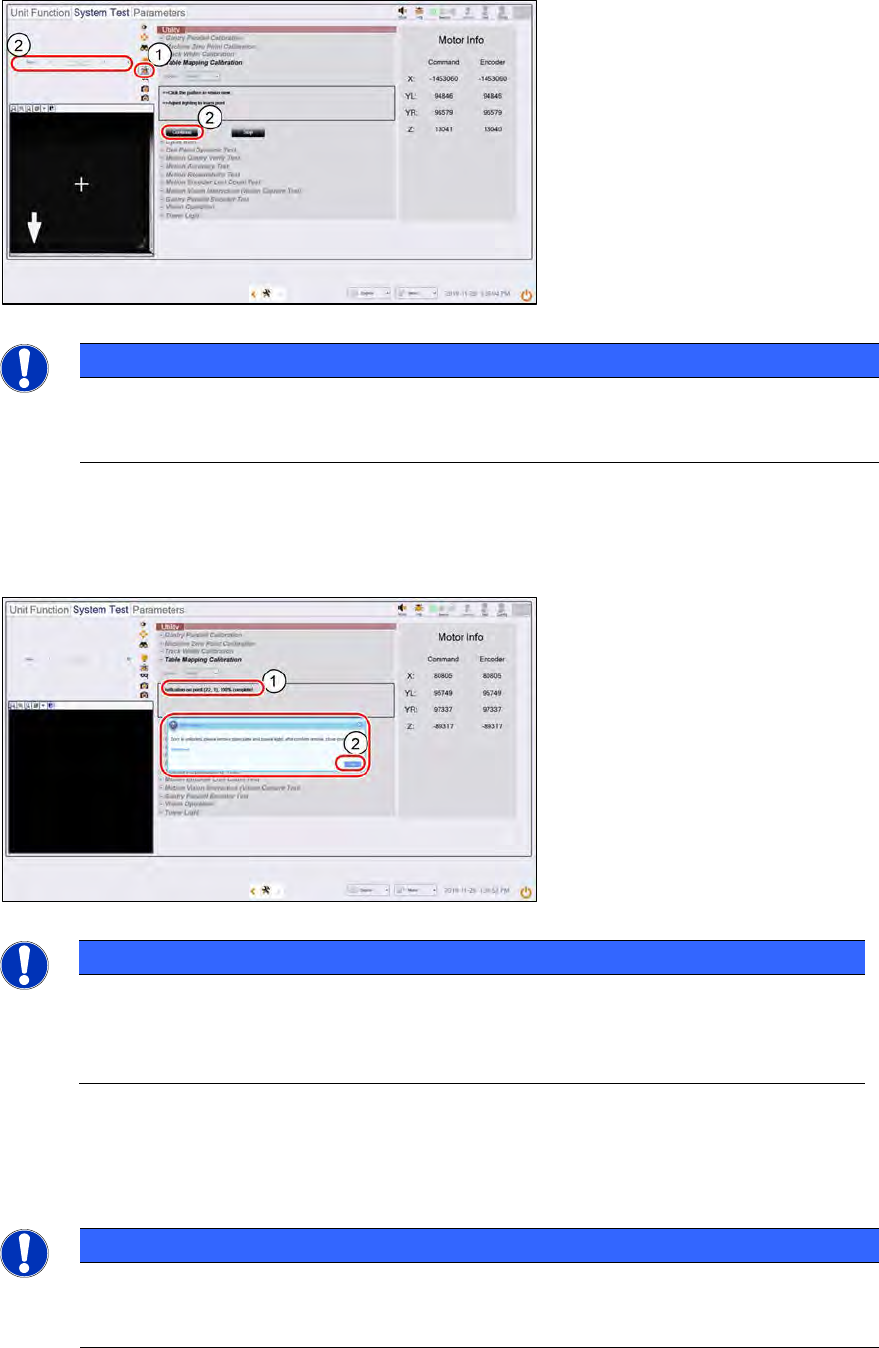
Step 5
1.
Click on Focus icon.
2.
Adjust Focus between 50 ~ 60
(recommended).Click Continue
to
start the teach table mapping
process. The progress of the
mapping is continuously reported.
NOTICE
After about 3 minutes, at 50% completion, the table towers, the stopper rises, and the
plate will move forward to the stopper to continue the second stage of the mapping. Do
not be alarmed by this sudden movement. No user intervention is required.
Step 6
1. A successful verification takes
about 5.5 minutes to complete.
2.
A message pops up asking for the
removal of the coaxial light and
mapping plate. .
Click Ok once completed.
NOTICE
If the mapping fails, clean the plate and repeat the procedure. Mapping failures are
caused by a failure to read a fiducial on the plate – usually caused by fingerprint
smudges on the fiducials. Verification of the mapping results is necessary after a
successful Teach.
1. Lower the conveyor lift cable.
2. Open the machine cover.
3. Remove the mapping plate.
4. Uninstall the coaxial light.
5. Reconnect the Low Ring light connector.
6. Open the machine cover.
NOTICE
The mapping information is stored in
C:\system\Log\TableMapping_timestamp*.log file (approx. 459KB).
The Delta of Gantry to fiducials` positions should be ≤ 20µm (0.020mm).
ASM ProcessLens Single-lane 03/2020 Edition
79
4.5 Calibrations – FOV Height Calibration
What is FOV Height Calibration?
This procedure is a Type 1 Gauge study to determine the ProcessLens as a measurement system
is capable of measuring parts consistently and accurately.
What is Cg & Cgk?
Cg compares the known tolerance with measurement variation, while Cgk compares the known
tolerance with both measurement variation and bias. Large Cg and Cgk indicate the variation due
to the measurement system is small compared with the tolerance range. A typical threshold for
both these values is 1.33 (i.e. the ProcessLens performance is acceptable only if the Cg and Cgk
exceeds 1.33).
Target Height Reference
The target height reference serves as a point of comparison in the study. It is determined by
averaging multiple measurements by the ProcessLens against the target that was measured with
measuring equipment of higher level of accuracy and precision (the "golden unit" of reference)..
Ideally, the height measured should be close to the center of the height's tolerance zone.
● The target is a Diameter 2mm cylindrical disc of nominal design height 120±6µm.
● Refer to the certificate that comes with the target for the certified height.
Handling Caution
● Fragile! Handle with care. The target is made from high precision ceramic.
● Touching the target will contaminate the target with debris (sebum oil and human skin) which
will severely distort measurements.
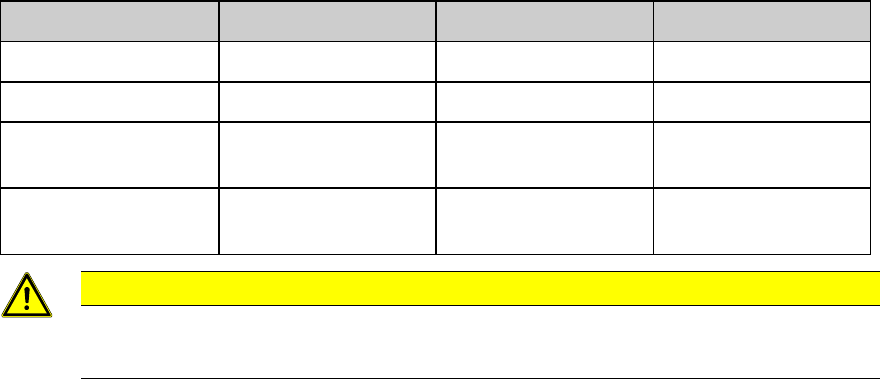
Target Information:
Mechanical feature
Dimension
Mechanic
al feature
Dimension
Fixture overall length
155mm
Target shape
Circle
Fixture overall width
122mm
Target diameter
2mm
Fixture edge thickness
4mm
Target thickness
123
µm (in the range of
120
µm)
Target area (standard)
4mm x 4mm
CAUTION
DO NOT TOUCH THE TARGET.
Maintain the target area free from dirt and contamination.