00191413-01.pdf - 第297页
User Manual Line Computer UNIX 9 Production Tools / Feeders Software Version 501.xx 01/99 Issue 9.1 Feeder Editor 9 - 13 - (Delet e) When this icon is active, the editor is in the deletion mode. In this mode it is possi …
9 Production Tools / Feeders User Manual Line Computer UNIX
9.1 Feeder Editor Software Version 501.xx 01/99 Issue
9 - 12
9.1.3.4 Command Area
The commands are symbolized by means of icons. They determine the mode (selection mode, allocation mode
or deletion mode) in which the Feeder Editor is to operate.
NOTE
Upon opening, the Feeder Editor is initially in the selection mode.
- (Select)
When this icon is active (displayed in reverse video, with arrow pointing from the lower left to the upper
right), the editor is in the selection mode. It is possible to select machine types or individual elements
from the display area, and feeding units from the selection fields, by clicking the left mouse button.
● Click on icon in the command area.
(The arrow in the icon now points to the upper right).
● Click on machine element (feeder part) in the display area (see Fig. 9.1.2).
The selected element is highlighted in green.
In the selection field "Placeable feeders" all feeders or waffle-pack trays are displayed that can be
set up on the selected element.
NOTE
Double-clicking on an entry in the selection field "Placeable feeders" causes the window for
editing the feeder or waffle-pack tray data to be opened (see section 9.1.4).
- (Allocate)
When this icon is active, the editor is in the allocation mode.
● Click on icon in the command area.
● Click on, for example, the Line button in the setting area to allocate the subsequently selected
feeding unit without any restrictions (see section 9.1.3.3). All machine types are now highlighted
in green.
● Select the feeder or waffle-pack tray from the selection field "Placeable feeders" .
The selected unit is displayed in the "Feeder" selection field.
NOTE
Further allocation possibilities are described in section 9.1.4.
Double-clicking on an entry in the selection field "Placeable feeders" causes the window for
editing the feeder of waffle-pack tray data to be opened (see section 9.1.4).
User Manual Line Computer UNIX 9 Production Tools / Feeders
Software Version 501.xx 01/99 Issue 9.1 Feeder Editor
9 - 13
- (Delete)
When this icon is active, the editor is in the deletion mode. In this mode it is possible to delete allocati-
ons and "customer-specific types" from the selection fields.
NOTE
In the selection field "Placeable feeders" only
created "customer-specific types" (see ) can be deleted.
If an attempt is made to delete a SIEMENS-defined type (feeder or waffle-pack tray), a
corresponding error message is displayed.
● Click on icon in the command area.
● Select the allocation to be deleted in the selection field "Feeder", or the entry of a customer-speci-
fic type from the selection field "Placeable feeders". The selected entry is deleted from the se-lec-
tion field.
NOTE
If the customer-specific type in the ".ri"-file is still being used (i.e. it is still allocated to other compon-
ents or package forms), a message contained in a dialog box appears to inform the operator of this
fact. If the operator deletes the customer-specific type nevertheless, all
allocations to the customer-
specific type will be lost.
9.1.4 Creating Allocations
This section explains the procedure to be followed for the creation of allocations, on the basis of examples "A"
and "B".
Example "A" describes the allocation of "Package form --> Feeder" and
example "B" describes the allocation of "Component --> Feeder".
Example "A" for package form "704"
Task:
1. Components with the package form "704" are to be set up in the customer-specific type "FM_PLCC" (waffle-
pack tray) on the waffle-pack tray carrier"FT~S_Typ_1", on all feeder parts of the line where the customer-
specific type "FM_PLCC" can be set up.
Steps to be performed:
1. Setting the Feeder Editor for editing package form "704"
● Click on editing field "Package form", enter package form number 704 and complete the entry by
pressing RETURN.
The comment ("PLCC68") entered in the Package Form Editor is displayed in the "GF name" field.
9 Production Tools / Feeders User Manual Line Computer UNIX
9.1 Feeder Editor Software Version 501.xx 01/99 Issue
9 - 14
2. Creating customer-specific type "FM_PLCC" and editing waffle-pack tray data
● Activate icon or icon in the command area.
● Select entry FM~(1x1) for the waffle-pack tray in the selection field "Placeable feeders" by
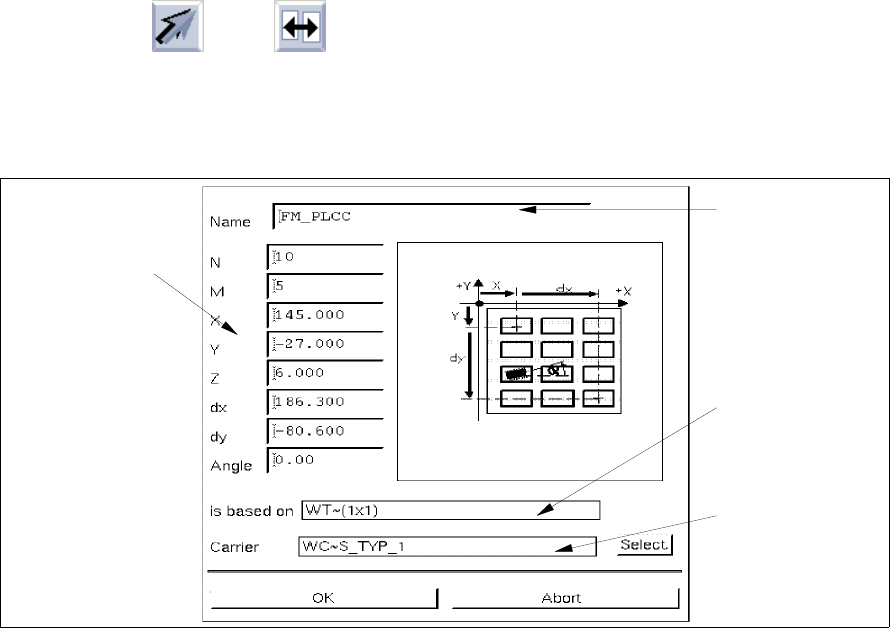
double-clicking. The sub-editor "Waffle-Pack Tray" for the definition of the customer-specific type
is opened (name, dimensions, carrier).
Fig. 9.1.3 Sub-Editor "Waffle-Pack Tray"
Meaning of the editing fields (see also chapt. 13)
- Name
Name of the customer-specific type
- N
Number of divisions in x-direction
- M
Number of divisions in y-direction
- X [mm]
Offset from the zero point of the WPT to the center of the first division in x-direction
- Y [mm]
Offset from the zero point of the WPT to the center of the first division in y-direction
Editing field
"Name"
Name of the
SIEMENS type
(default type)
Name of the
WPT carrier
Editing fields
"Dimensions of the
waffle-pack tray"