00191413-01.pdf - 第519页
User Manual Line Computer UNIX 16 MaDaMaS Software Version 501.xx 01/99 Issue 16.2 MaDaMaS Evaluation User Interface 16 - 23 16.2.8.3 MTBI (Mean Time Between Interrupts) The aver age time (in min utes) b etween the o ccu…
16 MaDaMaS User Manual Line Computer UNIX
16.2 MaDaMaS Evaluation User Interface Software Version 501.xx 01/99 Issue
16 - 22
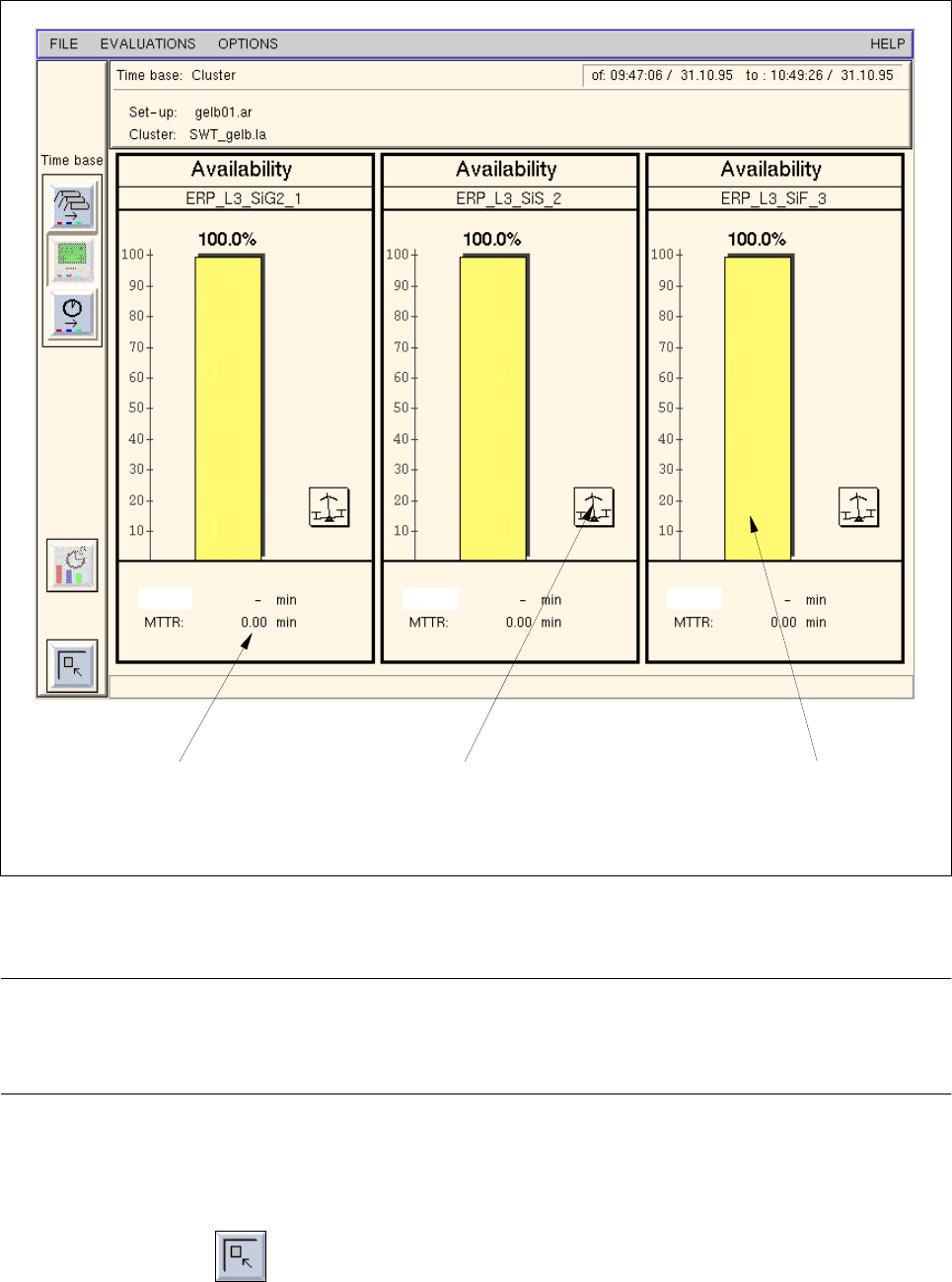
Fig. 16.2.5 Evaluation user interface - "Availability" evaluation for all stations
NOTE
If more stations exist than can be displayed in the view area, a scroll bar appears above the info line per-
mitting the display area to be scrolled.
- Exiting from the "Availability - Station" evaluation
● Click on the icon.
The "Overall view" evaluation is redisplayed.
bar for "Availability"call-up of "System diagram
(Station)" evaluation
specified time for
"MTBI" and "MTTR" of the station and
call-up of "List of events"
evaluation
and call-up of
"List of events" evaluation
MTBI:
MTBI:
MTBI:
User Manual Line Computer UNIX 16 MaDaMaS
Software Version 501.xx 01/99 Issue 16.2 MaDaMaS Evaluation User Interface
16 - 23
16.2.8.3 MTBI (Mean Time Between Interrupts)
The average time (in minutes) between the occurrence of two malfunctions is referred to as MTBI ( Mean Time
B
etween Failures). It can be called up for the entire line or for each individual station. It is displayed - for the
entire line or for each station - below the "Availability" (see Fig. 16.2.1 and Fig. 16.2.5) chart.
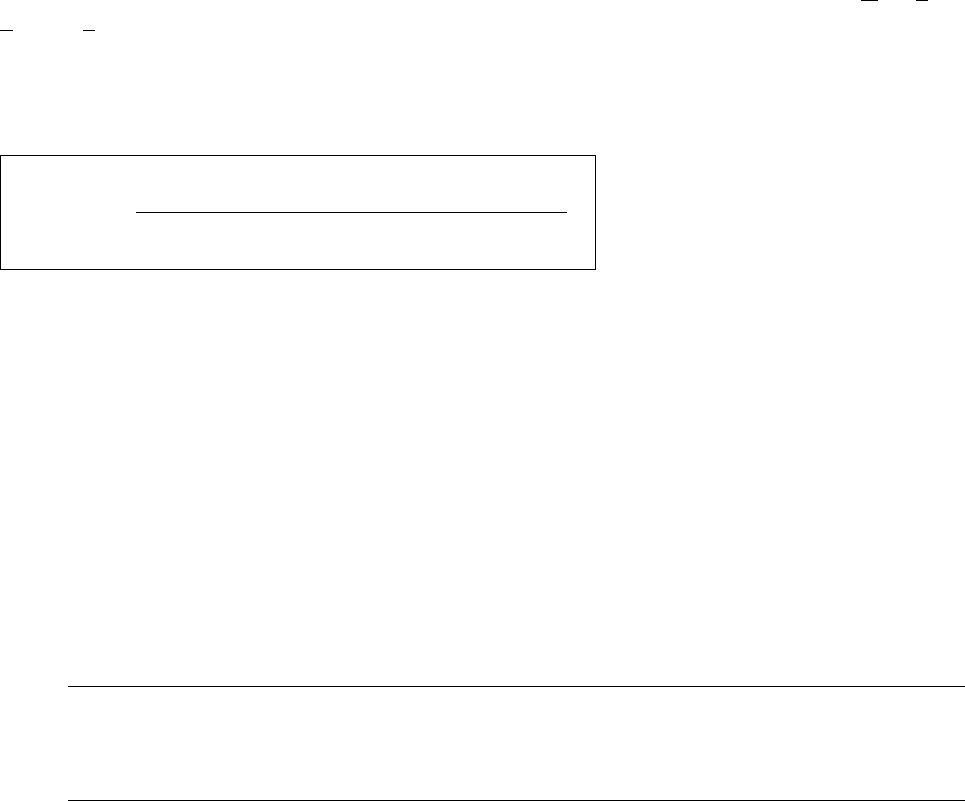
The MTBI is calculated as follows:
T
b
= total operating time of the machine, or time basis for the evaluation period
T
at
= machine-related technical downtimes, e.g. unidentified reason, fiducial error, nozzle error,
transport error, barcode reading error (see also page 16 - 3)
T
ap
= operator-related interruptions
- Calling up MTBI for the line
● On the menu bar select EVALUATIONS --> Overall view.
The "Overall view" evaluation is displayed.
The value for the MTBI is displayed in minutes below the "Availability" chart
(see Fig. 16.2.1).
NOTE
The MTBI values cannot be calculated until shutdowns due to technical reasons have occurred
(see formula above). As entry for the MTBI value only a dash "-" is displayed.
- Calling up MTBI for all stations
● On the menu bar select EVALUATIONS --> Availability.
Or else:
● Click on the yellow bar in the "Availability" chart in the Overall View.
The "Availability" evaluation is displayed for all stations.
The MTBI value is displayed in minutes below the "Availability" chart
(see Fig. 16.2.5).
T
b
-T
at
-T
ap
MTBI =
no. of downtimes due to techn. reasons
16 MaDaMaS User Manual Line Computer UNIX
16.2 MaDaMaS Evaluation User Interface Software Version 501.xx 01/99 Issue
16 - 24
16.2.8.4 MTTR (Mean Time To Repair)
The average time required to eliminate a malfunction is referred to as MTTR ( Mean Time To Repair). It can be
called up for the entire line or for each individual station. It is displayed - for the entire line or for each station -
below the "Availability" chart (see Fig. 16.2.1 and Fig. 16.2.5).
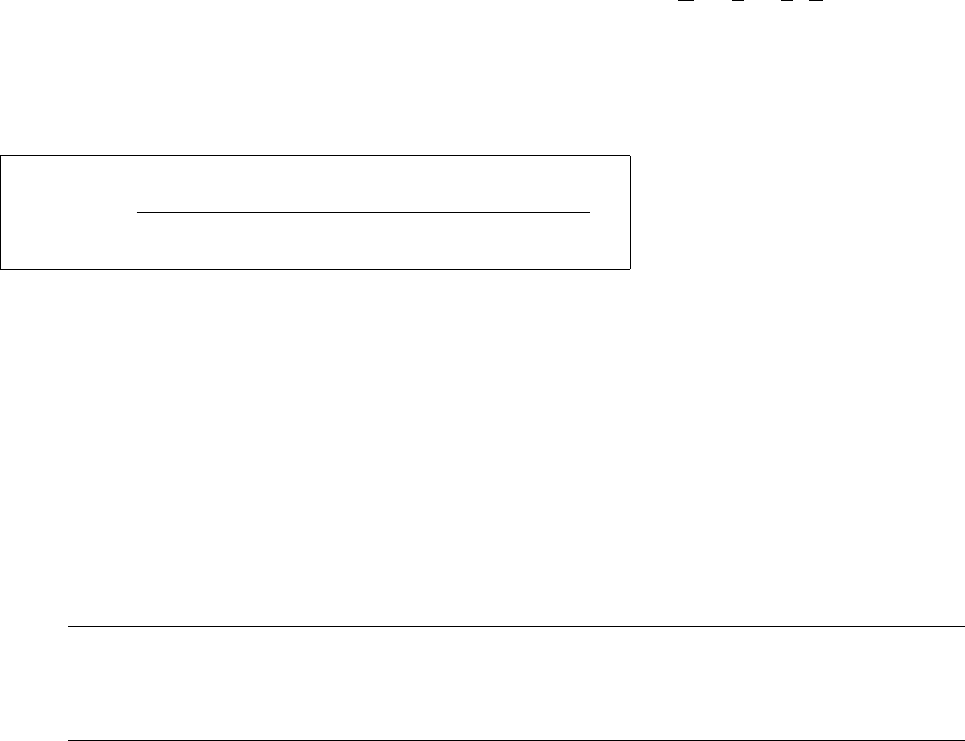
The MTTR is calculated as follows:
T
at
= machine-related technical downtimes, e.g. unidentified reason, fiducial error, nozzle error,
transport error, barcode reading error (see also page 16 - 3)
- Calling up MTTR for the line
● On the menu bar select EVALUATIONS --> Overall view.
The "Overall view" evaluation is displayed.
The value for the MTTR is displayed in minutes below the "Availability" chart
(see Fig. 16.2.1).
NOTE
If no data are available yet, a "0" is displayed, for plausibility reasons, as the entry for the MTTR
value.
- Calling up MTTR for all stations
● On the menu bar select EVALUATIONS --> Availability.
Or else:
● Click on the yellow bar in the "Availability" chart in the overall view.
The "Availability" evaluation is displayed for all stations.
The MTTR value is displayed in minutes below the "Availability" chart
(see Fig. 16.2.5)
T
at
MTTR =
no. of downtimes due to techn. reasons