00191413-01.pdf - 第517页
User Manual Line Computer UNIX 16 MaDaMaS Software Version 501.xx 01/99 Issue 16.2 MaDaMaS Evaluation User Interface 16 - 21 16.2.8.2 "Avail ability - Station" Ev aluation The avail ability of a s tation is a v…
16 MaDaMaS User Manual Line Computer UNIX
16.2 MaDaMaS Evaluation User Interface Software Version 501.xx 01/99 Issue
16 - 20
The track errors of the station are displayed as numerical values in the left portion of the view area, and in the
form of bar charts in the right portion. The numerical values contained in the columns "Total comp.", "Vacuum
error" and "Ident. error" are absolute values. They reflect the number of "good" placements as well as the
number of vacuum and identity errors that occurred during the selected evaluation period.
In the graphical display of the track errors in %, the individual bar lengths correspond to the percentage of the
respective error class (vacuum or identity error) in relation to the overall placement attempts on this track. A
bar is displayed for every error class (vacuum and identity errors).
- Exiting from the "Track information" evaluation
● Click on the icon.
The "Pick-up reliability" evaluation is redisplayed.
16.2.8 "Availability" Evaluation
16.2.8.1 "Availability - Linie" Type of Evaluation
The availability of a line is a value permitting an assessment of the "technical quality" of the line and the
placement/glueing process carried out thereon. Organizational or structure-related downtimes must not have
any impact on the availability. The special case of a PCB "passing through" without any assembly operation
taking place is, however, included in the evaluation.
The availability of a line is calculated as follows:
T
at
= machine-related technical downtimes, e.g. unidentified reason, fiducial error, general machine
malfunction, transport error, barcode reading error (see also page 16 - 3)
T
b
= total operating time of the machine, or time basis for the evaluation period
n = number of the stations
If the limit value set under "Availability" is exceeded, the icon is highlighted in red.
- Calling up the "Availability" evaluation for the line
● On the menu bar select EVALUATIONS --> Overall view.
The "Overall view" evaluation is displayed.
In the "Availability" chart, the availablity calculated for the entire line is displayed (see Fig. 16.2.1).
Availability
line
[ % ] = 100 x ( 1 - (Σ T
at
/ Σ T
b
))
i i
n n
n=1 i=1

User Manual Line Computer UNIX 16 MaDaMaS
Software Version 501.xx 01/99 Issue 16.2 MaDaMaS Evaluation User Interface
16 - 21
16.2.8.2 "Availability - Station" Evaluation
The availability of a station is a value permitting an assessment of the "technical quality" of the station and the
placement/glueing process carried out thereon. Organizational or structure-related downtimes must not have
any impact on the availability. The special case of a PCB "passing through" without any assembly operation
taking place is not taken into consideration in the evaluation.
The availability of a station is calculated as follows:
T
at
= machine-related technical downtimes, e.g. unidentified reason, fiducial error, general machine
malfunction, transport error, barcode reading error (see also page 16 - 3)
T
b
= total operating time of the machine, or time basis for the evaluation period
If the limit value set under "Availability" is exceeded, the icon is highlighted in red.
- Calling up the "Availability" evaluation for all stations
● On the menu bar select EVALUATIONS --> Availability.
Or else:
● Click on the yellow bar in the "Availability" chart in the Overall View.
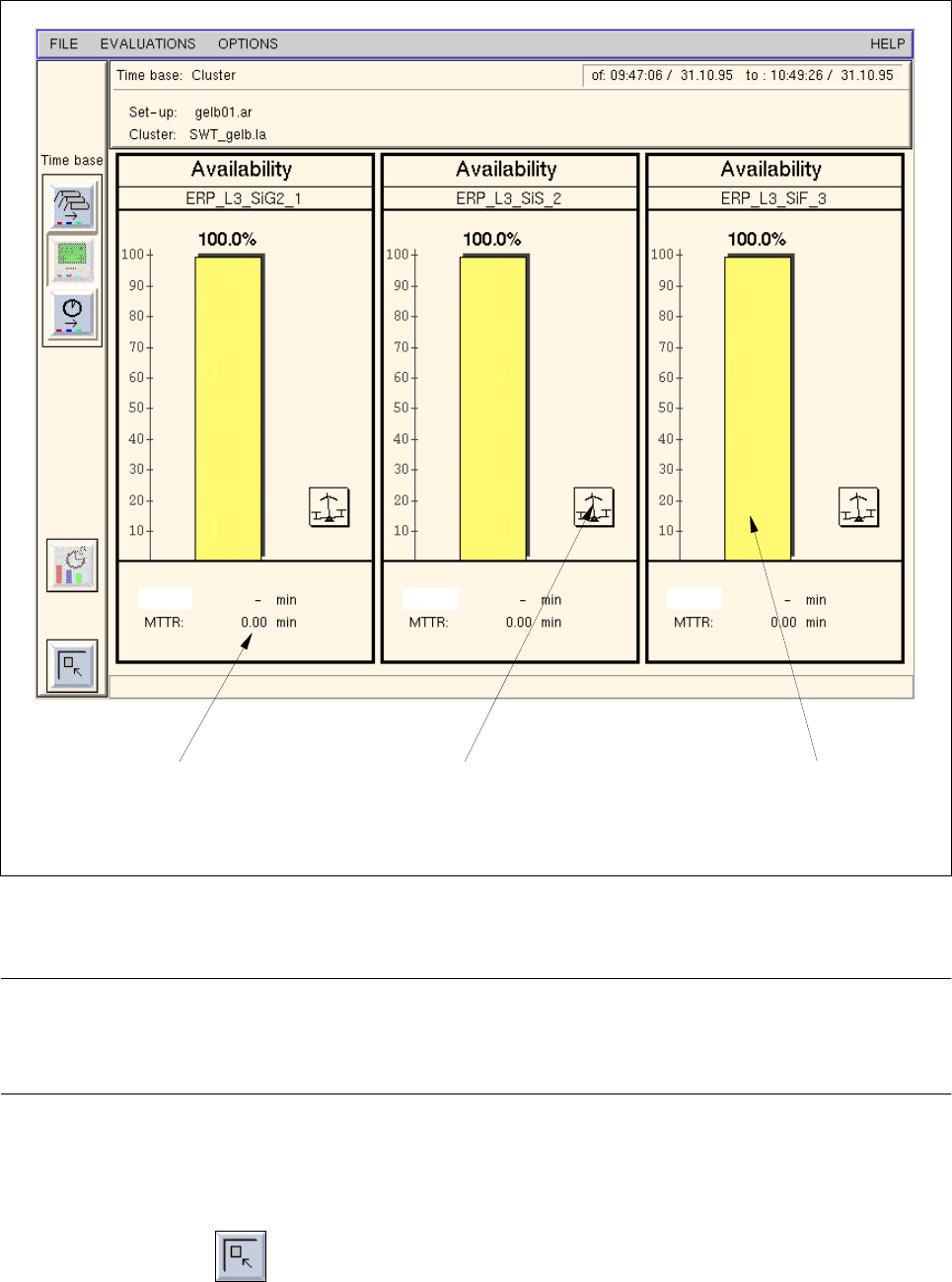
The "Availability" evaluation is displayed for all stations.
A chart reflecting the calculated availability is displayed for each station
(see Fig. 16.2.5).
Availability
station
[ % ] = 100 x ( 1 -
(T
at
/ T
b
))
16 MaDaMaS User Manual Line Computer UNIX
16.2 MaDaMaS Evaluation User Interface Software Version 501.xx 01/99 Issue
16 - 22
Fig. 16.2.5 Evaluation user interface - "Availability" evaluation for all stations
NOTE
If more stations exist than can be displayed in the view area, a scroll bar appears above the info line per-
mitting the display area to be scrolled.
- Exiting from the "Availability - Station" evaluation
● Click on the icon.
The "Overall view" evaluation is redisplayed.
bar for "Availability"call-up of "System diagram
(Station)" evaluation
specified time for
"MTBI" and "MTTR" of the station and
call-up of "List of events"
evaluation
and call-up of
"List of events" evaluation
MTBI:
MTBI:
MTBI: