00197458-01_UG_EDM_V2.2_en.pdf - 第44页
EDM V2.2 / U ser Guid e Ausgabe 10/2013 E dition 44 Part 2: Co nfigur ation an d Technical Reference s
EDM V2.2 / User Guide Ausgabe 10/2013 Edition
43
4.10 Troubleshooting
If the EDM software is causing problems, you should use the Error Reporting tool to report the error
information.
The Error Reporting tool will be installed by the Support Media DVD that is included in the delivery
of this software product and can then be started from Start Menu - SIPLACE EDM - SIPLACE
EDM Error Reporting.
EDM V2.2 / User Guide Ausgabe 10/2013 Edition
44
Part 2: Configuration and Technical References
EDM V2.2 / User Guide Ausgabe 10/2013 Edition
45
5 Configuring SIPLACE EDM
This chapter describes how to configure SIPLACE EDM.
Additionally, some basic configuration settings can be adapted after installation. These settings can
be found in the EDM Installation Manual, item no. [00197457-xx].
5.1 EDM Configuration Manager
The EDM Configuration Manager is the central tool to control an EDM environment. The user
changes settings and options that are then transferred to the Client computers.
After changing a setting, the user applies it with the Save button. If changes were detected, a
dialog is shown to confirm the immediate transfer to the affected EDM Client computers.
5.1.1 Regular Expressions for Search Patterns, Rules and Roles
In several edit fields, regular expressions are used instead of (case-sensitive) string patterns.
Some edit fields provide a Regexp check box to activate regular expression evaluation on this field;
others use regular expressions by default (e.g. the Name Pattern section of the notification rules).
EDM uses the standard regular expressions of the .NET Framework. A reference guide is available
on Microsoft®’s MSDN online library (http://msdn.microsoft.com/en-us/library/az24scfc.aspx).
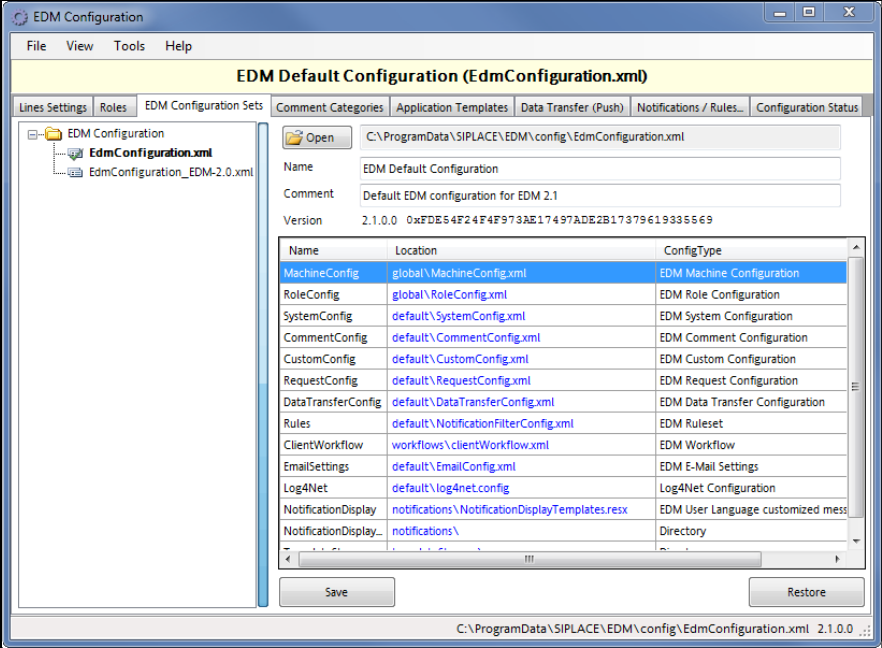
5.1.2 Configuration Sets
Figure 5-1: Configuration Sets