00197458-01_UG_EDM_V2.2_en.pdf - 第59页
EDM V2.2 / U ser Guid e Ausgabe 10/2013 E dition 59 6 Techn ical Referen ce s a nd A dvance d Configura tio n This c hapter contains detai led tech nica l references and als o describ es how to p erf orm advanced configu…
EDM V2.2 / User Guide Ausgabe 10/2013 Edition
58
5.1.9 Advanced Settings
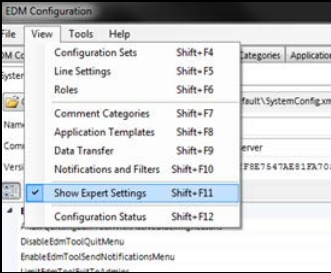
The Advanced Settings view (only visible if Show Expert Settings is active in the View menu)
reveals some in-depth options to tune the system behavior. In chapter 6 you will find detailed
descriptions of these settings.
Figure 5-17: Advanced settings

EDM V2.2 / User Guide Ausgabe 10/2013 Edition
59
6 Technical References and Advanced Configuration
This chapter contains detailed technical references and also describes how to perform advanced
configuration in SIPLACE EDM.
6.1 Registry Keys
This section describes the Windows Registry keys used by EDM. This includes user-defined
settings as well as the settings that need to be accessed when the application starts. The
installation program presets these with sensible values.
The core EDM settings are found in:
HKEY_LOCAL_MACHINE\Software\Siemens\SIPLACE\EDM
(
HKEY_LOCAL_MACHINE\SOFTWARE\Wow6432Node\Siemens SIPLACE\EDM on x64 Based Systems)
Key Type Contents
DataDir String Folder where EDM looks for its data files.
If the Key is not present, the default value of:
"%ProgramData%" (Windows Vista or newer) or the EDM
Installation folder (Windows XP) will be used.
ConfigDir String Location of the EDM configuration files. If the key is not
present, the search continues in the "config" subfolder of
the location specified in "DataDir".
ConfigurationServer
String This is the URI of the EDM Configuration Server to use
for configuration updates and status messages. On the
Configuration Server it will also be used by all EDM
Applications except the EDM Service (which will use the
values from the SystemConfig referenced in the local
EdmConfiguration).
ConfigurationMode String The value indicated which configuration distribution
scheme is used on this system. Possible values are:
● Centralized: Indicates that this is a configuration
client (which receives its configuration from the
configuration server specified in the
"ConfigurationServer" value). It will use the applicaton
specific config files stored in the "_cache" sub-folder
of the EDM "ConfigDir" if the configuration sever is not
available.
● Server: This is an EDM configuration sever. It will use
the local configuration found in "ConfigDir"
● Local: In this mode disables the centralized
configuration feature for this machine. EDM
applications will thus use local configuration found in
"ConfigDir". It is not recommended to use this mode
as it will likely cause an inconsistent EDM
environment.
Table 6-1: Global EDM configuration entries (HKLM)
EDM V2.2 / User Guide Ausgabe 10/2013 Edition
60
The User Specific Registry-Keys are sub-keys of:
"HKEY_CURRENT_USER\Software\Siemens SIPLACE\EDM"
Key Type Contents
Service String Language setting for the EDM Tool.
This key is generally *not* used by the EDM Service!
(The service runs as "SYSTEM" user. Previous EDM Versions used the
Key from: HKEY_USERS\S-1-5-18\Software\Siemens
SIPLACE\EDM\LanguageSettings. Due to access restrictions, this was not
configurable for a normal user).
Thus the EDM service uses the setting found in:
HKEY_LOCAL_MACHINE\SOFTWARE\Wow6432Node\Siemens
SIPLACE\EDM\LanguageSettings\Service).
Client String Language setting for the EDM Client.
Default: English. Can be changed in the EDM Client.
ClearingPool String Language setting for the Clearing Pool and Line Data
Transfer Manager.
Default: English. Can be changed in the Clearing Pool.
Configuration String Language setting for the Configuration. Default: English.
Can be changed in the Configuration Manager.
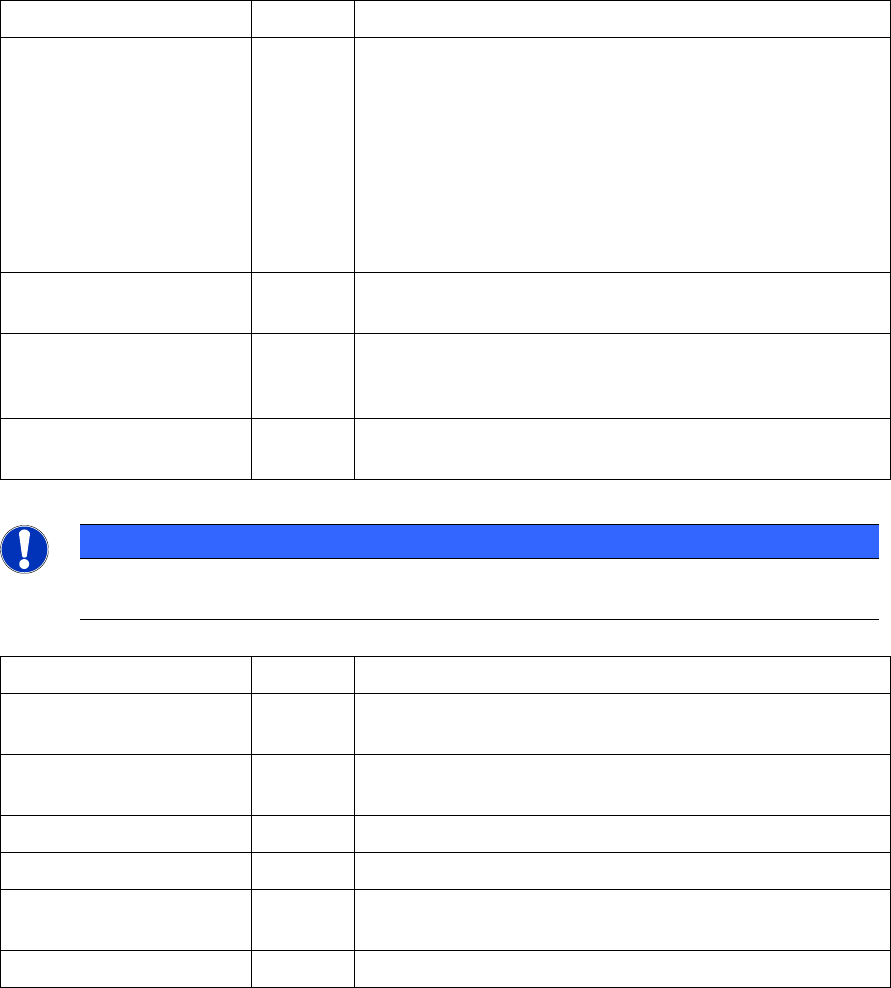
Table 6-2: EDM "LanguageSettings" (HKCU) entries in the Registry
NOTICE
Changing the Language with the "EDM Client" or the "EDM Configuration Manager" will
also change the Language for the "EDM Service" and "EDM Tool" on this computer.
Key Type Contents
ConfigCache Sub-Key A List of the configurations received by the configuration
server (used to find the current configuration on startup).
ForcedPull Sub-Key Data about the last data transfer (used by the "forced pull"
mode).
LanguageSettings
Sub-Key User specific language settings see: Table 6-4
Performance
Sub-Key Misc performance stats
PushMode Sub-Key User specific settings and History of the Data Transfer
Manager
Settings
Sub-Key User specific settings and History for the "Clearing Pool"
Table 6-3: List of EDM Registry Keys (HKCU)