00197458-01_UG_EDM_V2.2_en.pdf - 第9页
EDM V2.2 / U ser Guid e Ausgabe 10/2013 E dition 9 2 SIPL A CE ED M Overvie w The Eng ineering Dat a Manager c omp rises three m ajor units: the EDM Co nfigurati on Manager, EDM Mas ter Server and th e EDM Clie nt . T he…
EDM V2.2 / User Guide Ausgabe 10/2013 Edition
8
Registration for the user group is very simple:
► Click on the Register link.
► Fill in the registration form and send it off to us.
Soon afterwards, you will receive your access authorization with USER ID and password.
1.1.3 Languages
The User Interface (GUI) is available in German, English and Simplified Chinese.
1.1.4 Prerequisites
The necessary system and software requirements for SIPLACE EDM can be found in the EDM
Installation Manual, item no. [00197457-xx].
EDM V2.2 / User Guide Ausgabe 10/2013 Edition
9
2 SIPLACE EDM Overview
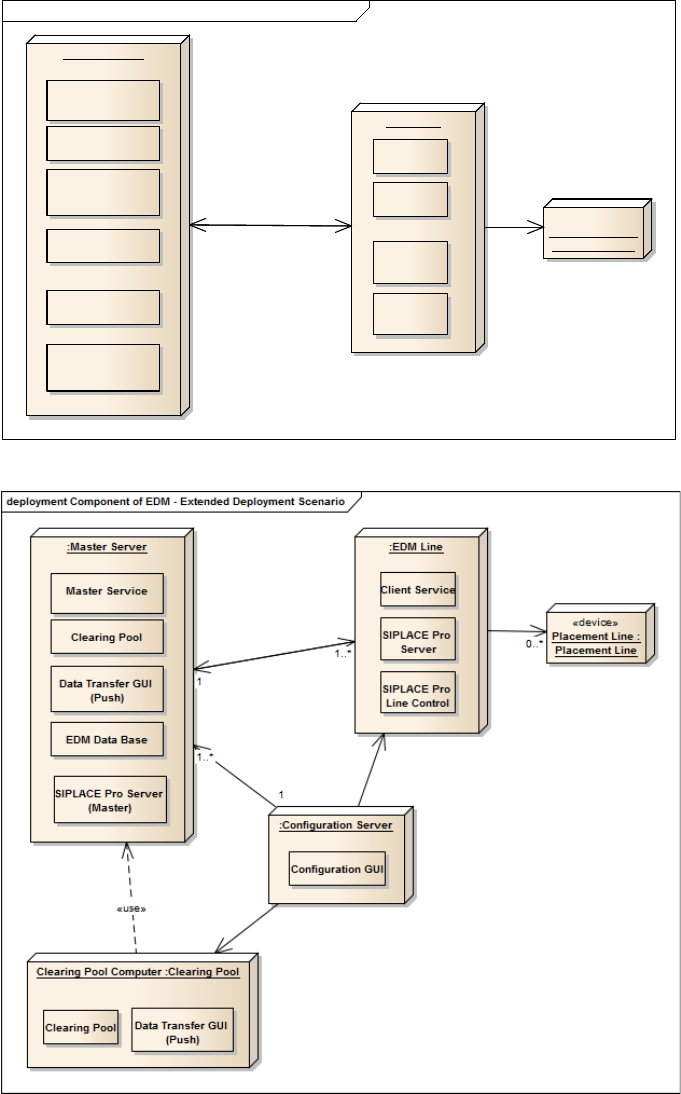
The Engineering Data Manager comprises three major units: the EDM Configuration Manager,
EDM Master Server and the EDM Client. The illustrations below show a basic deployment scenario
and a typical deployment scenario for the EDM and the communication paths between the
individual system components.
Figure 2-1: Basic deployment scenario
Figure 2-2: Extended deployment scenario
The following sections deal with the system components, their functionality and communication
channels in more detail.
deployment Components of the EDM - Basic Deployment Scenario
:Master Server
Master Service
Clearing Pool
:EDM Line
Data Transfer GUI
(Push)
SIPLACE Pro Server
(Master)
SIPLACE Pro
Server
Client Service
SIPLACE Pro
Line Control
«device»
Placement Line :
Placement Line
EDM Data Base
EDM Client
Configuration GUI
0..*
1..*
1
EDM V2.2 / User Guide Ausgabe 10/2013 Edition
10
2.1 System Components
The Engineering Data Manager consists of the following system components.
2.1.1 EDM Configuration Manager
The EDM Configuration Manager is the central program for configuring the EDM system. Changing
the EDM configuration is an administrative task and does not concern the EDM line operator.
The EDM Configuration Manager contains the functionality to define and change configuration sets
to support multiple EDM scenarios. A configuration set consists of references to all configuration
items, including
● Filter rule settings
● Settings for email notification on incoming notifications
● Master server storage location
Based on certain rules, the Configuration Manager assigns exactly one configuration set to each
EDM Client computer, defining its behavior.
The configuration options and the user interface are described in chapter 5.
2.1.2 EDM Master Service
The EDM master service is the server component of EDM. It replies to queries from EDM line
services and distributes the data in the central SIPLACE Pro database among the lines. In return, it
accepts change notifications and collects them in the Clearing Pool database.
The EDM master service is implemented as a Windows service that starts automatically when the
system is started.
2.1.3 EDM Line Service
The EDM line service is the counterpart to the EDM master service. It monitors the changes made
by users to the local SIPLACE Pro data (SPI), documents the changes and sends them to the
master service for entry in the EDM Clearing Pool.
2.1.4 EDM Client
The EDM Client enables user interaction on the line. It implements the customer workflow for the
distribution of data from a central database. The workflow can be customized to match user needs.
See section 4.2 and section 6.3.
2.1.5 EDM Clearing Pool
The EDM Clearing Pool is the tool used by the data preparation engineer to examine the change
notifications from each of the lines in terms of their relevance and, if necessary, integrate them into
the SIPLACE Pro master database. With the functionality already available in SIPLACE Pro,
individual objects of a certain type (components, component shapes, fiducial types, boards and
placement lists) can be compared attribute-by-attribute, and changes can be applied at this low
level. The EDM Clearing Pool can be installed on a separate workstation computer independently
of the EDM master service. See section 4.4.