TM6419.PickupMACS.pdf - 第20页
SMT Software Engineering Group IM Operations Y AMAHA MOT OR CO., L TD. MDOC-SOFT50177 20/28 6. Notice for up da te This section describes about notice wh en you start this machine after updating. When updating…
SMT Software Engineering Group
IM Operations YAMAHA MOTOR CO., LTD.
MDOC-SOFT50177
19/28
5. Limitations
5.1. Feeder MACS
Target machine is a mounter equipped with SS Feeder and ZS Feeder. Machines
without SS(ZS) Feeder and other series of mounters are not supported.
Target feeder type is 4mm feeder and 8mm feeder.
CT estimation of optimizer doesn’t consider the operation time of this function.
5.2. Nozzle MACS
Both of x11A nozzle with two holes and x11A nozzle with one hole can’t be used in one
machine. Select either one.
Target nozzle is 30X type, 31X type, 50X type or 51X type.
FNC nozzle system is not supported.
CT estimation of optimizer doesn’t consider the operation time of this function.
This function does not correspond to FL head in YSM40. (*3)
SMT Software Engineering Group
IM Operations YAMAHA MOTOR CO., LTD.
MDOC-SOFT50177
20/28
6. Notice for update
This section describes about notice when you start this machine after updating.
When updating the software, please be sure to read this section.
6.1. Setting method of Feeder MACS mark data
6.2
. Setting method of Nozzle MACS mark data
6.3.
Using with Pick Position Correct
6.1. Setting method of Feeder MACS mark data
As described on [4.1.3. Mark data of Feeder MACS], to execute Feeder MACS, you need to
register the special mark data into the database, and set the database number.
Please use the board data enclosed in the installation CD of V3.41STD R1.000 or later. Setting
method is as follows.
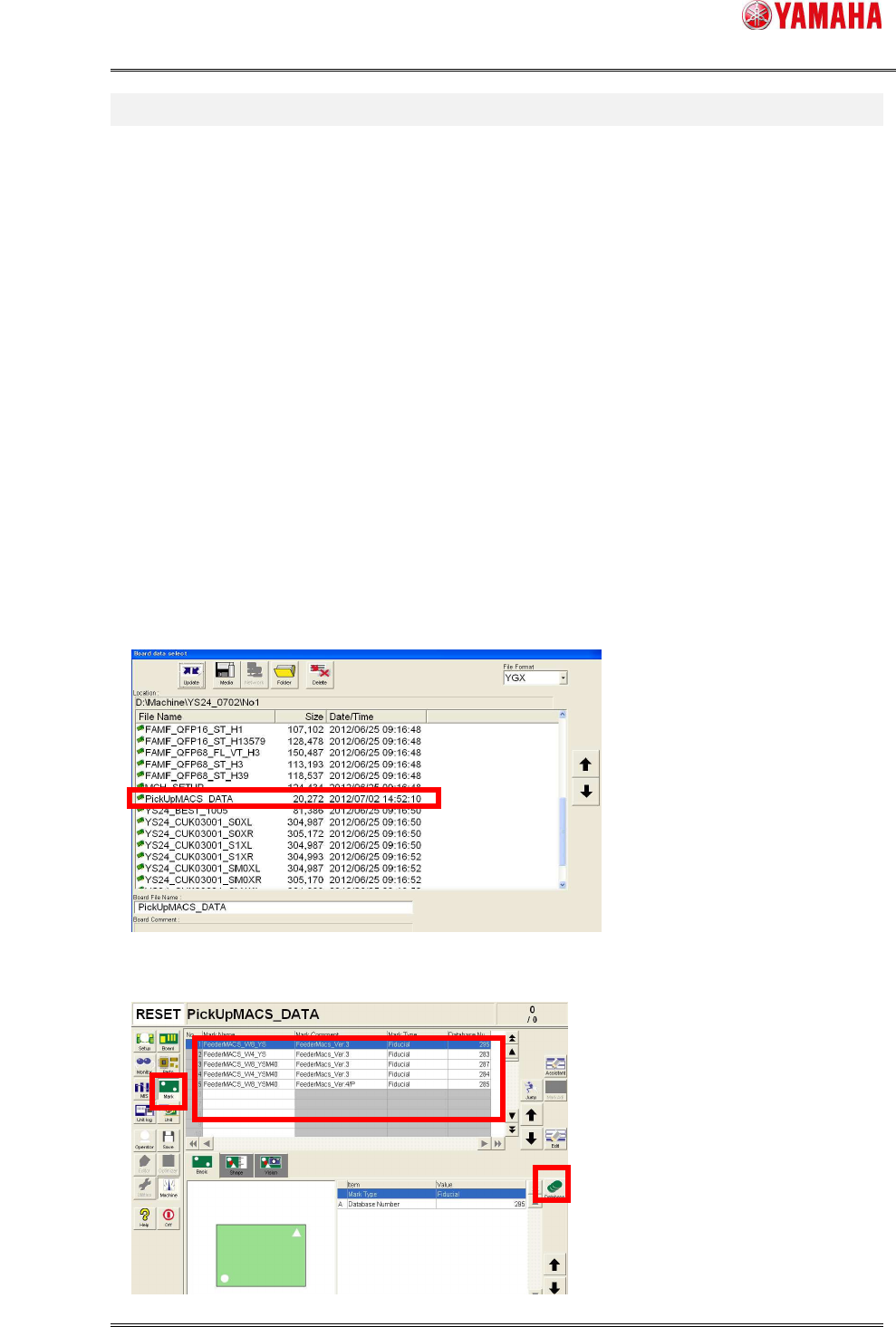
(1) Copy [PickUpMACS_DATA.ygx] from the installation CD to the [No1] folder of the target
machine.
(2) Read board data [PickUpMACS_DATA.ygx] on the [Setup] screen. Sometimes a board
data read error occurs, but ignore it.
(3) Press the [Mark] button. Select mark data named [Feeder MACS]. And press the
[Database] button.
*4
SMT Software Engineering Group
IM Operations YAMAHA MOTOR CO., LTD.
MDOC-SOFT50177
21/28
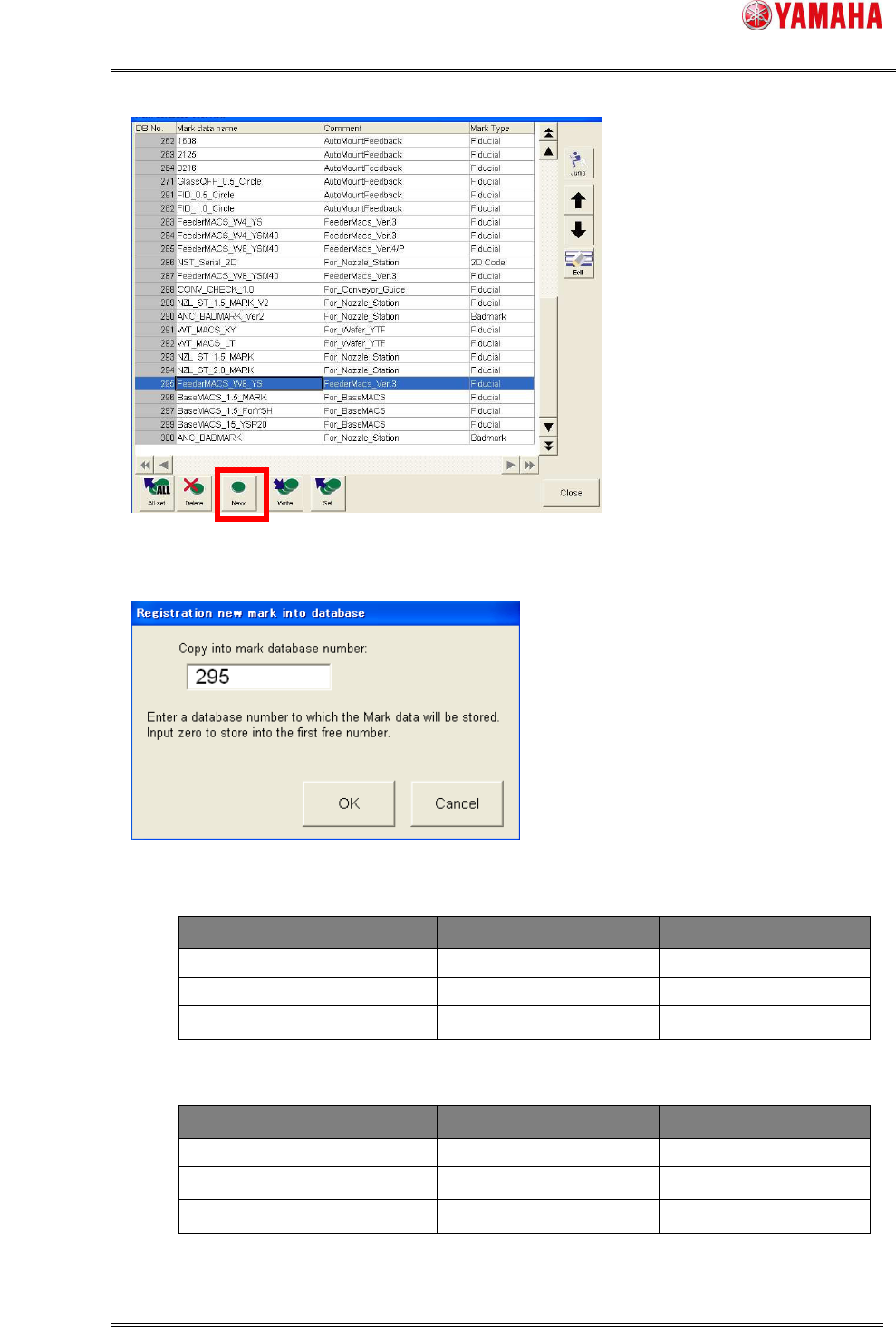
(4) [Mark database overview] dialog opens. Press the [New] button.
(5) The [Registration new mark into database] dialog opens.
Input a mark database number, then press [OK].
Database number is as below.
■ YS/YSM20
Mark Name Mark Comment Database Number
FeederMACS_W8_YSM40 FeederMACS_Ver.*/P 285
FeederMACS_W8_YS FeederMACS_Ver.* 295
FeederMACS_W4_YS FeederMACS_Ver.* 283
■ YSM40
Mark Name Mark Comment Database Number
FeederMACS_W8_YSM40 FeederMACS_Ver.* 287
FeederMACS_W4_YSM40 FeederMACS_Ver.* 284
FeederMACS_W8_YSM40 FeederMACS_Ver.*/P 285
*4
*6