TM6419.PickupMACS.pdf - 第6页
SMT Software Engineering Group IM Operations Y AMAHA MOT OR CO., L TD. MDOC-SOFT50177 6/28 3. Setting Settings to use this function are as follows. 3.1. Machine Setting In [Machine] - [Setting] - [M achine Dat…

SMT Software Engineering Group
IM Operations YAMAHA MOTOR CO., LTD.
MDOC-SOFT50177
5/28
2. Summary
This function stabilizes pick up condition, mainly targeting small parts. It consists of the
following two functions.
- Feeder MACS
- Nozzle MACS
It is more effective to use these two functions together. However, it is possible to individually
select either one on [Machine Setting].
2.1. Feeder MACS
Feeder MACS detects a feeder set position, and corrects its pick up position without a manual
teaching.
A Feeder MACS correction value is cleared when the machine shut down or the feeder is
detached from the machine. In that case, Feeder MACS is executed again at the next pick up
action.
When the following buttons are pressed, Feeder MACS is always executed.
- The [Parts Adjust] - [Pickup] button
- The [Teach] - [Trace] button
When Feeder MACS is failed, pick up is executed without a Feeder MACS correction.
2.2. Nozzle MACS
Nozzle MACS detects a nozzle position, and calculates its appropriate pick up position.
The correction value is cleared when an operation concerning a nozzle change is executed,
such as loading board data, pick up error, or Emergency Stop etc.
You can specify whether or not to execute Nozzle MACS again after which operation.
Refer to [3. Setting].
When Nozzle MACS is failed, pick up is executed without a Nozzle MACS correction.
SMT Software Engineering Group
IM Operations YAMAHA MOTOR CO., LTD.
MDOC-SOFT50177
6/28
3. Setting
Settings to use this function are as follows.
3.1. Machine Setting
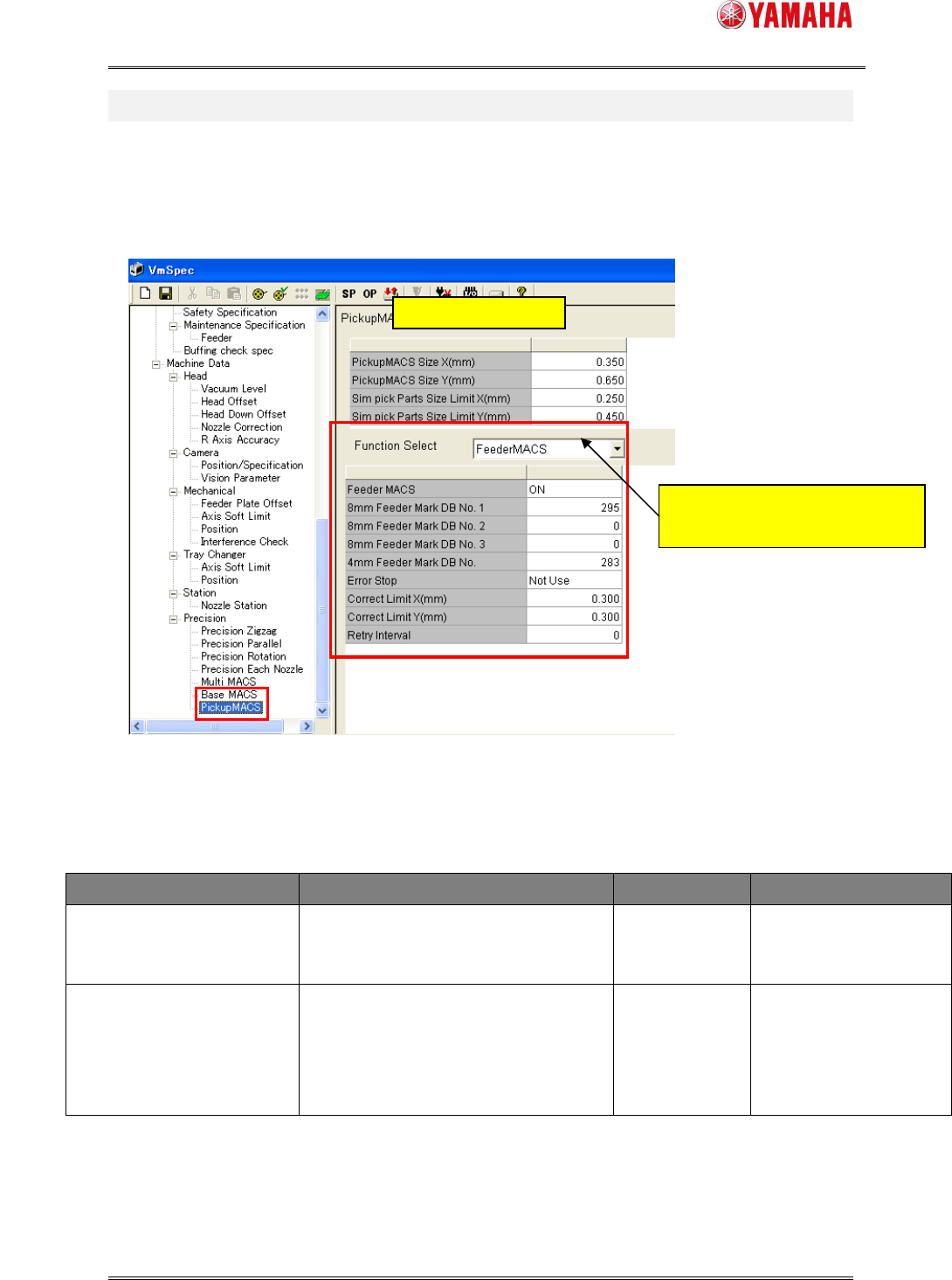
In [Machine] - [Setting] - [Machine Data] - [Precision] - [Pickup MACS], set each item.
Fig.3.1 “Pickup MACS” Settings
< Contents of Pickup MACS common setting items >
Items Explanation Input range Initial value
Pickup MACS Size X(mm)
Pickup MACS Size Y(mm)
Input the target parts size. This
function executes parts size smaller
than input value in this item.
000.000–
999.999(mm)
X 0.700(mm)
Y 1.400(mm)
Sim Pick Parts Size Limit
X(mm)
Sim Pick Parts Size Limit Y
(mm)
Input the parts size which lower limit
executing simultaneous pickup. The
parts of the size of less than an input
value do not execute simultaneous
pickup.
000.000–
999.999(mm)
X 0.25(mm)
Y 0.45(mm)
Common Setting items
Switch [Feeder MACS] setting items
and [Nozzle MACS] setting items.
*6

SMT Software Engineering Group
IM Operations YAMAHA MOTOR CO., LTD.
MDOC-SOFT50177
7/28
< Contents of Feeder MACS setting items >
Items Explanation Input range Initial value
Feeder MACS Select whether use Feeder MACS or not.
ON – Use, OFF – Not use
ON/OFF ON
8mm Feeder Mark DB
No.1-3
Input the mark data number for Feeder
MACS. The number for 8mm feeder
should be registered in the mark database.
It is used for Feeder MACS action in order
of 1, 2, and 3.
In case of mark data not using, input the
“0”.
0 - 300 0
4mm Feeder Mark DB
No.
Input the mark data number for Feeder
MACS. The number for 4mm feeder
should be registered in the mark database.
In case of mark data not using, input the
“0”.
0 - 300 0
Error Stop When Feeder MACS is failed in auto
running. It stops machine running and
displays error message.
Use – Enabled, Not Use – Disabled
Use/Not Use Not Use
Correct Limit X(mm)
Correct Limit Y(mm)
Input the upper limit correction value of
Feeder MACS.
When Feeder MACS correction value
exceeds this input value, it does not
correct by Feeder MACS.
000.000–
999.999(mm)
X - 0.3(mm)
Y - 0.3(mm)
Retry interval (Minute) Input the time interval for retry of Feeder
MACS.
In the case of “0”, it does not retry Feeder
MACS by time interval.
0 - 480 0 (Minute)
< Contents of Nozzle MACS setting items >
Items Explanation Input range Initial value
Nozzle MACS
Select whether use Nozzle MACS or not.
ON – Use, OFF – Not use
ON/OFF ON
Error Stop
When Nozzle MACS is failed, it stops
machine running and displays error
message.
Use – Enabled, Not Use – Disabled
Use/Not Use Not Use
Execute at Load Board
Data
Select whether get Nozzle MACS again or
not, at loading board data..
Use – Enabled, Not Use – Disabled
Use/Not Use Use
*1
*1
*5
*5