40-575AM.pdf - 第27页
Page 6.1 pick ering test .com Section 6 - T roubleshooting Installation Problems The Plug & Play functionality of Pickering switch car ds generally ensures trouble-free installation. If you do e xperience any install…
Page 5.5
pickeringtest.com
Section 5 - Connectors
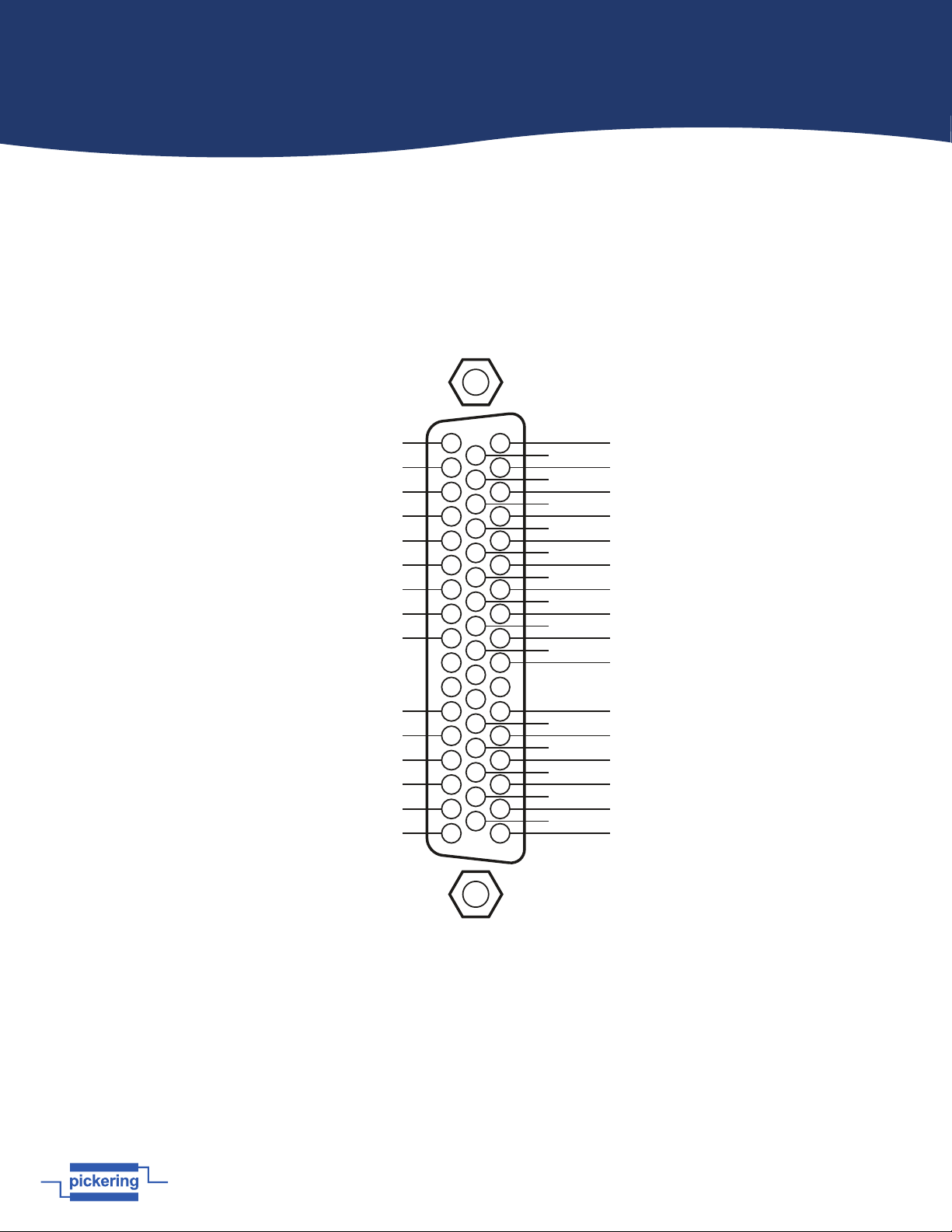
Figure 5.5 - 2 A 1-Pole 28x16 Matrix Module 40-579-001:
50-pin D-type male connector pinout viewed from front of module.
Y4
X27
Y3
Y6
Y9
Y12
Y15
X1
X4
X7
X10
X13
X16
X19
X22
X25
X28
Y1
Y7
Y10
Y13
Y16
X2
X5
X8
X11
X14
X17
X20
X23
X26
Y2
Y5
Y8
Y11
Y14
X3
1
2
3
4
5
6
7
8
9
10
11
12
13
14
15
16
17
18
19
20
40
41
42
43
44
45
46
47
48
49
50
21
22
23
24
25
26
27
28
29
30
31
32
33
34
35
36
37
38
39
X6
X9
X12
X15
X18
X21
X24
FP_GND
Page 6.1
pickeringtest.com
Section 6 - Troubleshooting
Installation Problems
The Plug & Play functionality of Pickering switch cards generally ensures trouble-free installation.
If you do experience any installation problems you should first ensure that all cards are properly seated in their slots.
Improperly mated cards may go undetected by the operating system, or may be detected as a card of an unknown type.
They can also cause the computer to freeze at various stages in the boot sequence.
If your system employs a remote control interface you should check the integrity of all remote control interface links.
When the system is powered up, and during Windows start-up, you should expect to see periodic activity on the remote
control interface RX/TX (yellow) indicators, clearing to leave only the PWR/LNK (green) LEDs illuminated. The RX/TX
indicators should show activity when you attempt to access a card.
Diagnostic Utility
The Pickering Diagnostic Utility (accessible through the Programs>>Pickering>>PXI Utilities menu) generates a
diagnostic report of the system’s PCI configuration, highlighting any potential configuration problems. Specific details of
all installed Pickering switch cards are included. All the installed Pickering switch cards should be listed in the “Pilpxi
information” section - if one or more cards is missing it may be possible to determine the reason by referring to the PCI
configuration dump contained in the report, but interpretation of this information is far from straightforward, and the
best course is to contact Pickering support: support@pickeringtest.com, if possible including a copy of the diagnostic
report.
In the “VISA information” section, if VISA is not installed its absence will be reported. This does not affect operation using
the Direct I/O driver, and is not a problem unless you wish to use VISA. VISA is a component of National Instruments
LabWindows/CVI and LabVIEW, or is available as a standalone environment.
If VISA is present and is of a sufficiently recent version, the section “Pipx40 information” should present a listing similar
to “Pilpxi information”.
Please note that the Diagnostic Utility cannot access cards if they are currently opened by some other application, such
as the Test Panels or Terminal Monitor.
Refer to the Warnings and Cautions at the front of this manual.
!
Page 7.1
pickeringtest.com
Section 7 - Maintenance Information
General Cleaning
• Isolate the electrical power from the chassis and ensure that no user I/O signals are being applied.
• Wipe the product & chassis surfaces with a clean dry anti-static cloth only.
Software Update
For PXI modules operating in a PXI chassis, no module software updates are required. For the latest version of the
driver please refer to our web site pickeringtest.com where links to our Software Download page will provide the
latest version of the driver software for the various programming environments encountered.
For PXI modules which are supported in one of Pickering Interfaces’ Modular LXI Chassis (such as the 60-102D
and 60-103D) no module software update is required. If the module was introduced after the LXI chassis was
manufactured the module may not be recognized, in this case the chassis firmware may need upgrading. This is a
simple process which is described in the manual for the Modular LXI Chassis.
Periodic Maintenance
This product and its corresponding chassis do not require any periodic maintenance.
!
Refer to the Warnings and Cautions at the front of this manual.
Switching System Test Tools
We recommend the use of eBIRST to provide a check of the correct operation of relays and to identify the location of
any faulty relay. For more information vist: pickeringtest.com/ebirst