00196715-01_IM_SSW_704_DE_EN.pdf - 第27页
Installation Manual, Station Software Version 704.01 04/2010 Edition 5 Inst alling the machine computer 5.1 Inst allation sequence See section 5.2 . See section 5.2 . See separate Installation Manuals for details on inst…
Installation Manual, Station Software Version 704.01 04/2010 Edition
4.3 Network configuration
Machine
computer
Vision computer
10Base-T
or 100Base-T
cross-over cable
100Base-T
cross-over cable
Private network between
machine computer and Vision
computer
SIPLACE LAN
or
customer LAN
SIPLACE Pro
Twisted pair TP
(100 Mbit/s)
Twisted pair TP
(10 or 100 Mbit/s)
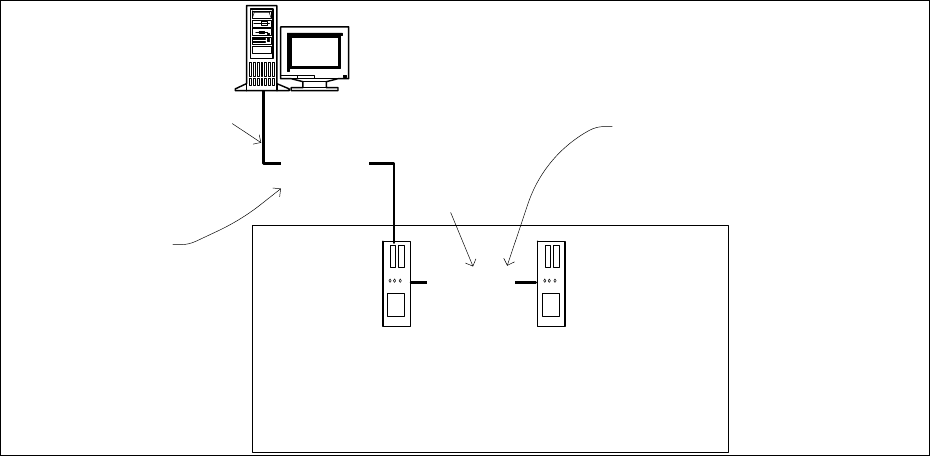
Fig. 4-5: Network connections between the machine and SIPLACE Pro
In two-computer operation a separate private network (100 Mbit/s) is set up between the machine
computer and the Vision computer via a subnet mask.
Fixed IP addresses for the machine computer and the Vision computer can thus be assigned for all
SIPLACE machines. These IP addresses are not known outside the private network, for instance in the
SIPLACE LAN or customer LAN.
These IP addresses need not be further configured by the operator while the station software is being
installed.
26 of 60
Installation Manual, Station Software Version 704.01 04/2010 Edition
5 Installing the machine computer
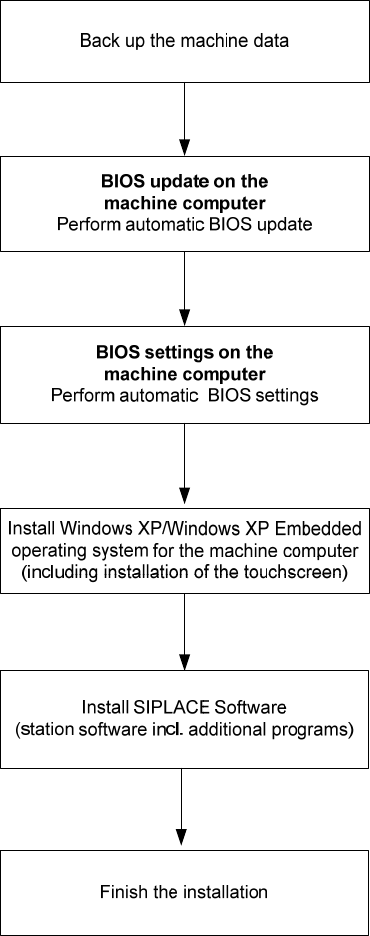
5.1 Installation sequence
See section 5.2.
See section 5.2.
See separate Installation Manuals for details on installing the
Windows XP or Windows XP Embedded operating system (item
no. 00196151-xx and 00196737-xx respectively)
For details on calibrating the touchscreen, see section 5.3.3.
See sections 5.3 and 5.4.
See section 5.4.7.
27 of 60
Installation Manual, Station Software Version 704.01 04/2010 Edition
28 of 60
5.2 Performing automatic BIOS update/settings on the machine computer
and Vision computer
The image files for the automatic BIOS update/BIOS settings and the corresponding installation instruction
(readme file) are available on the V1.0 BIOS CD that can be ordered for download via the service
technician or SecuFEx.