00196715-01_IM_SSW_704_DE_EN.pdf - 第28页
Installation Manual, Station Software Version 704.01 04/2010 Edition 28 of 60 5.2 Performing automatic BIOS up date/settings on the machine computer and V ision computer The image files for the automatic BIOS update/BIOS…
Installation Manual, Station Software Version 704.01 04/2010 Edition
5 Installing the machine computer
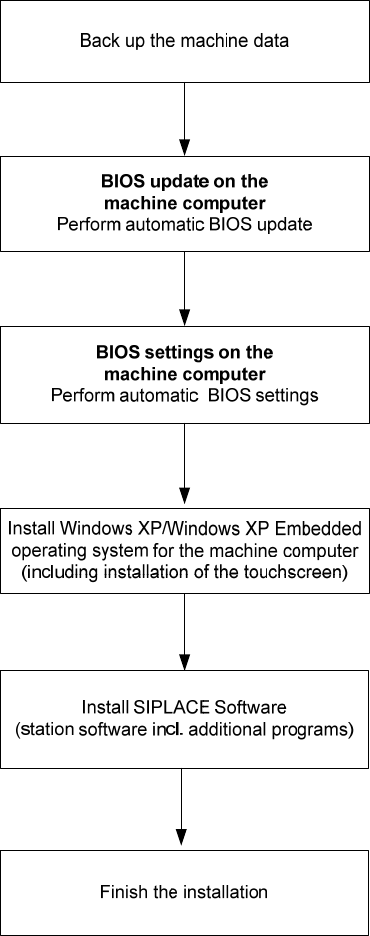
5.1 Installation sequence
See section 5.2.
See section 5.2.
See separate Installation Manuals for details on installing the
Windows XP or Windows XP Embedded operating system (item
no. 00196151-xx and 00196737-xx respectively)
For details on calibrating the touchscreen, see section 5.3.3.
See sections 5.3 and 5.4.
See section 5.4.7.
27 of 60
Installation Manual, Station Software Version 704.01 04/2010 Edition
28 of 60
5.2 Performing automatic BIOS update/settings on the machine computer
and Vision computer
The image files for the automatic BIOS update/BIOS settings and the corresponding installation instruction
(readme file) are available on the V1.0 BIOS CD that can be ordered for download via the service
technician or SecuFEx.

Installation Manual, Station Software Version 704.01 04/2010 Edition
5.3 Preparations for installing the software
5.3.1 Requirements
Requirements for installing the SIPLACE software and the Vision computer software:
- The Windows XP embedded operating system with Service Pack 2 must be installed on the
machine computer and in two-computer operation on the Vision computer (see "Installation Manual
Operating System Windows XP Embedded SP2 for 70x", item number 00196737-xx)
Or
- The Windows XP Professional operating system with Service Pack 3 and all current hotfixes
(SIPLACE Hotfix CD) must be installed on the machine computer and in two-computer operation on the
Vision computer (see the Installation Manual for the Windows XP operating system, item number
00196151-xx).
Note:
The Windows XP Embedded operating system is only used for new installations. On
upgrading to station software version 704 or higher, there will be no operating system
change from Windows XP Professional to Windows XP Embedded.
Under Windows XP Professional the default Windows display settings have to be changed and the
touchscreen has to be calibrated. Under Windows XP Embedded only the touchscreen has to be
calibrated. You must be logged on as the Administrator
in order to be able to carry out this work.
29 of 60