00196500-05_IM_SSW_703_03_DE EN.pdf - 第51页
Installation Manual, Station Software Version 703.03 01/2011 Edition Fig. 9-3: Finalizing uninstallation → Click the Finish button. The Vision computer software ha s no w been uninstal led correctly. 51 of 54
Installation Manual, Station Software Version 703.03 01/2011 Edition
9 Uninstalling the Vision computer software
If it is necessary to uninstall the Vision computer software manually, this must be done in one of the ways
described below.
Note:
You must be logged in as administrator to uninstall the software.
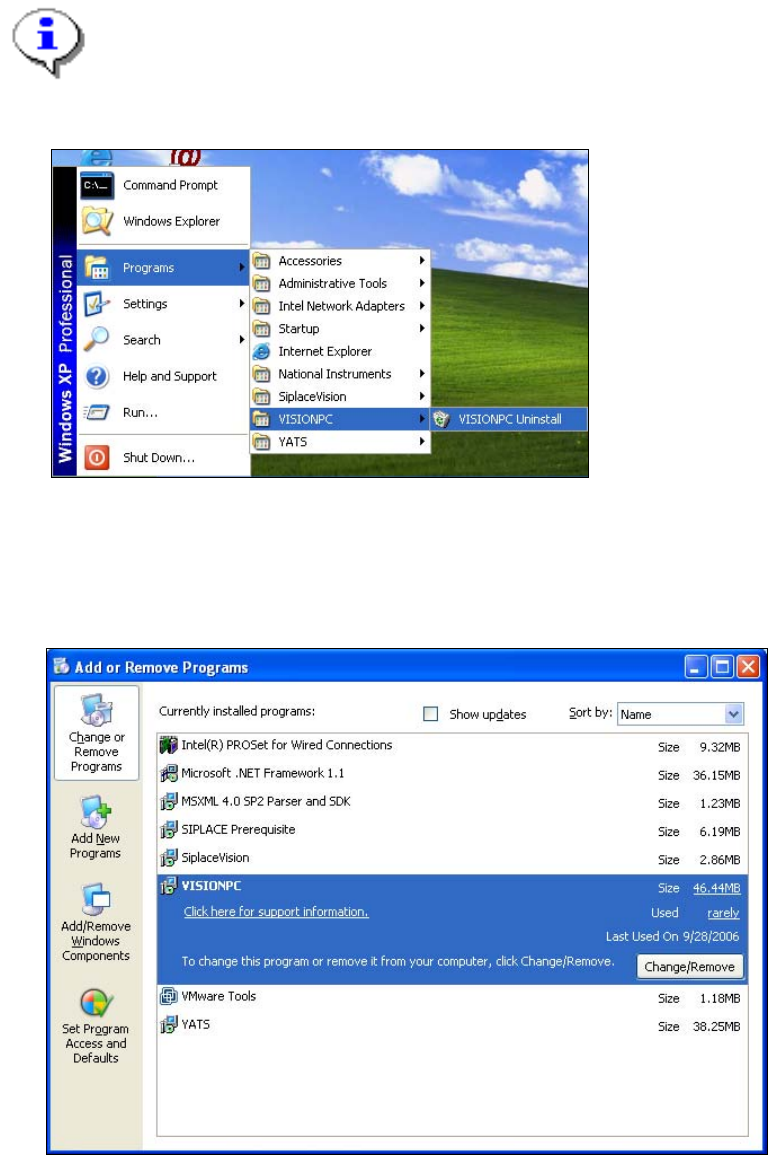
→ Open the Start menu and choose Programs Æ VISIONPC Æ VISIONPC Uninstall.
Fig. 9-1: Starting uninstallation (alternative 1)
Or:
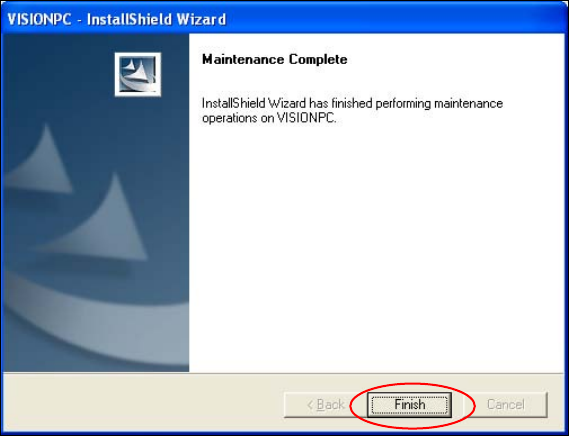
→ Open the Start menu and choose Settings Æ Control Panel.
→ Double-click Add/Remove Programs.
Fig. 9-2: Starting uninstallation (alternative 2)
→ Select VISIONPC from the list of installed programs.
→ Click the Change/Remove button.
50 of 54
Installation Manual, Station Software Version 703.03 01/2011 Edition
Fig. 9-3: Finalizing uninstallation
→ Click the Finish button.
The Vision computer software has now been uninstalled correctly.
51 of 54
Installation Manual, Station Software Version 703.03 01/2011 Edition
52 of 54