0197787-01_UM_HeadVerification_708_EN.pdf - 第54页
SIPLACE Head V erification User Manual Edition 01/2015 54 4.9.2 Explanation of Measurement Results in "Progress" Menu After com pletion of the measurem ent, the following res ults appear in the " Progress&…

SIPLACE Head Verification
User Manual Edition 01/2015
53
Measurement steps:
1. Firstly, the exact position of the calibration component in the calibration bag is determined with
the PCB camera, as the actual position (the exact center and position), and is then adopted as
the pickup position. This center is determined using 4 points at the corners of the calibration
component.
2. Segment 1 now moves downwards at an angle of 0° and picks the calibration component up
from the pickup position determined (calibration component center).
3. Segment 1 is moved upwards again.
4. Segment 1 is rotated by the star over the component camera.
5. The component camera measures the four calibration component structure fiducials to
determine the exact position of the calibration component to the camera center, thereby
optically centering the calibration component.The offset values determined here are saved as
Up X [µm] and Up Y [µm]. This value now describes the eccentricity of the calibration
component to the camera center.This value provides the "Segment offset up" for segment 1 at
0°, as we can assume that segment 1 picked up the calibration component exactly in the
center. The offset values determined are calculated into the following placement (putdown) of
the calibration component (calibration bag) as correction values.
6. The star now rotates the segment with the calibration component back into the placement
position.
7. Segment 1 and the Z axis are moved downwards and the calibration component is placed in
the calibration bag at an angle of 0° (DP/segment angle) and with the corrected offset values
Up X [µm] and Up Y [µm], as a placement position.
8. The PCB camera now moves over the calibration component and once more determines the
four points in the calibration component corners, to find the exact position of the calibration
component in the bag. This provides the offset values Down X [µm] and Down Y [µm], which
describe the eccentricity of the calibration component to the PCB camera center. This value
describes exactly the offset of the segment 1 center at a placement angle of 0°, when
segment 1 is in the placement position. This provides the exact displacement of segment 1 at
a placement angle of 0°, describing how much the Z linear guide has changed the segment
position at the top to the segment position at the bottom.This deviation also describes the
offset of the component camera to the PCB camera for this segment.
9. The values determined for segment 1 Down X [µm] and Down Y [µm] are taken as an
absolute 0 for all other calculations of all segment offsets. The "Segment offset down" for
segment 1 is the reference value as all other offsets for all other segments refer to this initial
value.
10. The calibration component position determined is now used again as actual pickup position for
the following measurement.
11. Segment 2 now picks up at 0°.
12. Steps 2-10 are performed for all segments.
13. The calibration component stays in its position at 0° for the entire measurement and does not
change its angle!
SIPLACE Head Verification
User Manual Edition 01/2015
54
4.9.2 Explanation of Measurement Results in "Progress" Menu
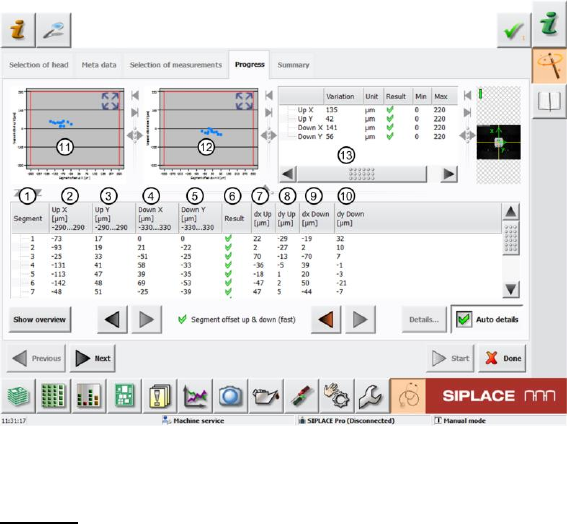
After completion of the measurement, the following results appear in the "Progress" menu:
Figure 36: Segment offset up and down (fast) result
Legend:
1. Segment measured
2. Calculated "Segment offset up" value Up X [µm] from measurement at an angle of 0°. This
deviation is determined with the value dx Up [µm] (7), as the actual segment offset measured
to the component camera center. The calculated "Segment offset up" value Up X [µm] is
calculated from the offset between the component and PCB camera.
The segment offset values Up X [µm] determined must always be in a certain tolerance range
(in our example -290..290µm). This value defines a permissible segment offset within the
construction and production tolerances, which can still be compensated by the software. If the
segment offset values are outside the tolerances, we can assume that the segment has been
mechanically deformed, so that it has been bent and is no longer suitable for accurate
placement.
3. Calculated "Segment offset up" value Up Y [µm] from measurement at an angle of 0°. This
deviation is determined with the value dy Up [µm] (8), as the actual segment offset measured
to the component camera center. The calculated "Segment offset up" value Up Y [µm] is
calculated from the offset between the component and PCB camera.
The segment offset values Up Y [µm] determined must always be in a certain tolerance range
(in our example -290..290µm). This value defines a permissible segment offset within the
construction and production tolerances, which can still be compensated by the software. If the
segment offset values are outside the tolerances, we can assume that the segment has been
mechanically deformed, so that it has been bent and is no longer suitable for accurate
placement.
4. Calculated "Segment offset down" value Down X [µm] from measurement at an angle of 0°.
This value is calculated from the actual "Segment offset down" value dx Down [µm] for this
segment. This offset is illustrated in the value dx Down [µm] (9).
The segment offset values Down X [µm] determined must always be in a certain tolerance
range (in our example -330..330µm). This value defines a permissible segment offset within
the construction and production tolerances, which can still be compensated by the software. If
the segment offset values are outside the tolerances, we can assume that the segment has
been mechanically deformed, so that it has been bent and is no longer suitable for accurate
placement.
The Down X [µm] value for segment 1 is used as a reference value for all other segments
and is therefore always set to 0.
SIPLACE Head Verification
User Manual Edition 01/2015
55
As the "Segment offset down" for segment 1 is the reference value for all other segment
offsets, the actual segment offset value dx Down [µm] is set to 0 for "Down X [µm] = 0"!
The following formula is used for the relationship of all other segments:
Down X [µm] Seg (n) = dx Down [µm] Seg (n) - dx Down [µm] Seg 1
5. Calculated "Segment offset down" value Down Y [µm] from measurement at an angle of 0°.
This value is calculated from the actual "Segment offset down" value dy Down [µm] for this
segment. This offset is illustrated in the value dy Down [µm] (10).
The segment offset values Down Y [µm] determined must always be in a certain tolerance
range (in our example -330..330µm). This value defines a permissible segment offset within
the construction and production tolerances, which can still be compensated by the software. If
the segment offset values are outside the tolerances, we can assume that the segment has
been mechanically deformed, so that it has been bent and is no longer suitable for accurate
placement.
The Down Y [µm] value for segment 1 is used as a reference value for all other segments
and is therefore always set to 0.
As the "Segment offset down" for segment 1 is the reference value for all other segment
offsets, the actual segment offset value dx Down [µm] is set to 0 for "Down X [µm] = 0"!
The following formula is used for the relationship of all other segments:
Down Y [µm] Seg (n) = dy Down [µm] Seg (n) - dy Down [µm] Seg 1
6. Results display (OK green tick / NOK red X)
7. Actual segment offset dx Up [µm] of relevant segment to component camera center during
measurement of calibration component.
8. Actual segment offset dy Up [µm] of relevant segment to component camera center during
measurement of calibration component.
9. Actual segment offset dx Down [µm] of relevant segment to component camera center during
measurement of calibration component.
10. Actual segment offset dy Down [µm] of relevant segment to component camera center during
measurement of calibration component.
11. Diagram for illustration of segment offset values "up" with the following values:
a. Axis of abscissas (X axis) Segment offset up X [µm]
b. Axis of ordinate (Y axis) Segment offset up Y [µm]
c. Red border Min and max tolerances (in our case -290..290µm)
d. Use the button to zoom in on the diagram.
12. Diagram for illustration of segment offset values "down" with the following values:
Axis of abscissas (X axis) Segment offset down X [µm]
Axis of ordinate (Y axis) Segment offset down Y [µm]
Red border Min and max tolerances (in our case -330..330µm)
Use the button to zoom in on the diagram.
13. The following values are displayed in this screen:
e. Dispersion Up X This value is determined by finding the difference between
the lowest value for "Up X" [µm] (2) and the highest values for "Up X" [µm] (2). This
difference must be within a plausible tolerance (in this case 0..220µm).
f. Dispersion Up Y This value is determined by finding the difference between
the lowest value for "Up Y" [µm] (3) and the highest values for "Up Y" [µm] (3). This
difference must be within a plausible tolerance (in this case 0..220µm).
g. Dispersion Down X This value is determined by finding the difference
between the lowest value for "Down X" [µm] (4) and the highest values for "Down X"
[µm] (4). This difference must be within a plausible tolerance (in this case 0..220µm).
h. Dispersion Down Y This value is determined by finding the difference
between the lowest value for "Down Y" [µm] (5) and the highest values for "Down Y"
[µm] (5). This difference must be within a plausible tolerance (in this case 0..220µm).
i. Results display (OK green tick / NOK red X)