0197787-01_UM_HeadVerification_708_EN.pdf - 第68页
SIPLACE Head V erification User Manual Edition 01/2015 68 4.13 "ZDS Sen sor Valu es" Measurement The following tools are r equired for these m easurem ents: CP20P: 20x nozzle type 4069 03106244- 01 (vacuum nozz…
SIPLACE Head Verification
User Manual Edition 01/2015
67
4.12.3 Explanation of Measurement Results Using Results PDF
These results can be seen if you scroll down the "Summary" menu or generate a results PDF!
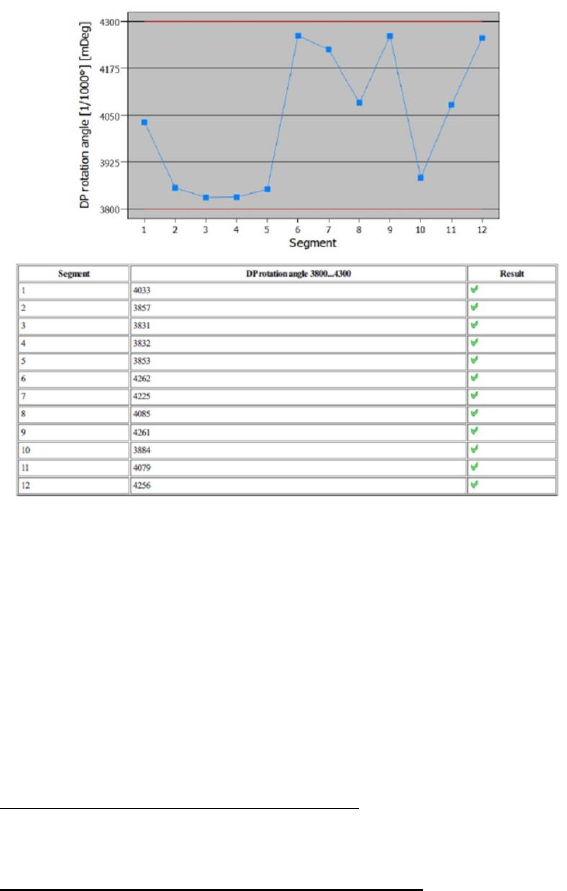
Figure 46: Results PDF for DP rotation
As we can see in the results above, all rotary angles for the segments are OK. This means that all DPs
can reach the specified angle of 4.000° reliably and within the tolerance range.
This means also that, if a component needs to be corrected by a specific rotary angle after component
evaluation under the component camera, each segment will rotate reliably within the tolerance range
of this angle.
4.12.4 Meaning of the Results
DP rotation angle error at all segments:
1. Possible contamination of component camera Clean the lens or replace the component
camera
DP rotation angle error at individual segments:
1. DP does not rotate reliably Replace the DP / segment
2. Calibration component rotates on nozzle Nozzle dirty
Check nozzle seat
Check vacuum

SIPLACE Head Verification
User Manual Edition 01/2015
68
4.13 "ZDS Sensor Values" Measurement
The following tools are required for these measurements:
CP20P: 20x nozzle type 4069 03106244-01 (vacuum nozzle red, closed)
4.13.1 Explanation of Measurement – Procedure
The "ZDS sensor values" measurement determines the functionality of the Z-down light barrier and the
component sensor, in accordance with the rotary angles of the DP or segment.
Firstly, the reference run is applied to determine the brightness adjustment for the Z-down light barrier
(LED Gain). In relation to this, the voltage value is determined for the Z-down light barrier, which
provides a reference value (Sensor value [mV]) for the distance to the switching ring.
Additional measurements are performed to determine the Z-down light barrier voltage values when the
switching ring issues the Z axis end position signal during placement (Spring resp. low [mV]) and
also when the Z axis makes contact at full force (Spring resp. high [mV]), corresponding to a
complete compression of the segment spring.
In further tests, the rotary axis of the DP / segment is rotated by a full rotation (360°). During this, the
Z-down light barrier voltage values are constantly recorded and an image recorded of the distance
from the Z-down light barrier to the switching ring. The changes in voltage are measured in steps of
5°, to prove a relatively even fluctuation. The entire change in voltage is also determined over the
complete 360°.
As this measurement is performed in the component sensor area, the changes in nozzle tip length can
be measured across the entire 360°. These changes in length are recorded in steps of 5° and must
remain within a certain range.
The results of these measurements provide feedback about the following sources of errors:
1. Swaying switching rings
2. Dirty switching rings
3. Defective Z-down light barrier
4. Defective segment spring
Measurement steps:
1. Firstly, a height reference run is performed with the nozzle 4069.
2. Then a brightness adjustment for the Z-down light barrier LED is performed. This involves the
star rotating each segment into the placement position and switching the Z-down light
barrier.The voltage value determined at the segment setting 0° provides the value Sensor
Value [mV] which illustrates the distance between the Z-down light barrier and the DP
switching ring. The LED gain value is also determined. This is the brightness adjustment for
the LED in the Z-down light barrier, which returns during light barrier referencing. There is a
relationship between the brightness LED gain (transmitter) and the Sensor Value [mV]
(receiver), which shows the basic functionality of the Z-down light barrier.
This is performed separately for all segments.
3. Then segment 1 is moved downwards by the Z axis, with a segment setting of DP 0°.
For this, the Z axis is moved downwards to the height reference run position, using the travel
profile TP13 [TP13 NOZZLE CHANGER DOWN]. As soon as the DP switching ring has
triggered the Z-down light barrier, the voltage value for the Z-down light barrier Spring resp.
low [mV] is determined. The axis moves downwards at full force, until the current sensor of
the Z axis issues the end position signal. The segment spring is now fully compressed. The
voltage value for the Z-down light barrier Spring resp. high [mV] is now determined
again.This measurement is used to provide information about the switching ring and the linear
guide of the segment.
This is then performed separately for all segments.
4. Segment 1 is rotated into the placement position.
5. Segment 1 is rotated by 360° (step size 1°).
SIPLACE Head Verification
User Manual Edition 01/2015
69
6. The Z axis is in the bottom position, so that the nozzle tip stands in the component sensor
beam.
7. During the rotation, measurements are taken at each rotated 1°:
- Voltage value for Z-down light barrier (sensor value [mV] / 1°) Min value [mV]
and Max value [mV]
- Change in nozzle length in component sensor (change in length determined / 5°
Radial runout 5° [µm])
- Change in voltage for Z-down light barrier (sensor value [mV]/5° Variation 5°
[mV]
- These saved values are used to determine the maximum voltage fluctuations of
the Z-down light barrier during a 360° rotation. This is provided by the delta
between the maximum voltage value and the minimum voltage value for the Z-
down light barrier Variation 360° [mV]
- The saved values can also be used to determine the maximum change in nozzle
length for the component sensor measurement during a 360° rotation. This is
provided by the delta between the maximum nozzle length and the minimum
nozzle length in the component sensor across 360° Radial runout 360° [µm]
8. This measurement is now performed for all other segments.
4.13.2 Explanation of Measurement Results in "Progress" Menu
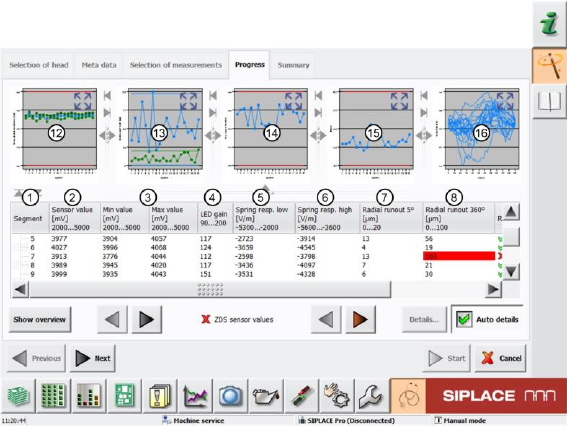
After completion of the measurement, the following results appear in the "Progress" menu:
Figure 47: ZDS sensor values_1 results