00197392-02_IM_OIS_SIS_11.2_DE_EN.pdf - 第31页
SIPLAC E OI S V11. 2 / Ins tallatio n Manual Ausgabe 05/2014 Edit ion 31 3.7 Identi fy Station (onl y OIS client ) For a stat ion to b e monitor ed, it m ust be ide ntified. For a stat ion wit h station so ftware version…

SIPLACE OIS V11.2 / Installation Manual Ausgabe 05/2014 Edition
30
3.6 System time (only OIS client)
The OIS operating data is stored using the appropriate station's system time. The SIS operating
data are stored with the server system time. Therefore, it is important that the system time on all
station computers is synchronized to allow the operating data to be evaluated correctly. To do this,
you must install a time server client on each machine.
SIPLACE Explorer also requires the system time of the OIS and SIS operating data to be
synchronized.
NOTICE
► Install the current version of TimeSync to synchronize the system time.
TimeSync is not included in the OIS package.
TimeSync is provided on the Support Media DVD. In the software guide, item no.
[00194669-xx] you find detailed information for the installation of TimeSync.
SIPLACE OIS V11.2 / Installation Manual Ausgabe 05/2014 Edition
31
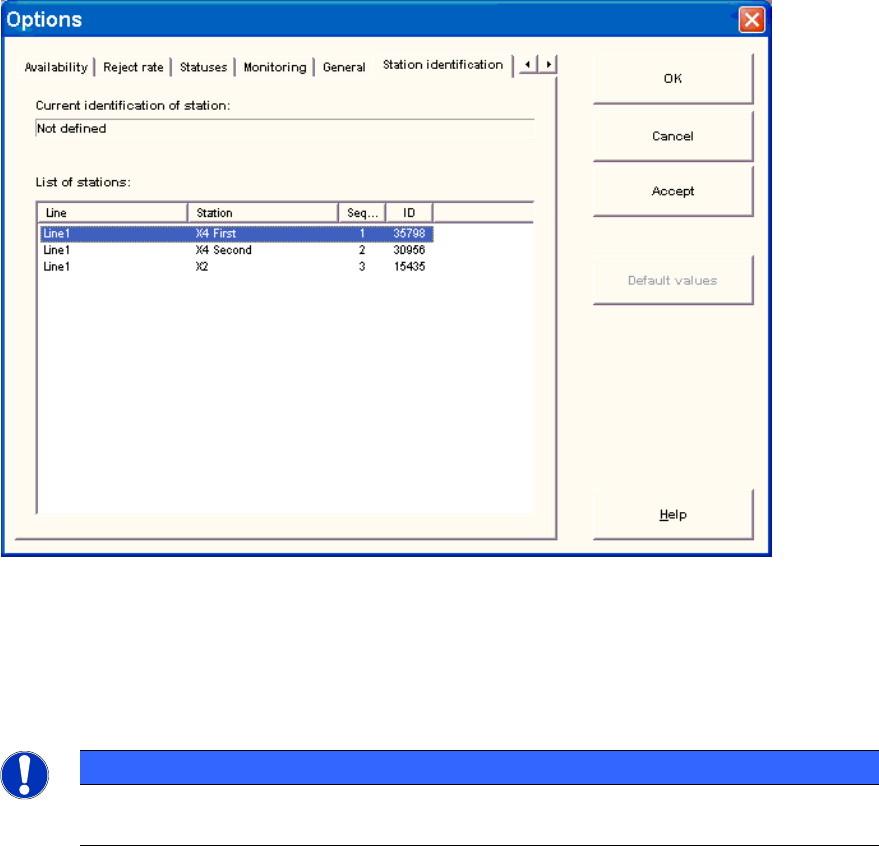
3.7 Identify Station (only OIS client)
For a station to be monitored, it must be identified.
For a station with station software version 70x, the station identification is not necessary.
► Select the Station identification item from the Options menu.
Figure 3-38: Identifying station
► Select the appropriate station in the OIS Client from the list.
► Double-click the station to identify it.
► Close the dialog by clicking OK.
NOTICE
To select the station, the line configuration must be created first on the OIS Server using
OIS LineConfig, see the Administration Guide, item no. [00197390-xx].
SIPLACE OIS V11.2 / Installation Manual Ausgabe 05/2014 Edition
32