00197392-02_IM_OIS_SIS_11.2_DE_EN.pdf - 第66页
SIPLACE O IS V11. 2 / Ins tallatio nsanleitun g Ausgabe 05/2014 Edit ion 32
SIPLACE OIS V11.2 / Installationsanleitung Ausgabe 05/2014 Edition
31
3.7 Station identifizieren (nur OIS Client)
Um Betriebsdaten zu erfassen und analysieren, muss die Station identifiziert werden.
Für Stationen mit Stationssoftware-Version 70x ist die Identifizierung der Station nicht notwendig.
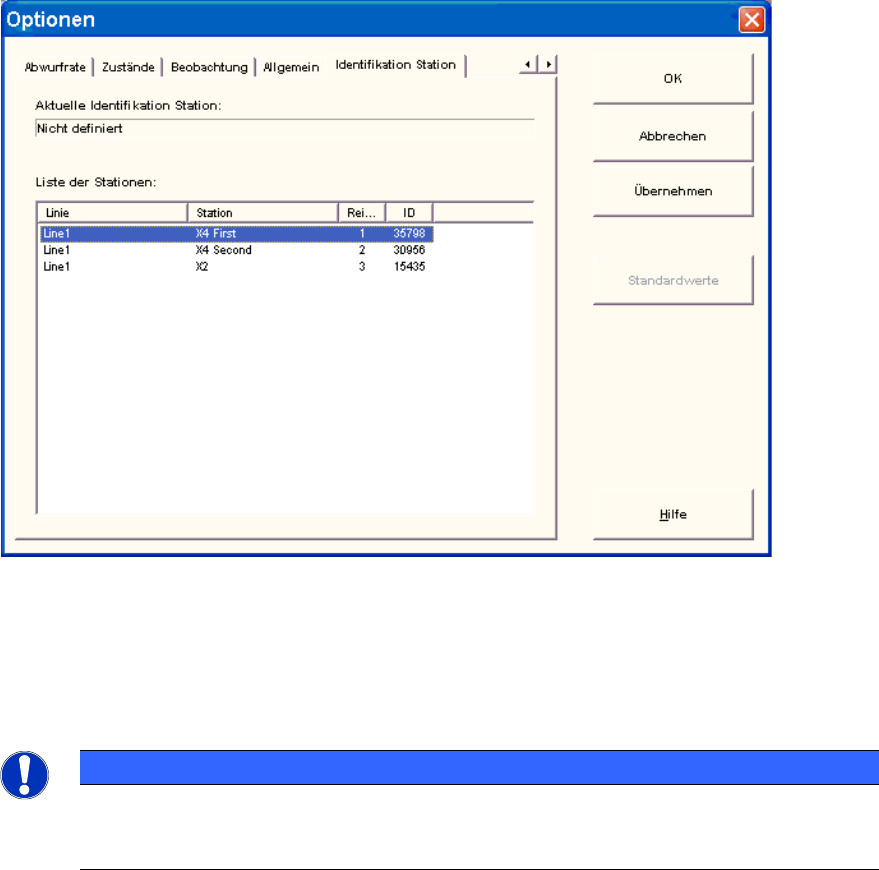
► Wählen Sie im Menü Optionen den Menüpunkt Identifikation Station aus.
Abbildung 3-38: Station identifizieren
► Wählen Sie aus der Liste die entsprechende Station im OIS Client aus.
► Doppelklicken Sie auf die Station, um sie zu identifizieren.
► Schließen Sie den Dialog mit OK.
HINWEIS
Um die Station auswählen zu können, muss die Linienkonfiguration zuerst mit dem
OIS LineConfig am OIS Server erstellt werden, siehe Administrationshandbuch,
Artikelnummer [00197389-xx].
SIPLACE OIS V11.2 / Installationsanleitung Ausgabe 05/2014 Edition
32
SIPLACE OIS V11.2 / Installationsanleitung Ausgabe 05/2014 Edition
33