00193985-01.pdf - 第54页
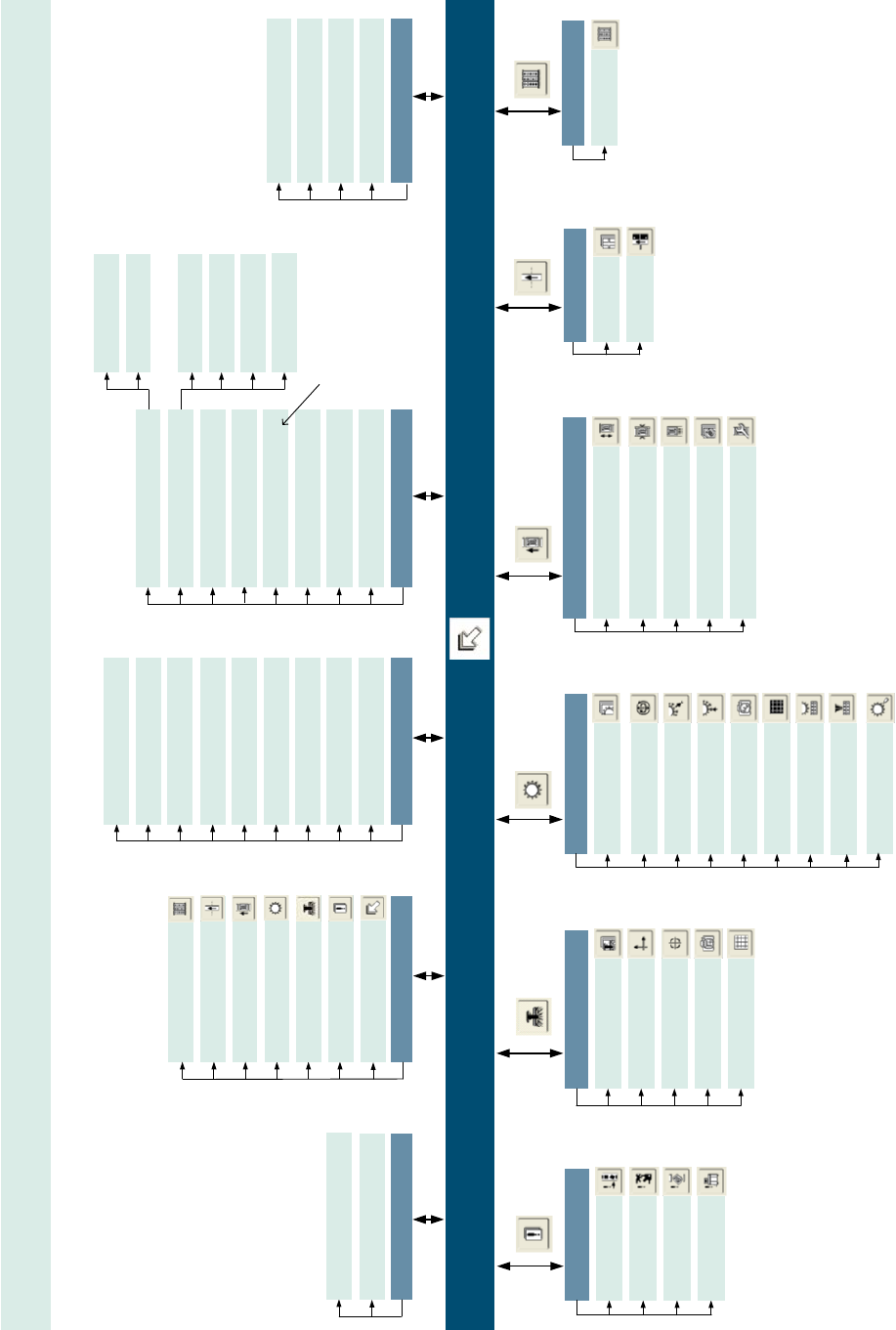
4 Programma di test SITEST SIPLACE Manuale software SR.505.xx 4.5 Schemi sinottici - Menu sulla vista base Edizione 05/2004 IT 54 4 Vista ba se [F1] [F2] Error Track errors Machine erro rs Transport errors General er ror…
SIPLACE Manuale software SR.505.xx 4 Programma di test SITEST
Edizione 05/2004 IT 4.5 Schemi sinottici - Menu sulla vista base
53
4
Vista base [F1]
[F2]
Error
Track errors
Machine errors
Transport errors
General errors
SITEST versione 505.xx Barra dei menu e strumenti sulla vista base
Tipo di macchina: SIPLACE HS-50 / HS-60
Mode
Shut down computer…
Exit Esc
View
In-/outputs F8
Tables F6
PCB Conveyor F5
RV heads F4
Gantries F3
Error F2
Main view F1
General functions
Run options... Alt+t
PCB camera P1 > Alt+1
RV camera P1 > Alt+2
PCB camera P2 > Alt+3
RV camera P2 > Alt+4
PCB camera P3 > Alt+5
RV camera P3 > Alt+6
PCB camera P4 > Alt+7
RV camera P4 > Alt+8
Save machine data
Settings
Access level...
Copy machine data...
Edit machine data... *
Firmware download...
Machine configuration...
Head exchange
Language
RV head 4...
RV head 3...
RV head 2...
RV head 1...
English
German
Help
Contents Ctrl+Alt+F1
Help Alt+F1
Use help
Info...
PCB conveyor
PCB Conveyor functions
Adjust and measure
PCB conveyor width
Adjust and test
conveyor speed
Calibrate conveyor
and functions
Options and configuration
[F5]
[F6]
Tables
Functions
Calibrate
pick-up position
[F3]
Gantry functions
Gantries
Axis functions
Calibrate position
PCB camera functions
PCB mapping
[F4]
Revolver heads
Functions
Axes
Holding/reject ciruit /
turning station
Placement and
pick-up circuit
RV head and camera
RV mapping
Nozzle changer,
head functions
Nozzle changer,
magazine functions
Component sensor
[F8]
Inputs/outputs
1 - 12
Inputs/outputs
*
s
e
l
e
z
i
o
n
a
b
i
l
e
s
o
l
o
a
l
l
i
v
e
l
l
o
"
S
e
r
v
i
c
e
(
S
i
e
m
e
n
s
)
"
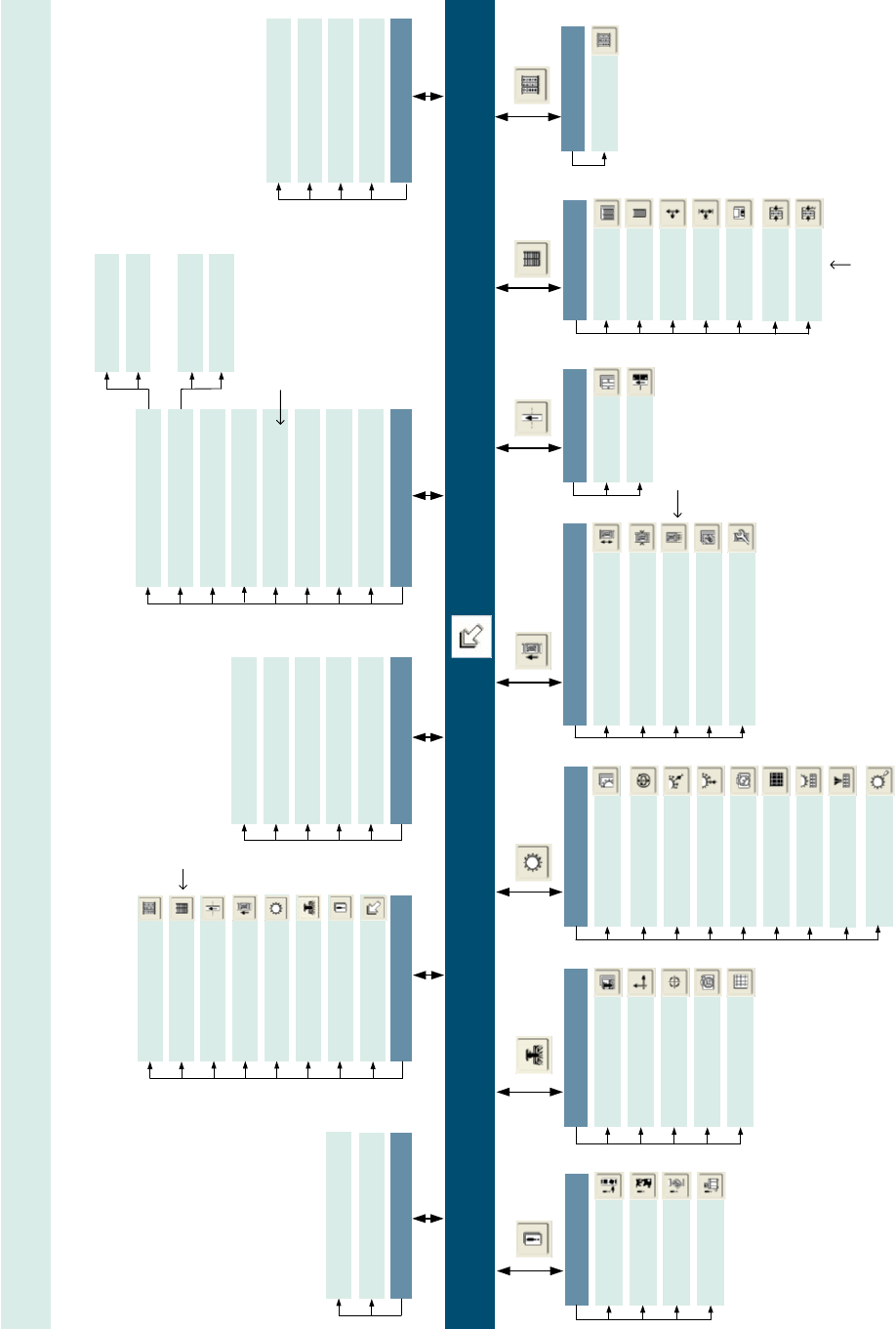
4 Programma di test SITEST SIPLACE Manuale software SR.505.xx
4.5 Schemi sinottici - Menu sulla vista base Edizione 05/2004 IT
54
4
Vista base [F1]
[F2]
Error
Track errors
Machine errors
Transport errors
General errors
SITEST versione 505.xx Barra dei menu e strumenti sulla vista base
Tipo di macchina: SIPLACE S-25 HM / S-27 HM
Mode
Shut down computer…
Exit Esc
View
Tables F6
PCB Conveyor F5
RV heads F4
Gantries F3
Error F2
Main view F1
General functions
Run options... Alt+t
PCB camera P1 > Alt+1
RV camera P1 > Alt+2
PCB camera P2 > Alt+3
RV camera P2 > Alt+4
Save machine data
Settings
Access level...
Copy machine data...
Edit machine data... *
Firmware download...
Machine configuration...
Head exchange
Language
RV head 2...
RV head 1...
English
German
Help
Contents Ctrl+Alt+F1
Help Alt+F1
Use help
Info...
PCB conveyor
PCB Conveyor functions
Adjust and measure
PCB conveyor width
Adjust and test
conveyor speed
Calibrate conveyor
and functions
Options and configuration
[F5]
[F6]
Tables
Functions
Calibrate
pick-up position
[F3]
Gantry functions
Gantries
Axis functions
Calibrate position
PCB
camera functions
PCB mapping
[F4]
Revolver heads
Functions
Axes
Holding/reject circuit /
turning station
Placement and
pick-up circuit
RV head and camera
RV mapping
Nozzle changer,
head functions
Nozzle changer,
magazine functions
Component sensor
[F8]
Inputs/outputs
1 - 11 or 1 - 12
*
Inputs/outputs
*
1
-
1
1
S
-
2
5
H
M
1
-
1
2
S
-
2
7
H
M
Functions
Tower functions
Axes
MTC *
[F7]
Settings
Machine data
Inputs/outputs 1
Inputs/outputs 2
In-/outputs
MTC * F7
*
s
e
l
e
z
i
o
n
a
b
i
l
e
s
o
l
o
s
e
è
c
o
n
f
i
g
u
r
a
t
o
i
l
S
A
V
M
(
M
a
t
r
i
x
T
r
a
y
C
h
a
n
g
e
r
)
*
s
e
l
e
z
i
o
n
a
b
i
l
e
s
o
l
o
s
e
è
c
o
n
f
i
g
u
r
a
t
o
i
l
S
A
V
M
(
M
a
t
r
i
x
T
r
a
y
C
h
a
n
g
e
r
)
*
s
e
l
e
z
i
o
n
a
b
i
l
e
s
o
l
o
a
l
l
i
v
e
l
l
o
"
S
e
r
v
i
c
e
(
S
i
e
m
e
n
s
)
"
*
d
i
s
p
o
n
i
b
i
l
e
s
o
l
o
p
e
r
S
I
P
L
A
C
E
S
-
2
7
H
M
SIPLACE Manuale software SR.505.xx 5 Compiti sulla linea SIPLACE
Edizione 05/2004 IT 5.1 Accendere la linea SIPLACE
55
5 Compiti sulla linea SIPLACE
In questo capitolo trovate la descrizione sulla procedura di inclusione ed esclusione della linea SI-
PLACE e per il trattamento delle informazioni sugli errori. 5
5.1 Accendere la linea SIPLACE
5.1.1 Avviare il sistema di programmazione SIPLACE Pro
Æ Avviate SIPLACE Pro tramite il menu di avvio di Windows XP
Start --> Programmi --> voce Siemens SIPLACE
oppure
Æ avviate SIPLACE Pro
tramite il simbolo del programma sul Desktop.
5
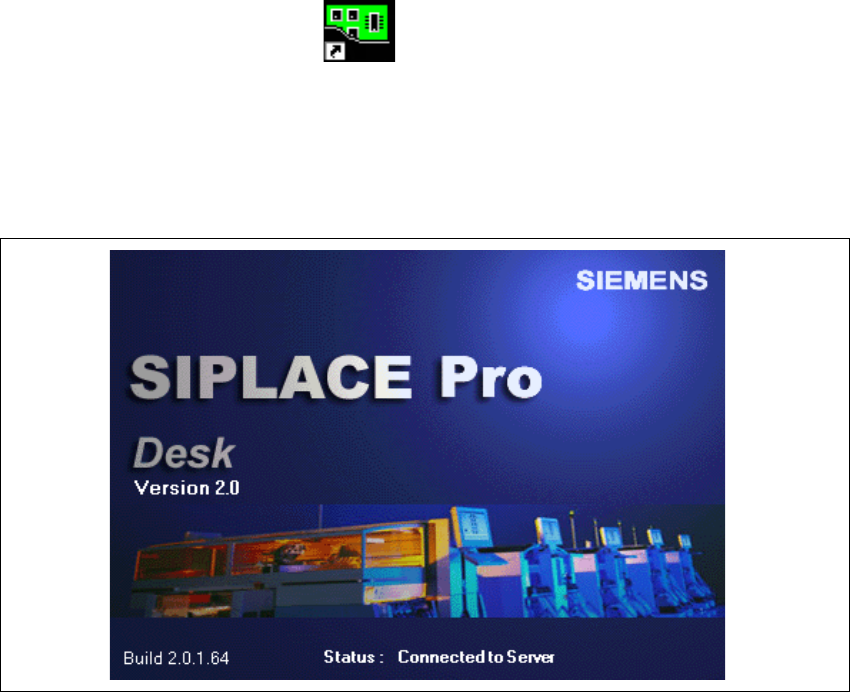
Il sistema si connette ora al SIPLACE Pro Server ed apre l’interfaccia utente di SIPLACE Pro
Desk. Mentre il sistema instaura il collegamento con SIPLACE Pro Server, appare la seguente
schermata. 5
5
Fig. 5.1 - 1 Si avvia SIPLACE Pro