00198001-01_IM_709.0_DE_EN.pdf - 第22页
Station Software 709.0 / Installation Manual Ausgabe 11/2015 E dition 22 5 Installing the M a chine C omputer 5.1 Installation S equence Back up the machine data BIOS update on the machine computer Perform BIOS update In…
Station Software 709.0 / Installation Manual Ausgabe 11/2015 Edition
21
4.3 Network Configuration
Machine
computer
Coplan computer /
feeder computer
Private network between
machine computer and Coplan
computer / feeder computer
SIPLACE LAN
SIPLACE Pro
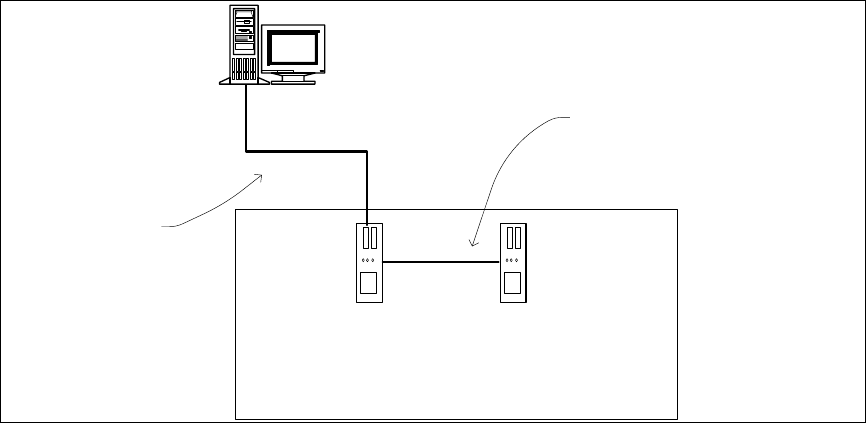
Figure 4-1: Network connections between the machine and SIPLACE Pro
In two-computer operation a separate private network is set up between the machine computer and
the Coplan computer or feeder computer via a subnet mask.
Fixed IP addresses for the machine computer, Coplan computer or feeder computer can thus be
assigned for all SIPLACE machines. These IP addresses are not known outside the private
network, for instance in the SIPLACE LAN.
These IP addresses need not be further configured by the operator while the station software is
being installed.

Station Software 709.0 / Installation Manual Ausgabe 11/2015 Edition
22
5 Installing the Machine Computer
5.1 Installation Sequence
Back up the machine data
BIOS update on the machine computer
Perform BIOS update
Install Windows Emb. Standard 7 operating
system for the machine computer
(including selection of the computer
configuration and installation of the touch
screen)
Install SIPLACE software
(station software incl. additional programs)
BIOS settings on the machine computer
Perform BIOS settings
Finish the installation
See section 5.2.
See section 5.2.
See separate Installation Manual for details on
installing the Windows 7 operating system,
item no. [00197737-xx].
For details on calibrating the touchscreen, see
section 5.3.2.
See section 5.4.
See section 5.4.6.
Figure 5-1: Installation sequence

Station Software 709.0 / Installation Manual Ausgabe 11/2015 Edition
23
5.2 Performing BIOS Update/Settings on the Machine / Coplan /
Feeder Computer
The image files for the BIOS update/BIOS settings and the corresponding installation instruction
(readme file) are available on the V1.0 BIOS CD that can be ordered via the service technician or
downloaded from the SIPLACE Software Download Center. For more information, see separate
Installation Manual for details on installing the Windows 7 system, item no. [00197737-xx].
5.3 Preparations for Installing the Software
5.3.1 Requirements
Requirements for installing the SIPLACE software, Coplan computer software or feeder computer
software:
– The Windows Embedded Standard 7 SP1 (32-bit or 64-bit) must be installed on the machine
computer and in two-computer operation on the Coplan computer or feeder computer (see
"Installation Manual Operating System Windows Embedded Standard 7", item number
[00197737-xx]).
The station computer has to be equipped with at least 2 GB memory with WES 7, 32-bit and 4
GB memory with WES7, 64-bit respectively. If necessary, station computers in the field have to
be exchanged or upgraded with a memory extension. Please refer to the Technical Information
TI2014-09E04.
Under Windows Embedded Standard 7 the computer configuration has to be selected and the
touch screen calibrated. You must be logged in as Administrator in order to be able to carry out
this work.