00196800-03_IM_Explorer_2.10_EN.pdf - 第92页
4 Co nfigur atio n Ins tall ati on and Con f igu rati on Guid e SIPL ACE Exp lorer 4. 3 D ata ba s e Sett in gs Ed iti on 02 /2 01 2 EN 92
Installation and Configuration Guide SIPLACE Explorer 4 Configuration
Edition 02/2012 EN 4.3 Database Settings
91
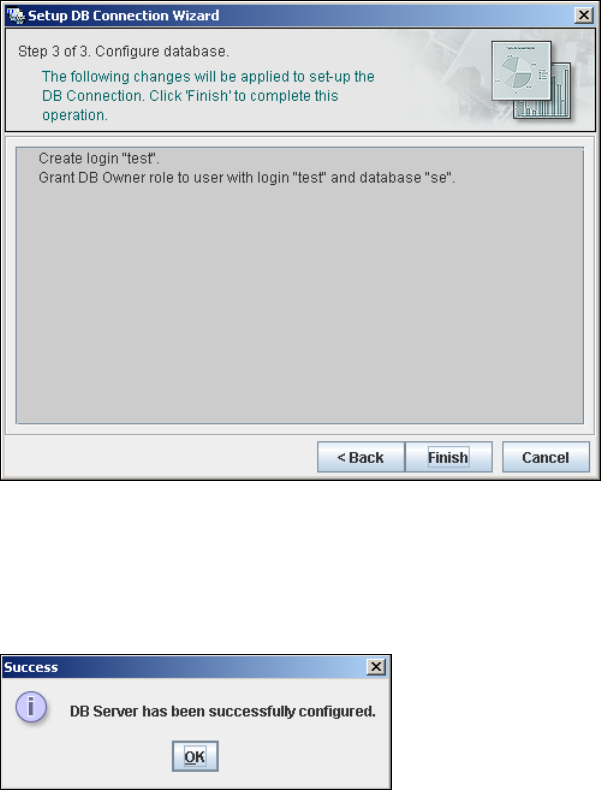
– Step 3- Configure Database
Step 3 takes your modifications from Step 2 and uses them to configure the database
connection.
4
Fig. 4 - 60 Step 3 database connection wizard
Click on Finish and the wizard will carry out the required configuration. The DB settings are
now correctly specified for your project. and the database and set user will be created.
You will receive a success message.
4
Fig. 4 - 61 Step 3 database connection wizard
Click OK. You can now configure your system database.
4
4 Configuration Installation and Configuration Guide SIPLACE Explorer
4.3 Database Settings Edition 02/2012 EN
92

Installation and Configuration Guide Index
Edition 02/2012 EN
93
Index
A
Add Equipment
. . . . . . . . . . . . . . . . . . . . . . . . . .51
Add Line
. . . . . . . . . . . . . . . . . . . . . . . . . . . . . . .72
Add User
. . . . . . . . . . . . . . . . . . . . . . . . . . . . . . .78
Administrator Privileges
. . . . . . . . . . . . . . . 28, 36
Adobe Reader 7.0
. . . . . . . . . . . . . . . . . . . . . . . .25
Available For
. . . . . . . . . . . . . . . . . . . . . . . . . . . .53
C
Calendar
. . . . . . . . . . . . . . . . . . . . . . . . . . . . . . .54
Changing Tomcat Port Number
. . . . . . . . . . . . .43
Choose Destination Location,
SIPLACE Explorer Setup
. . . . . . . . . . . . . . . . . .31
Choose Folder’ Dialog Box,
SIPLACE Explorer Setup
. . . . . . . . . . . . . . 32, 34
Client LAN
. . . . . . . . . . . . . . . . . . . . . . . . . . . . . .13
Configuration
. . . . . . . . . . . . . . . . . . . . . . . . . . . .45
Configuration of the System Database
. . . . . . . .89
Configurations
. . . . . . . . . . . . . . . . . . . . . . . . . . .13
Configure Production Line
. . . . . . . . . . . . . . . . .51
Configuring Production Lines
. . . . . . . . . . . . . . .71
Configuring Your Web Server
. . . . . . . . . . . . . . .42
Connect to the MS SQL Server
. . . . . . . . . . . . .89
Connection to Database
. . . . . . . . . . . . . . . 56, 68
Creation of Custom Applications
. . . . . . . . . . . . .45
D
Database Connection Wizard
. . . . . . . . . . . 87, 89
Database Settings
. . . . . . . . . . . . . . . . . . . . . . . .87
DB Administrator
. . . . . . . . . . . . . . . 60, 61, 83, 84
DB Administrator Login
. . . . . . . 59, 60, 61, 82, 83
DB Error
. . . . . . . . . . . . . . . . . . . . . . . . . . . 56, 68
DB Maintenance
. . . . . . . . . 59, 60, 61, 82, 83, 84
Default Maintenance Schedule
. . . . . . . . . . . . . .59
Default User Rights
. . . . . . . . . . . . . . . . . . . . . . .80
Default Web Server
. . . . . . . . . . . . . . . . . . . . . . .44
Development Environment
. . . . . . . . . . . . . . . . .23
Development Environment, Installation Option
. .32
E
Edit Line List
. . . . . . . . . . . . . . . . . . . . . . . . . . . 47
Edit Logbook Entries
. . . . . . . . . . . . . . . . . . . . . 77
F
Factory Calendar
. . . . . . . . . . . . . . . . . . . . . . . . 75
Factory Configuration Utility
. . . . . . . . . . . . 23, 66
Factory Configuration Utility -
Add Production Lines
. . . . . . . . . . . . . . . . . . . . 72
Factory Configuration Utility - DB Maintenance
82
Factory Configuration Utility - Factory Calendar
75
Factory Configuration Utility - Production Lines
72
Factory Configuration Utility - reports
. . . . . . . . 76
Factory Configuration Utility - SMTP Server
. . . 81
Factory Configuration Utility - User Details
. . . . 79
Factory Configuration Utility - Users
. . . . . . . . . 78
Factory Configuration Utility
Windows Start Menu
. . . . . . . . . . . . . . . . . . . . . 38
Factory Configuration Utility, Installation Option
32
Factory Configuration Utility, Starting
. . . . . . . . 66
Factory Database
. . . . . . . . . . . . . . . . . . . . . . . 82
Factory Host
. . . . . . . . . . . . . . . . . . . . . . . . . . . 71
Factory Website
. . . . . . . . . . . . . . . . . . 15, 77, 87
G
Generate Website
. . . . . . . . . . . . . . . . . . . . . . . 85
Generate website - Factory Configuration Utility
85
Generating the Website
. . . . . . . . . . . . . . . . . . 63
I
import line configuration
. . . . . . . . . . . . . . . 33, 34
Import OIS Lines
. . . . . . . . . . . . . . . . . . . . . . . . 48
Initial Installation, SIPLACE Explorer 2.6
. . 28, 36
Installation Complete,
SIPLACE Explorer Setup
. . . . . . . . . . . . . . . . . 36
Installation Variants
. . . . . . . . . . . . . . . . . . . . . . 17
Installing SIPLACE Explorer
. . . . . . . . . . . . . . . 23