YS12P_YS12F_Mainte_E.pdf - 第114页
4-7 4 How to replace consumable parts 3.3 Replacing the cleaning blow valve e 1 Mo ve the head unit forward. 1. Press the emergency stop button and then open the machine safety cover . 2. Move the head unit forward. 2 T …
4-6
4
How to replace consumable parts
3.2 Replacing a valve (solenoid valve)
e
1
Move the head unit forward.
1. Press the emergency stop button and
then open the machine safety cover.
2. Move the head unit forward.
2
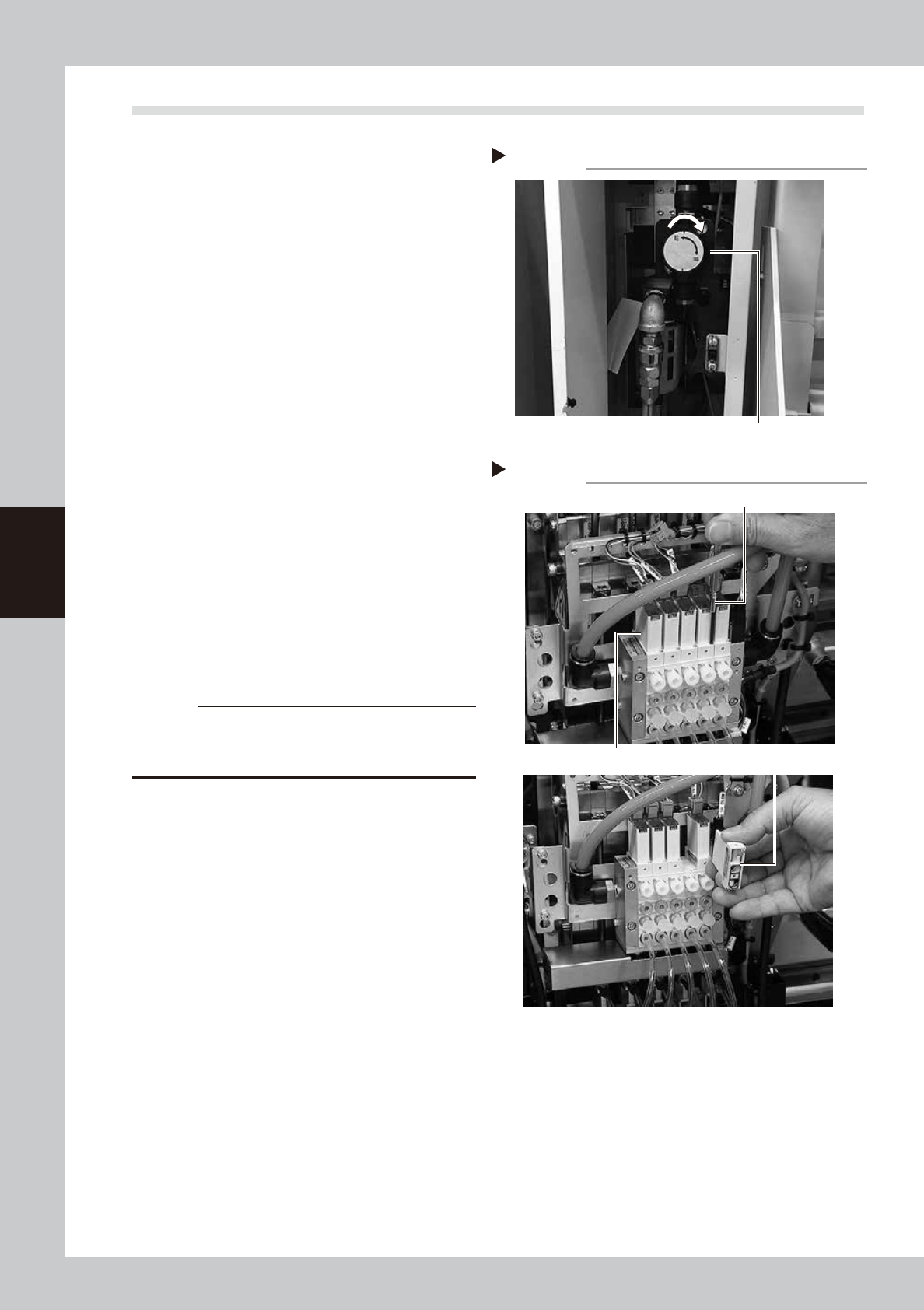
Turn OFF the air supply and power
OFF the machine.
1. Quit the software and power OFF the
machine.
2. Turn the air supply/exhaust switch inside
the panel at lower left of the machine
clockwise to turn the air supply OFF.
53405-L6-10
3
Disconnect the connectors of the
ejector harness.
1. Place a square cloth below the head.
2. Disconnect all connectors of the ejector
harness.
4
Remove the valve (solenoid valve).
Use a precision Phillips screwdriver to loosen
the 2 screws mounting the valve (solenoid
valve) and remove it.
53426-L6-10
5
Attach a new valve (solenoid valve).
c
CAUTION
A gasket is attached on the back of the valve. Be
careful not to drop and pinch the gasket when
replacing with a new valve.
6
Reconnect the ejector harness.
1. Connect the harness’ connector for
ejector on its original place.
2. Remove the square cloth.
7
Supply air to the machine and
power on the machine.
Start the machine and perform return-to-
origin.
8
Check the operation.
On the [Unit] - [Head] screen, press the
[Vacuum] and [Blow] buttons to check that
no abnormal values appear.
Step 2
Shutting off the air supply
Air supply/exhaust switch
Removing the valve (solenoid valve)
Step 4
Precision Phillips screwdriver
Valve (solenoid valve)
Gasket
4-7
4
How to replace consumable parts
3.3 Replacing the cleaning blow valve
e
1
Move the head unit forward.
1. Press the emergency stop button and
then open the machine safety cover.
2. Move the head unit forward.
2
Turn OFF the air supply and power
OFF the machine.
1. Quit the software and power OFF the
machine.
2. Turn the air supply/exhaust switch inside
the panel at lower left of the machine
clockwise to turn the air supply OFF.
3
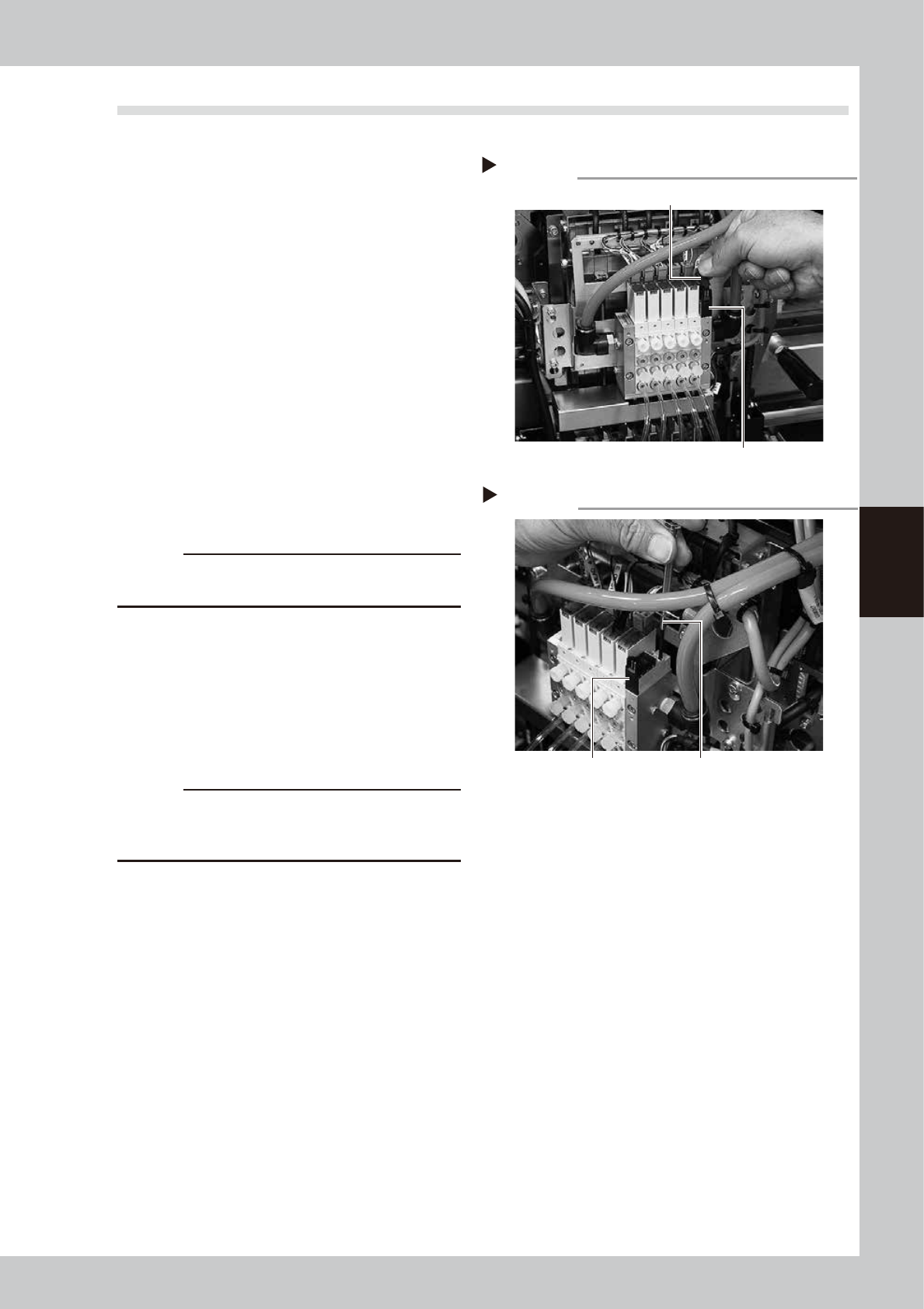
Disconnect the connectors of the
cleaning blow valve.
1. Place a square cloth below the head.
2. Remove the connector for the blow
valve.
53406-L6-00
c
CAUTION
When disconnecting the connector, do not pull the
harness.
4
Remove the cleaning blow valve.
Use a precision Phillips screwdriver to loosen
the 2 screws mounting the cleaning blow
valve and remove the blow valve.
53407-L6-00
5
Attach a new blow valve.
c
CAUTION
A gasket is attached on the back of the valve. Be
careful not to drop and pinch the gasket when
replacing with a new valve.
6
Connect the connector.
1. Connect the connector to its original
place.
2. Remove the square cloth.
7
Supply air to the machine and
power on the machine.
Start the machine and perform return-to-
origin.
8
Check the operation.
Follow the same procedure as described in
chapter 3,"4.3 Operation check of head
blow valve and cleaning blow valve" to
check the valve operation.
Disconnecting the connector
Step 3
Blow valve connector
Blow valve
Removing the cleaning blow valve
Step 4
Precision Phillips screwdriverBlow valve
4-8
4
How to replace consumable parts
4. Replacing the conveyor belts
1
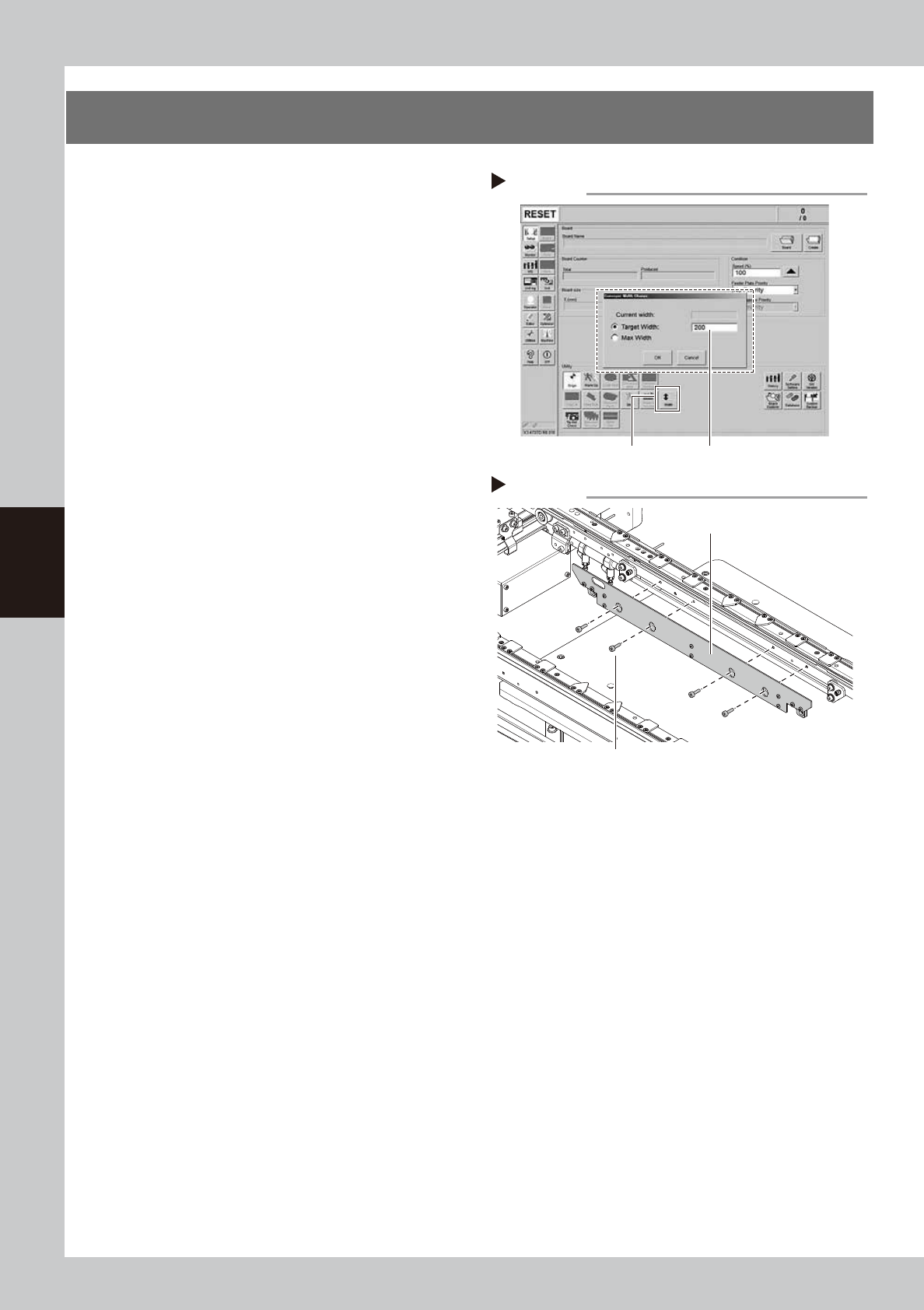
Change the conveyor width to a
convenient width for maintenance
work.
1. Press the [Width] button to display the
"Conveyor Width" screen.
2. Enter a width wide enough for a hex
wrench to be inserted (about 200 mm) in
the "Target Width" box and press the [OK]
button. The conveyor is changed to the
specified width.
54400-L6-00
e
2
Prepare for cleaning.
1. Press the emergency stop button and
then open the machine safety cover.
2. If the machine is equipped with a
carriage, remove the carriage to easily
access to the conveyor.
3. Place a square cloth on the push-up
plate.
3
Remove the board clamp plate.
Use a hexagon wrench (3) to remove the 4
board clamp plate mounting bolts, then
remove the board clamp plate.
53431-L6-00
Step 3
Removing the board clamp plate
Board clamp plate
Board clamp plate mounting bolts
Step 1
[Width] button
Enter conveyor width.
Changing the conveyor width