YS12P_YS12F_Mainte_E.pdf - 第75页
3-10 3 Periodic maintenance items 1.4 Checking the board clamp condition and operation 1.4.1 Checking the board clamp condition Check the board clamp condition at least once a week w hen a production type is changed or e…

3-9
3
Periodic maintenance items
5
Check the sensor status.
Change the conveyor width again and
check that no error message appears.
6
Check the portion around the
sensor.
If the error message still appears, the light
receiving status around the sensor may be
poor, the sensor (amplifier) may be
malfunction, or the fiber may be broken.
First, remove contaminant or dust from the
sensor. Then perform the conveyor sensor
tuning again.
3-10
3
Periodic maintenance items
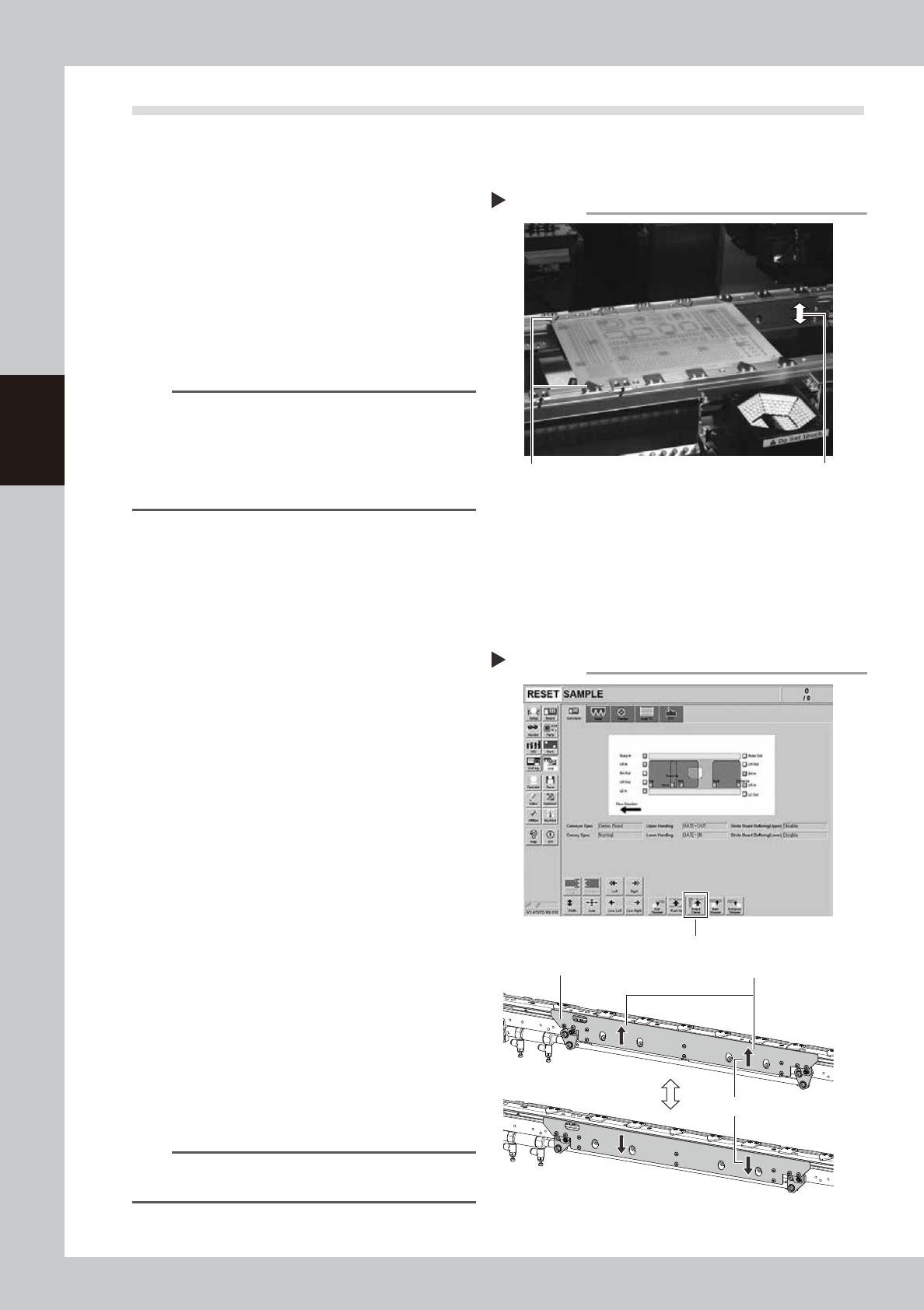
1.4 Checking the board clamp condition and operation
1.4.1 Checking the board clamp condition
Check the board clamp condition at least once a week when a production type is changed or even when a
production type change is not performed.
1. When the board is clamped, no backlash is found.
2. There is no clearance between the board and the
board hold plate when the board clamp is raised.
3. The board is flush with the upper surface of the
conveyor rails when the board clamp is raised.
4. The board clamp unit moves smoothly.
53301-L6-10
n
NOTE
If either of 1 to 3 or all of 1 to 3 are result in failure,
check that the board hold plate, the push-up pin
quantity and positions are correct. If the mounting
screws of the board hold plate are loosened, tighten
them. If 4 is result in failure, check the clamp unit
operation with the procedure on the next.
1.4.2 Checking the board clamp operation
e
1
Prepare for maintenance work.
1. Press the emergency stop button and
then open the machine safety cover.
2. In case the specification has a cart,
remove the cart for easy access to the
conveyor.
2
Move the clamp board up.
1. While there is no board in the conveyor,
press the [Board Clamp] button in the
[Unit] – [Conveyor] screen.
2. Visually check the clamp board moves
up smoothly without deviation.
3
Move the clamp board down.
1. Press the [Board Clamp] button again to
move the clamp board down.
2. Visually check the clamp board moves
down smoothly without deviation.
4
Repeat the clamp operation.
Repeat Step 2 and 3 to check the clamp
operation is stable.
54318-L6-00
n
NOTE
If an error is found in board clamp operation, contact
YAMAHA sales representative.
Checking the clamp condition
Check that no gap between the board
and board hold plate is found.
Board is flush with the conveyor rails.
Clamp and unclamp the
board to check the
movement
Checking the board clamp operation
Step 2-4
[Board Clamp] button
Shall move up and down smoothly
Shall be no deviation between
right and left
Board clamp plate
3-11
3
Periodic maintenance items
2. Monthly inspection
2.1 Cleaning the nozzle air path
Clean the nozzle air path if a nozzle clogging is found in the daily inspection or every month.
e
1
Remove the nozzle from the head.
1. Press the emergency stop button and
then open the machine safety cover.
2. Remove the nozzle from the head. If the
machine is equipped with the nozzle
station, press the [Nozzle Stn Shutter]
button to open the nozzle station shutter
and remove the nozzle.
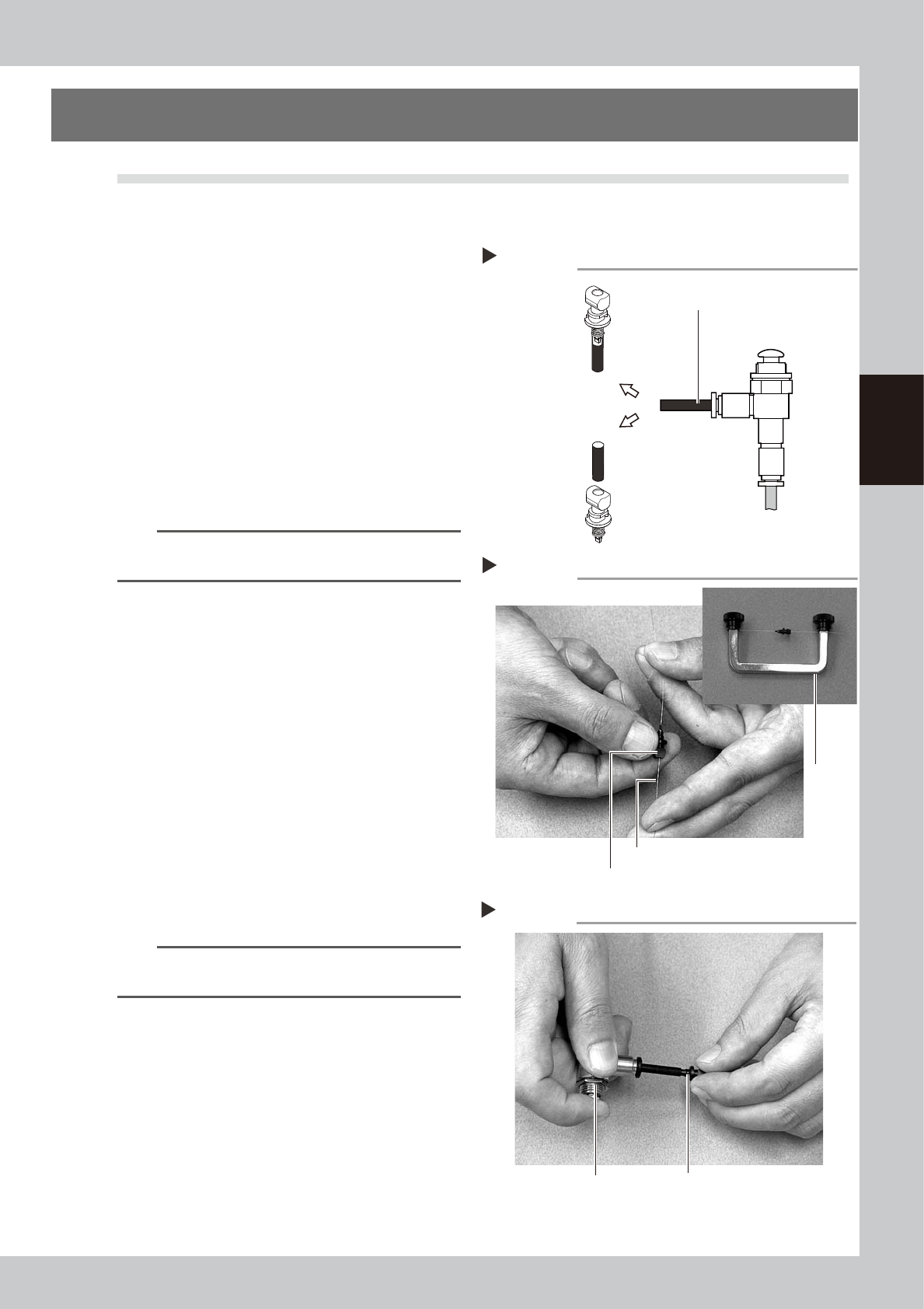
2
Blow air through the nozzle.
Using an air blow tool, blow air through the
nozzle from the nozzle tip and then from the
other end.
53310-L6-00
n
NOTE
If there are dust deposits in the nozzle, perform steps 3
and 4.
3
Clean the nozzle hole.
Pass the nozzle cleaning wire through the
nozzle hole and clean the nozzle hole. While
holding both ends of the wire with fingers or
using a custom handle (option) shown in the
figure on the right, gently move the nozzle
back and forth.
53311-L6-00
4
Blow air onto the nozzle tip again.
After removing the cleaning wire, blow air
through the nozzle with the air blow tool, just
as in step 2.
53312-L6-00
5
Return the nozzle to its original
head.
n
NOTE
If removed nozzles from the nozzle station, return them
to the nozzle storage positions.
Air blow
Step 2
Air tube (black)
Air blow tool
(option)
Air tube (orange) connected to
air supply port
Insert the
nozzle tip into
the air tube and
blow air.
Blow air from the
nozzle attachment
side.
Cleaning a nozzle
Step 3
Custom
handle
(option)
Nozzle
Nozzle cleaning wire
Air blow
Step 4
NozzleAir blow tool (option)