00195813-04_IM_SSW_605.03_DE EN.pdf - 第23页
Installation Manual, Station Software Version 605.03 10/2010 Edition 5 Inst alling the st ation sof tware Note: The operation system must be installed on the machine controller and Vision computer before installing the s…
Installation Manual, Station Software Version 605.03 10/2010 Edition
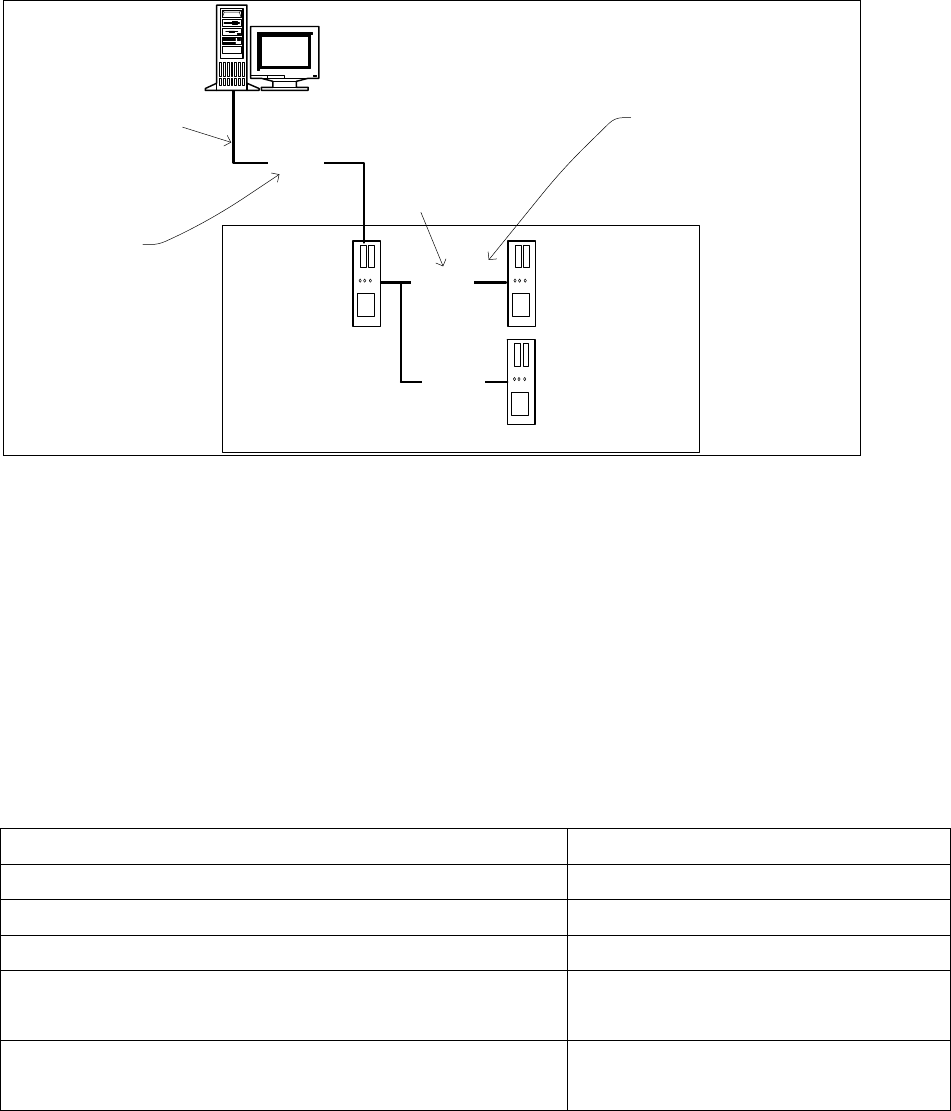
4.5 Network configuration
Station computer
Machine controller
10Base-T
100Base-T
Private network between
station computer,
Vision computer (optional)
and machine controller
SIPLACE LAN
SIPLACE Pro
Twisted Pair TP
(100 MB)
Twisted Pair TP
(10 MB)
Vision computer
(optional)
100Base-T
Fig. 4-5: Network connections between the machine and SIPLACE Pro
A separate private network (100 Mbit) is set up between the station computer (and optionally the Vision
computer) and the machine controller via a subnet mask.
Fixed IP addresses for the station computer, Vision computer and machine controller can thus be assigned
for all SIPLACE machines. These IP addresses are not known outside the private network, for instance in
the SIPLACE LAN or customer LAN.
These IP addresses need not be further configured by the operator while the station software is being
installed.
IP address, station computer 192.168.255.249
IP address, machine controller 192.168.255.250
Vision computer IP Address 192.168.255.251
Subnet mask, station computer/machine controller 255.255.255.248
IP address range, SIPLACE LAN or
IP address range, customer LAN
172.22.xxx.xxx
is configured on-site
Subnet mask for SIPLACE-LAN or
subnet mask for customer LAN
255.255.0.0
is configured on-site
Table 4-13: Network configuration
22 of 50
Installation Manual, Station Software Version 605.03 10/2010 Edition
5 Installing the station software
Note:
The operation system must be installed on the machine controller and Vision computer
before installing the station software.
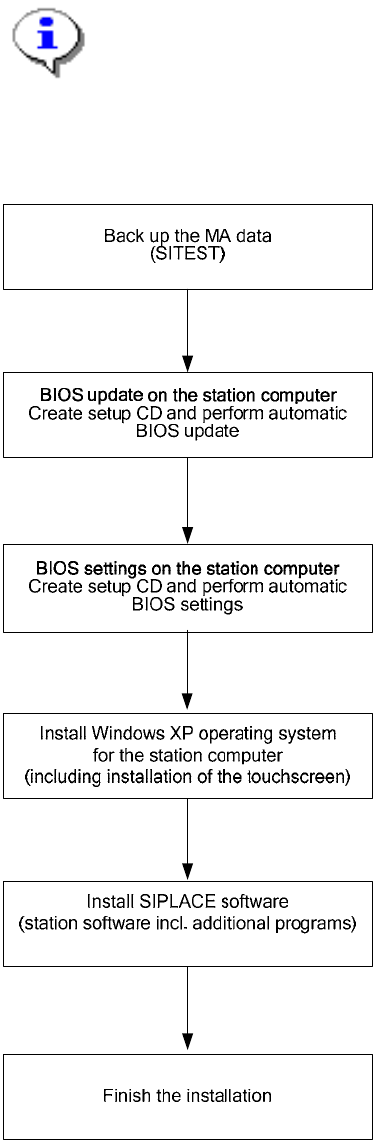
5.1 Installation sequence
See section 5.2.
See section 5.3.
See the separate installation manual for installing the "Windows XP operating
system" (item no. 00194575-xx)
For calibrating the touchscreen, see sections 5.4.3.
See sections 5.4 and 5.5.
See section 5.6.
23 of 50

Installation Manual, Station Software Version 605.03 10/2010 Edition
5.2 Automatic BIOS update on the station computer
Note:
If the BIOS version is ≤ 1.50, you must update the BIOS at first.
A setup CD must first be created to automatically make the BIOS update on the station computer. To do
this, you require a computer running Windows XP that is fitted with a CD-RW drive.
The image files necessary for creating the CD (see table below) are in the "BIOS-Images" folder of the
second CD for version 605.03 of the software.
Station computer / computer type BIOS settings / ISO image
SMP16-CPU086 CPU086_MC_SR_BIOS_Update.iso (contains the BIOS
update for station computer and machine controller, see
the installation manual "Windows Embedded XP
operating system for the MC German and English"
(00195327-xx).
Table 5-1: File required for creating the Setup CDs for making the BIOS update on the station computer
5.2.1 Creating a setup CD
→ Insert an empty writable CD in the drive on any computer equipped.
→ Insert the CD for version 605.03 of the software in the drive.
→ In the Windows Explorer, open the "BIOS-Images" folder on the CD.
→ Open the image file (see table above) using the installed CD writing program and follow the
instructions on screen.
Note:
It is recommended to burn the CD with slow write speed (4x or 8x) to avoid reading
problems, that might occur at the station.
→ Once the CD has been written, remove the CDs from the drives.
24 of 50