JAKA Zu 12及JAKA Zu 12 pro -电控柜V2.1-硬件手册(英文版).pdf - 第30页
JAKA Zu 12 v 1.0 25 V+ V- 24V 0V P8 I nt e rn a l po we r su ppl y V+ V- 24V 0V P8 E x te r na l po we r su ppl y + - Fi gure 4-3 The electr ical cab inet has a dedicate d safety I /O interfa ce, and the user can c onfig…
24 JAKA Zu 12 v1.0
6 0V The internal 24V power supply output is negative
7 V-
The isolated power input is negative, and the factory
default is connected to the internal GND
9 SI2
The protection stop function input 2, the factory
default is V+
10 SI1
The protection stop function input 2, the factory
default is V+
11 EI2
Emergency stop function input 2, the factory default
is V+
12 EI1
Emergency stop function input 1, the factory default
is V+.
P9 - - USB USB3.0
P10 - - Ethernet1 Gigabit Ethernet interface
4.3.1 All digital I/O common specifications
This section describes the electrical specifications for 24V digital I/O using an electrical cabinet. Can be
divided into: V + power selection, security I / O configuration.
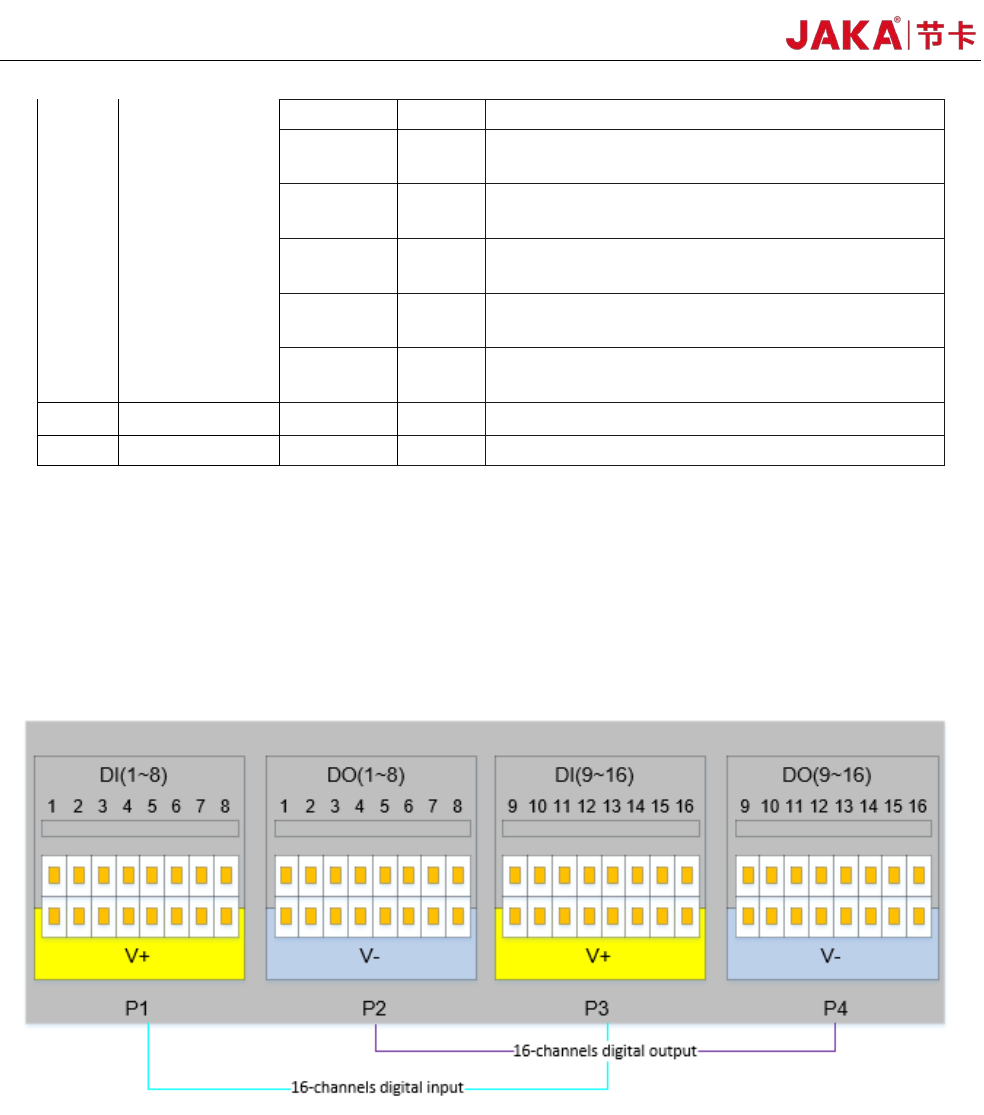
The electrical cabinet supports 16 digital inputs and 16 digital outputs, as shown in Figure 4-2.
Fi
gure 4-2
The digital I/O can be powered by a 24V power supply provided inside the control cabinet and supports up
to 1.5A output (overload will turn off the output). When the user needs more power output, the V+ power supply
can be powered by an external "24V power supply". 24V is the internal power supply and 0V is the internal
ground. V+ is the positive pole of the digital I/O interface, and V- is the negative pole of the digital I/O interface.
The factory default configuration is internal power, see Figure 4-3 below.
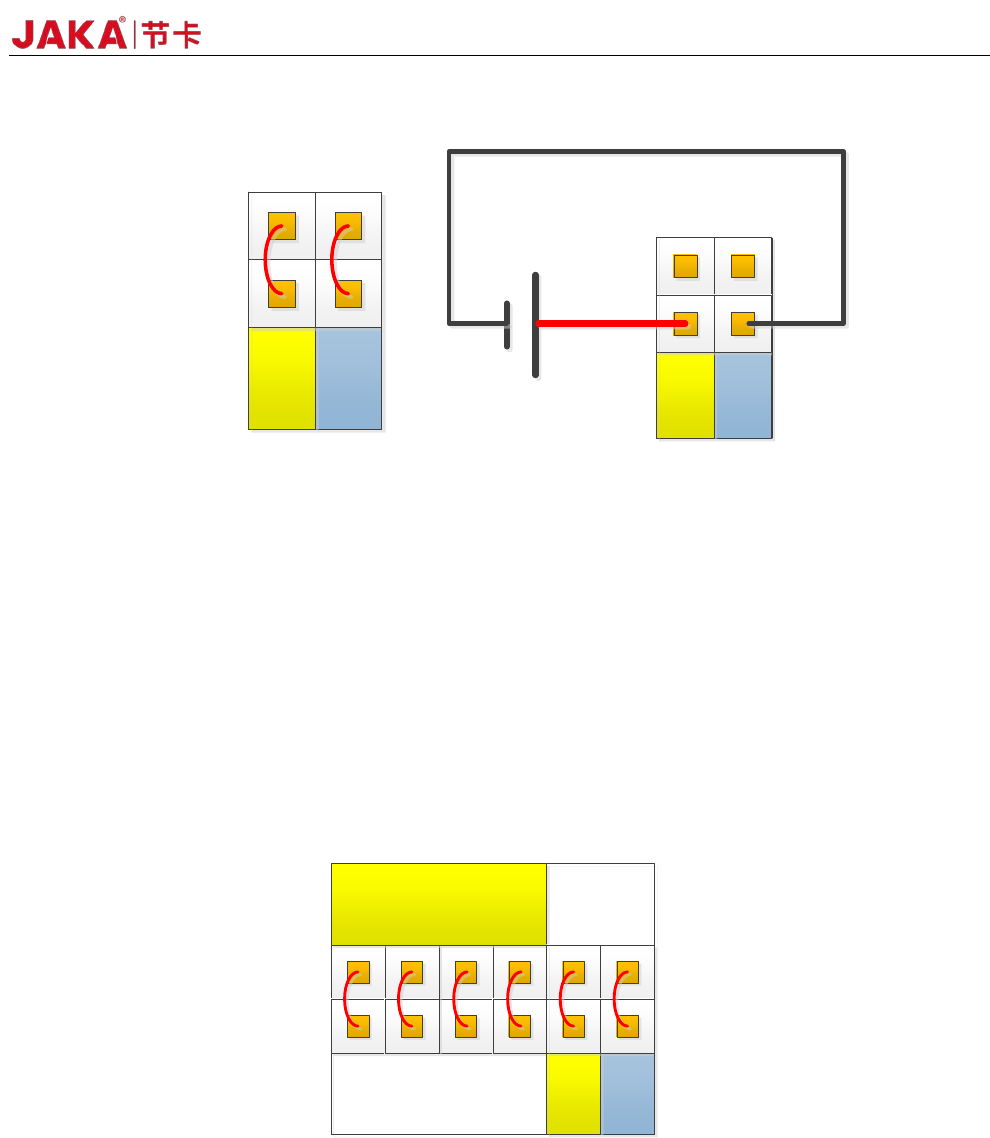
JAKA Zu 12 v1.0 25
V+ V-
24V
0V
P8
Internal power
supply
V+
V-
24V
0V
P8
External power
supply
+-
Fi
gure 4-3
The electrical cabinet has a dedicated safety I/O interface, and the user can configure two functions:
emergency stop and protection stop. The function description is detailed in section 4.3.7. Here are some
examples of how safe I / O interface.
1. Factory configuration.
Users can use the robot without any additional safety equipment. If EI1~2 and SI1~2 are both connected to
V+, V+ is connected to 24V, and V- is connected to 0V, it indicates that 24V power is provided inside the
electrical cabinet. As shown in Figure 4-4.
24V
0V
P8
EI
1 2
SI
1 2
V+
V+ V-
0V
24V
P8
Fi
gure 4-4
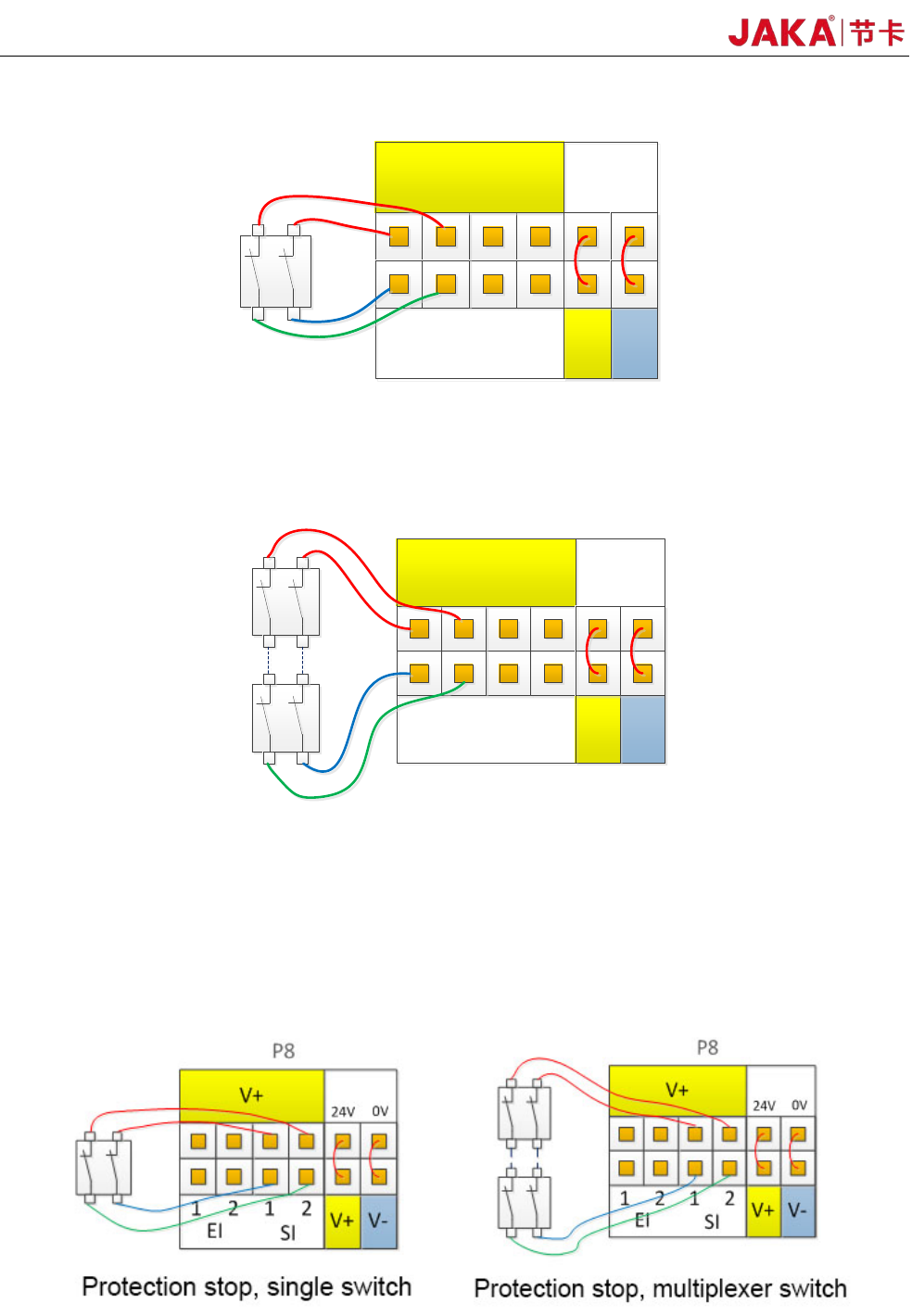
2、Connect the emergency stop switch.
The user needs to use one or more additional emergency stop or guard stop switches, please refer to Figure
4-5 and Figure 4-6 for wiring. Figure 4-5 and Figure 4-6 show how to use one or more emergency stop
switches. The example uses an internal 24V power supply and the user can also use an external 24V power
supply.
26 JAKA Zu 12 v1.0
24V
0V
P8
Emergency stop
switch-Single switch
EI
1 2
SI
1 2
V+
V+ V-
0V
24V
P8
Fig
4-5
24V
0V
P8
Emergency stop
-
multi-way switch
EI
1 2
SI
1
2
V+
V+ V-
0V
24V
P8
Fig 4-6
3. Connect the protective stop switch
Protective stop function, support automatic recovery. The electrical cabinet door switch is an application
case of the protection stop device, and the robot stops when the electrical cabinet door is opened. The wiring
diagram is shown in Figure 4-7.
Fig
4-7