TM2939.Solder Remaining Quantity Detection-Function.pdf - 第12页
SMT Software En gineering G roup IM Operati ons Y AMAHA MOTOR CO., L TD. MDOC-SOFT50 128 12 /18 Fig.4.7 “S older Sca n” button Fig.4.8 “E a8985: Succee ded in Scanni ng” mes sage 4.2.2. Rolling During t he rollin g oper …
SMT Software Engineering Group
IM Operations YAMAHA MOTOR CO., LTD.
MDOC-SOFT50128
11/18
Remaining Production Board Amount
This counter is set the remaining production amount
input in “Input Remaining Production Board Amount”
dialog box (Fig.4.4).
This counter is reset to “0” when “Ea8989:Solder
Empty Error” message (Fig.4.5) is displayed.
Remaining Production Board Counter
The produced board amount is counted while the
production of board amount set by “Remaining
Production Board Amount”.
This counter is incremented each time one print
cycle is complete. And this counter is reset to “0”
when “Ea8989:Solder Empty Error” message
(Fig.4.5) is displayed.
4.2. Utility
4.2.1. “Solder Scan” button
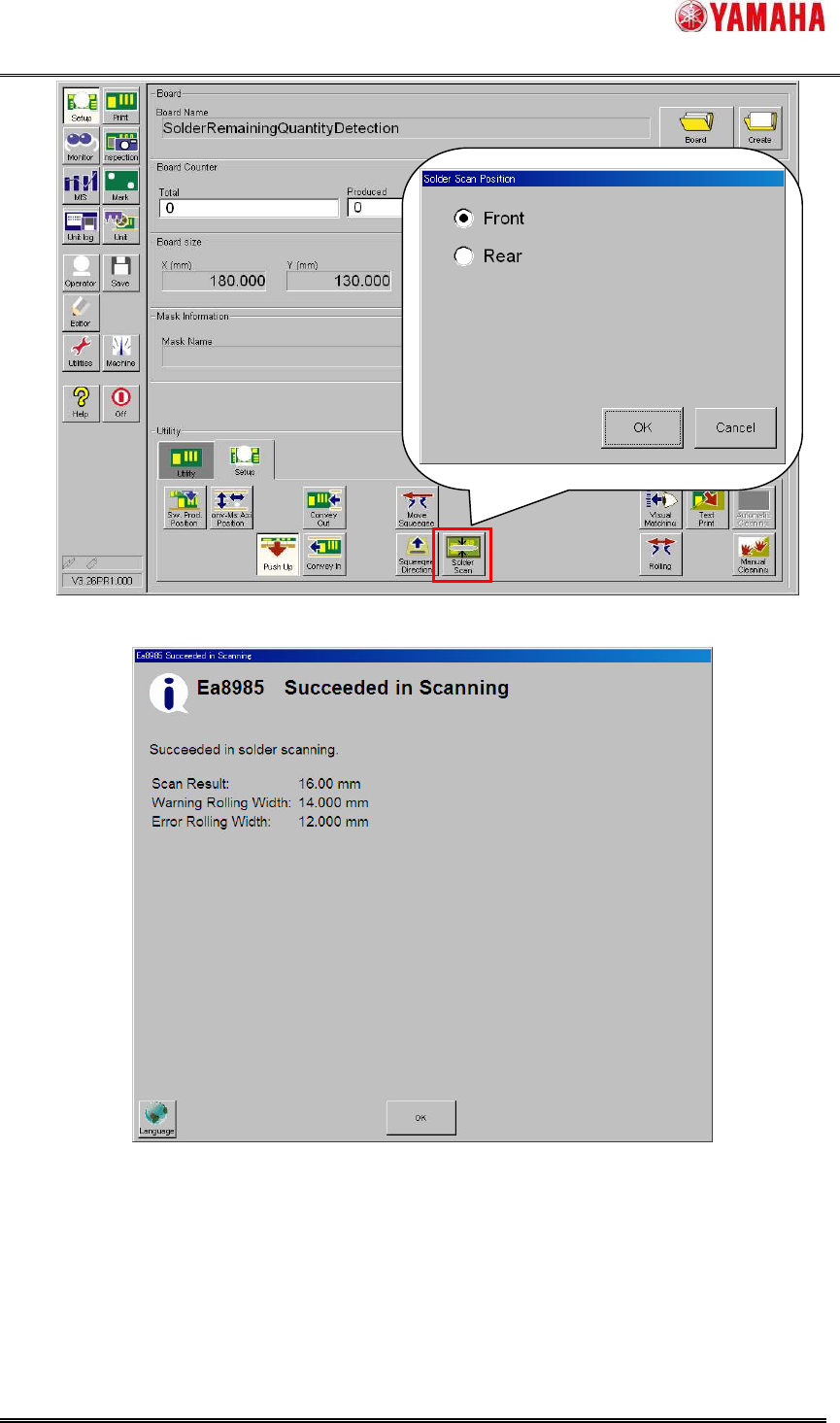
With the [Setup] - [Setup] - [Solder Scan] button, current rolling width on the mask can be
scanned. Select a scanning position either “Front” or “Rear” in the “Solder Scan Position” dialog
box (Fig.4.7).
When the rolling width is scanned successfully, the result is displayed in ”Ea8985:Succeeded
in Scanning” message (Fig.4.8). At this time, the printing direction will be changed according to
the scanning position because solder exists there.
When the rolling width is scanned on the rear side, adhered solder to the squeegee might be
dropped on aperture of the mask.
SMT Software Engineering Group
IM Operations YAMAHA MOTOR CO., LTD.
MDOC-SOFT50128
12/18
Fig.4.7 “Solder Scan” button
Fig.4.8 “Ea8985:Succeeded in Scanning” message
4.2.2. Rolling
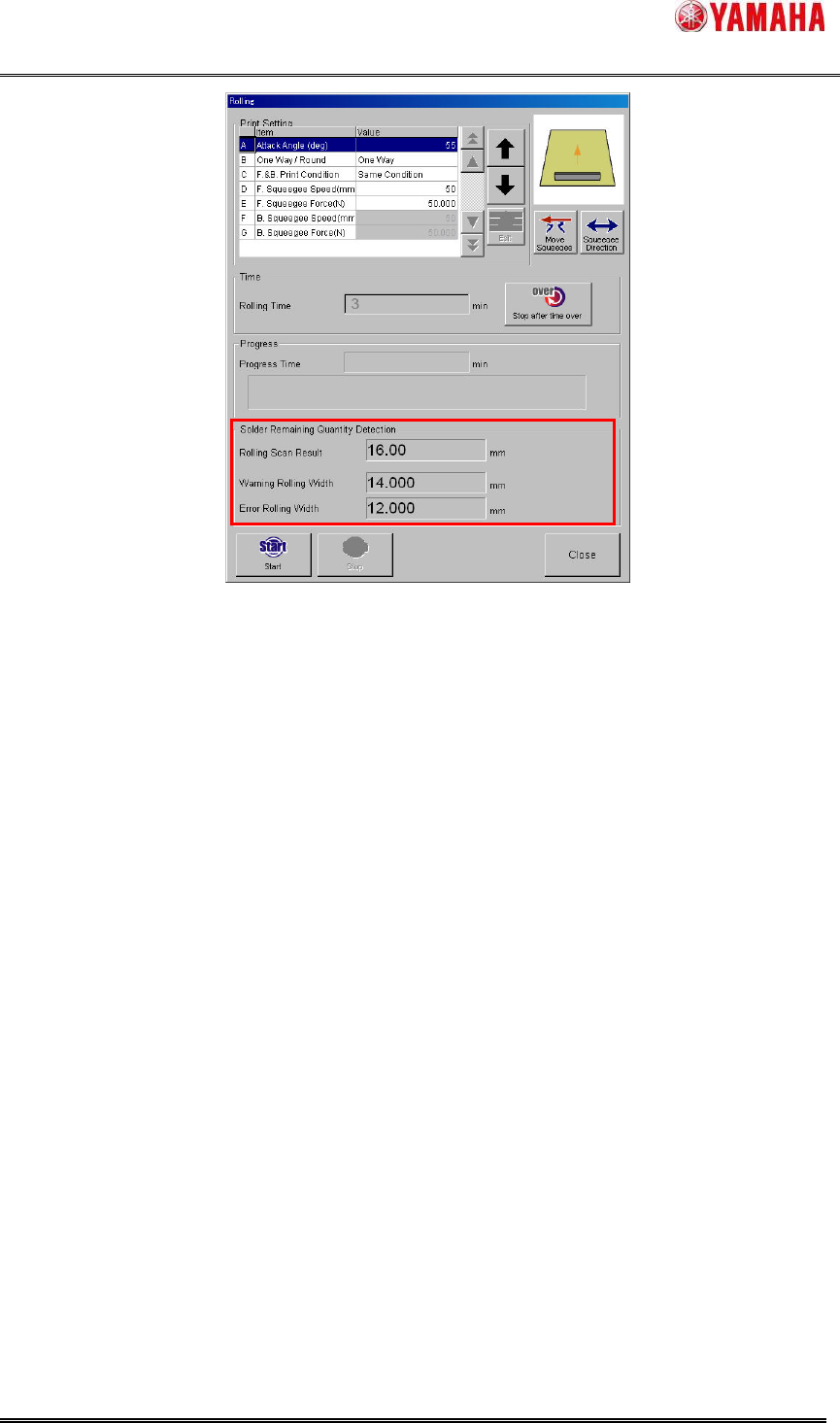
During the rolling operation, the solder rolling width on the mask is scanned after backward
printing every time. The result is displayed in the “Rolling” dialog box (Fig.4.9). Even if scan result
is smaller than “Warning Rolling Width” or “Error Rolling Width”, neither warnings nor errors are
counted. However, “Refilling Solder Board” counter is counted down.
SMT Software Engineering Group
IM Operations YAMAHA MOTOR CO., LTD.
MDOC-SOFT50128
13/18
Fig.4.9 “Rolling” dialog box
4.2.3. Test print
During the test print, the solder rolling width on the mask is scanned only after backward
printing. When the rolling width is scanned correctly, the result is displayed in the ”Ea8985:
Succeeded in Scanning” message (Fig.4.8). After that “Ea8645: Do you wish to carry out the
fixed Board?” is displayed. Even if scan result is smaller than “Warning Rolling Width” or “Error
Rolling Width”, neither warnings nor errors are counted. However, “Refilling Solder Board”
counter is counted down.
4.3. Result log function
The rolling width scan result is output to history and graph.
4.3.1. Board log
The rolling width scan result is output to [MIS] – [Board Log] – [Rolling Width] column per
board. If board log is saved to CSV file, it is useful for result analysis in offline software.