Installation_Manual_SIPLACE_Explorer_2.4_EN.pdf - 第110页
5 Uninstallation Installation and Configuration Guide SIPLACE Explorer 5.4 Remo ve Edition 06/2008 EN 110 5 Fig. 5 - 1 1 Uninstallation completed → Click on Finish to clos e the SIPL ACE Explorer 2.4 - InstallShield Wiza…
Installation and Configuration Guide SIPLACE Explorer 5 Uninstallation
Edition 06/2008 EN 5.4 Remove
109
5.4 Remove
5
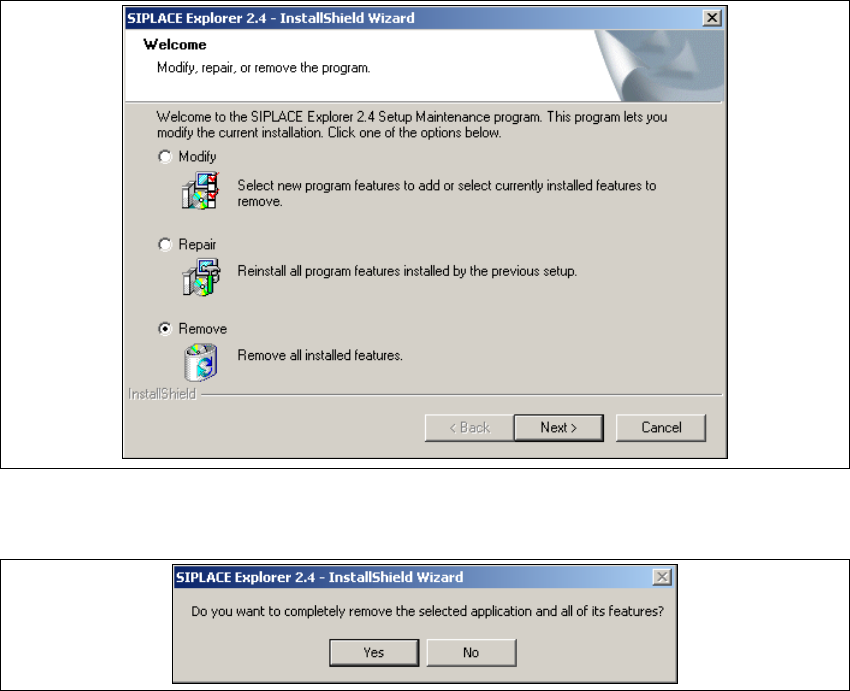
Fig. 5 - 9 SIPLACE Explorer 2.4 - install shield wizard
→ Click on Remove and then on Next to continue.
5
Fig. 5 - 10 Uninstallation query: confirm deletion of file
→ Confirm deletion with Yes.
The uninstallation process will be performed. SIPLACE Explorer V2.4 uninstallation has been
completed. 5
5 Uninstallation Installation and Configuration Guide SIPLACE Explorer
5.4 Remove Edition 06/2008 EN
110
5
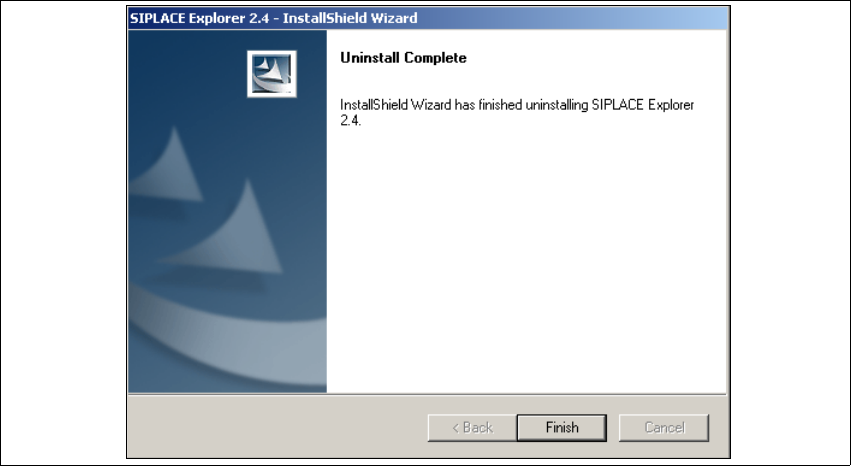
Fig. 5 - 11 Uninstallation completed
→ Click on Finish to close the SIPLACE Explorer 2.4 - InstallShield Wizard.
→ After you have rebooted your computer, SIPLACE Explorer 2.4 will no longer be available.

Installation and Configuration Guide Index
SIPLACE Explorer Edition 08/2008 EN
111
Index
A
Add Equipment
. . . . . . . . . . . . . . . . . . . . . . . . . .63
Add Line
. . . . . . . . . . . . . . . . . . . . . . . . . . . . . . .84
Add User
. . . . . . . . . . . . . . . . . . . . . . . . . . . . . . .90
Administrator Privileges
. . . . . . . . . 27, 36, 37, 41
Adobe Reader 6.0
. . . . . . . . . . . . . . . . . . . . . . . .24
Archiving Schedule
. . . . . . . . . . . . . . . . . . . 71, 95
Available For
. . . . . . . . . . . . . . . . . . . . . . . . . . . .65
C
Calendar
. . . . . . . . . . . . . . . . . . . . . . . . . . . . . . .66
Changing Tomcat Port Number
. . . . . . . . . . . . .55
Choose Destination Location, SIPLACE Explorer
Setup
. . . . . . . . . . . . . . . . . . . . . . . . . . . . . .31
Choose Folder’ Dialog Box, SIPLACE Explorer Set-
up
. . . . . . . . . . . . . . . . . . . . . . . . . . . . . 31, 34
Client LAN
. . . . . . . . . . . . . . . . . . . . . . . . . . . . . .13
Configuration
. . . . . . . . . . . . . . . . . . . . . . . . . . . .57
Configuration of the System Database
. . . . . . .100
Configurations
. . . . . . . . . . . . . . . . . . . . . . . . . . .13
Configure Production Line
. . . . . . . . . . . . . . . . .63
Configuring Production Lines
. . . . . . . . . . . . . . .83
Configuring Your Web Server
. . . . . . . . . . . . . . .43
Connect to the MS SQL Server
. . . . . . . . . . . .100
Connection to Database
. . . . . . . . . . . . . . . 68, 79
Creation of Custom Applications
. . . . . . . . . . . . .57
D
Database Backup
. . . . . . . . . . . . . . . . . . . . 72, 96
Database Connection Wizard
. . . . . . . . . . 98, 100
Database Settings
. . . . . . . . . . . . . . . . . . . . . . . .98
DB Administrator
. . . . . . . . . . . . . . . . . . . . . 71, 95
DB Administrator Login
. . . . . . . . . . . . . . . . 71, 94
DB Error
. . . . . . . . . . . . . . . . . . . . . . . . . . . 68, 80
DB Maintenance
. . . . . . . . . . . . . . . . . . 71, 72, 94
Default Maintenance Schedule
. . . . . . . . . . 71, 95
Default User Rights
. . . . . . . . . . . . . . . . . . . . . . .91
Default Web Server
. . . . . . . . . . . . . . . . . . . . . . .55
Deinstallation
. . . . . . . . . . . . . . . . . . . . . . . . . .103
Deinstallation Process
. . . . . . . . . . . . . . . . . . .109
Development Environment
. . . . . . . . . . . . . . . . .23
Development Environment, Installation Option
. .32
E
Edit Line List
. . . . . . . . . . . . . . . . . . . . . . . . . . . 59
Edit Logbook Entries
. . . . . . . . . . . . . . . . . . . . . 89
F
Factory Calendar
. . . . . . . . . . . . . . . . . . . . . . . . 87
Factory Configuration Utility
. . . . . . . . . . . . 23, 78
Factory Configuration Utility - Add Production Lines
. . . . . . . . . . . . . . . . . . . . . . . . . . . . . . . . . . . 84
Factory Configuration Utility - DB Maintenance
94
Factory Configuration Utility - Factory Calendar
87
Factory Configuration Utility - Production Lines
84
Factory Configuration Utility - reports
. . . . . . . . 88
Factory Configuration Utility - SMTP Server
. . . 93
Factory Configuration Utility - User Details
. . . . 91
Factory Configuration Utility - Users
. . . . . . . . . 90
Factory Configuration Utility Windows Start Menu
43
Factory Configuration Utility, Installation Option
32
Factory Configuration Utility, Starting
. . . . . . . . 78
Factory Database
. . . . . . . . . . . . . . . . . . . . . . . 94
Factory Host
. . . . . . . . . . . . . . . . . . . . . . . . . . . 83
Factory Website
. . . . . . . . . . . . . . . . . . 15, 89, 98
Firewall
. . . . . . . . . . . . . . . . . . . . . . . . . . . . . . . 48
G
Generate Website
. . . . . . . . . . . . . . . . . . . . . . . 96
Generate website - Factory Configuration Utility
96
Generating the Website
. . . . . . . . . . . . . . . . . . 74
I
import line configuration
. . . . . . . . . . . . . . . . . . 33
Import OIS Lines
. . . . . . . . . . . . . . . . . . . . . . . . 60
Initial Installation, SIPLACE Explorer 2.1
. . 36, 41
Initial Installation, SIPLACE Explorer 2.4
. . . . . 27
Installation Complete, SIPLACE Explorer Setup
. .
35
, . . . . . . . . . . . . . . . . . . . . . . . . . . . . . . . . 40
Installation Variants
. . . . . . . . . . . . . . . . . . . . . . 17
Installing SIPLACE Explorer
. . . . . . . . . . . . . . . 23
J
J2SE Runtime Environment 6,0
. . . . . . . . . 29, 38
J2SE Runtime Environment 6.0
. . . . . . . . . . . . 24