M3_MaintenanceManual_e.pdf - 第7页
iii Before starting work 2. W arranty The machine you have purchased is warranted against malfunctions as described below. ■ Warranty Coverage If any failure or defects are found in this machine due to poor workmanship w…
ii
Before starting work
1. About safety
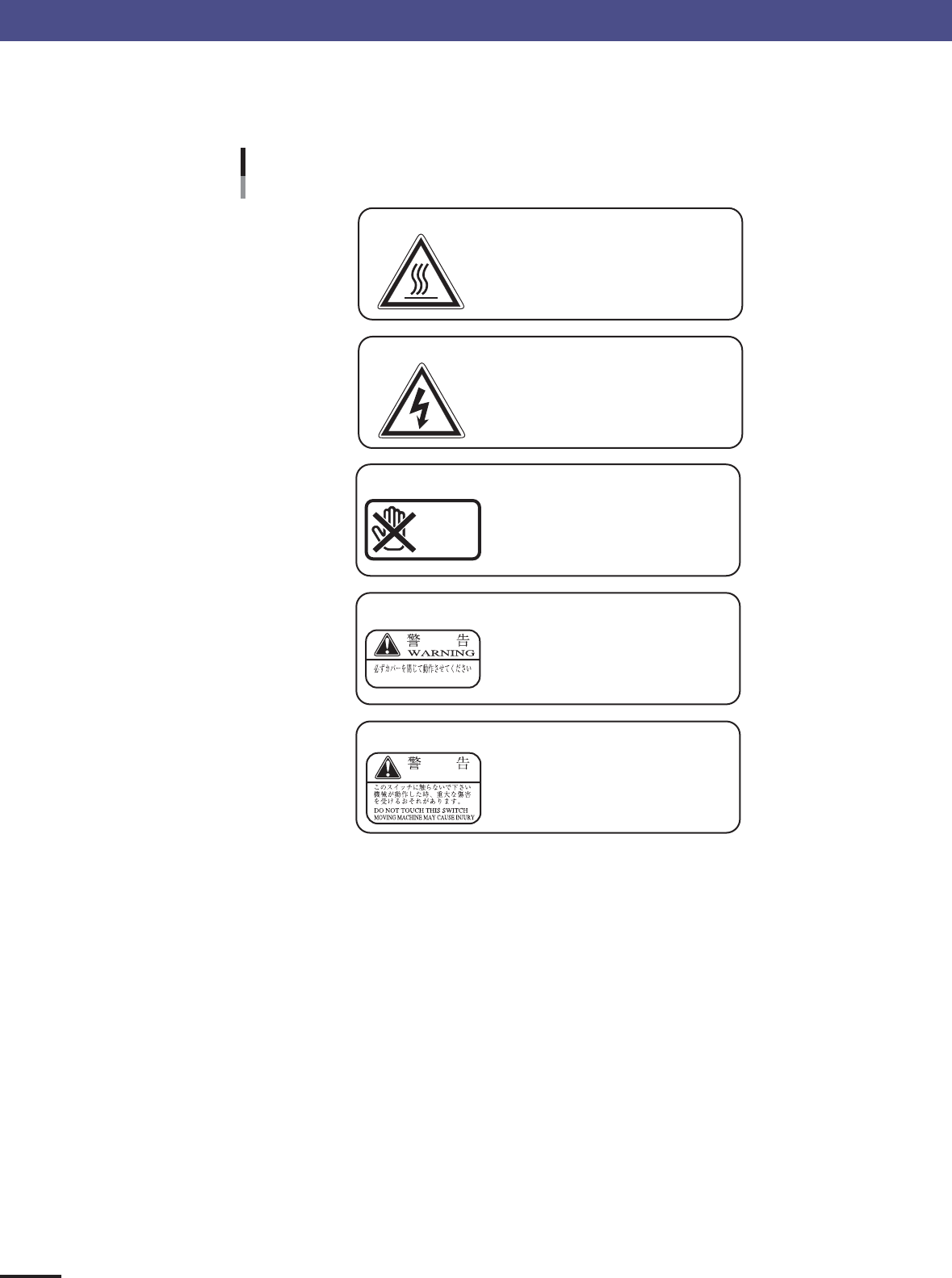
■ The following warning labels are affixed to the machine. Be sure to read the
instructions on the labels and observe them.
Warning labels
CLOSE COVER WHILE OPERATING
WARNING
DON'T
TOUCH
HOT!
Touching may cause burns!
Moving parts in the motor may reach
high temperatures so do not touch!
HIGH VOLTAGE!
Touching may cause electrical
shocks!
Touching or handling the power supply
inside the cover may cause electrical
shocks so use caution!
PROHIBITED!
Do not touch camera unit!
Touching, shaking or vibrating the
camera unit will badly affect
component mounting.
WARNING!
WARNING!
Do not operate with cover
removed!
Operating the unit with the cover still
open may cause moving parts to
come in contact with the body and
cause injuries.
Do not disable or remove
cover switch!
Operating the unit with the cover
switch disabled may cause moving
parts to come in contact with the body
and cause injuries.
23001-E0-00

iii
Before starting work
2. Warranty
The machine you have purchased is warranted against malfunctions as described below.
■ Warranty Coverage
If any failure or defects are found in this machine due to poor workmanship within the warranty period (one year or 2400
hours of operation whichever comes first), we will repair or replace the defective parts free of charge.
■ Warranty Period
The warranty period ends when any of the following applies:
1.After one year has elapsed from the time of incoming inspection of the machine.
2.After 2400 hours of operation.
■ Items not covered by the warranty
The warranty does not cover any of the following conditions:
1.Defects or trouble as a result of deterioration due to age or wear
Example: Normal discoloration of painted or plated surfaces, wear of consumable parts, etc.
2.Incidents associated with sensory perceptions which have no bearing on the quality or function of the machine
Example: Signal sounds emitted by the controller, rotating sounds of the motor, etc.
3.Damage as a result of user environment
Example: Impurities in the air supply, dust, debris and oil mist in the machine
■ Exception to warranty repairs
Warranty repairs shall not apply if failure or defects are caused by the following:
1.Earthquakes, typhoons, floods, lightning, accidents or fires and other natural or man-made disasters.
2.Modifications not approved by us or its distributors.
3.Use of non-genuine parts, greases or lubricants.
4.Lack of proper maintenance and inspection procedures.
5.Maintenance handled by anyone other than the approved distributors.
6.Change of the machine installation level due to poor foundations or harsh environment.
7.Machine was moved to another location after installation or modified to change specifications.
8.Defective parts replaced free of charge were not returned to the specified destination within 30 days.
■ Note on network connections
A precondition for surface mounter network connections is that such connections will be used in closed networks
comprised of a surface mounter and an off-line PC. The customer must take responsibility for connections to company in-
house networks and to external networks. Please acknowledge that we can bear absolutely no responsibility for networks
configured by other than just a surface mounter and off-line PC nor can accept responsibility for problems occurring due
to network settings and connections.

iv
Before starting work
3. About this manual
Descriptions in this manual stress important maintenance items that are essential for maintaining
equipment performance. Information given here mainly describes making inspections, cleaning and
greasing as well as procedures for replacing consumable parts in each location given in a step-by-step
format. This manual is comprised of the following chapters.
Chapter 1 Maintenance
Describes conditions and environments to use for maintaining equipment performance. The importance of making daily
checks and performing cleaning tasks is explained. Setups to make before starting maintenance work, consumable parts
and maintenance tools as well as the necessary tools are also described.
Chapter 2 Daily maintenance items
Making checks and cleaning the machine are essential daily maintenance tasks for maintaining equipment performance.
Performing these tasks prevents unforeseen trouble and allows using the machine in an optimum state.
Chapter 3 Periodic maintenance items
Describes maintenance tasks that should be performed periodically to maintain equipment performance. Includes periodic
maintenance intervals such as for “weekly or biweekly”, “monthly or bimonthly” and “6 month” maintenance tasks.
Chapter 4 How to replace consumable parts
Describes methods for replacing parts subject to constant wear such as nozzle leaf springs and ejector valves.