O_03._DE68_04547E_03_IB_FULL_MW3500K_MS23K3513AK_SP_EN_061025.pdf - 第17页
English 17 Oven use Using the Fav orite featur es If you often c ook or reheat the same types of dishes, you can s tore the c ooking times and power le vels in the ov en’s memory, so that y ou do not have t o reset them …
16 English
Oven use
Oven use
The following table presents the various Quick Defrost programmes, serving size,
standing times and appropriate instructions. Remove all kind of package material
before defrosting. Place meat, poultry, fish, vegetable and bread on a flat glass
dish or ceramic plate.
Code/
Food
Serving size
Instructions
1
Meat
200-1500 g
Shield the edges with aluminium foil. Turn the meat
over, when the oven beeps. This programme is suitable
for beef, lamb, pork, steaks, chops, minced meat.
Stand for 20-60 minutes.
2
Poultry
200-1500 g
Shield the leg and wing tips with aluminium foil.
Turn the poultry over, when the oven beeps. This
programme is suitable for whole chicken as well as
for chicken portions.
Stand for 20-60 minutes.
3
Fish
200-1500 g
Shield the tail of a whole fish with aluminium foil. Turn
the fish over, when the oven beeps. This programme is
suitable for whole fishes as well as for fish fillets.
Stand for 20-60 minutes.
4
Vegetable
200-1500 g
Spread frozen vegetable evenly into a flat glass
dish. Turn over or stir the frozen vegetable, when
the oven beeps.
This programme is suitable for all kind of frozen
vegetable. Stand for 5-20 minutes.
5
Bread
200-1500 g
Put bread horizontally on a piece of kitchen paper
and turn over, as soon as the oven beeps. Place cake
on a ceramic plate and if possible, turn over, as soon
as the oven beeps. (Oven keeps operating and is
stopped, when you open the door.) This programme
is suitable for all kinds of bread, sliced or whole, as
well as for bread rolls and baguettes. Arrange bread
rolls in a circle. This programme is suitable for all
kinds of yeast cake, biscuit, cheese cake and puff
pastry. It is not suitable for short/ crust pastry, fruit
and cream cakes as well as for cake with chocolate
topping. Stand for 10- 30 minutes.
Using the Soften/Melt features
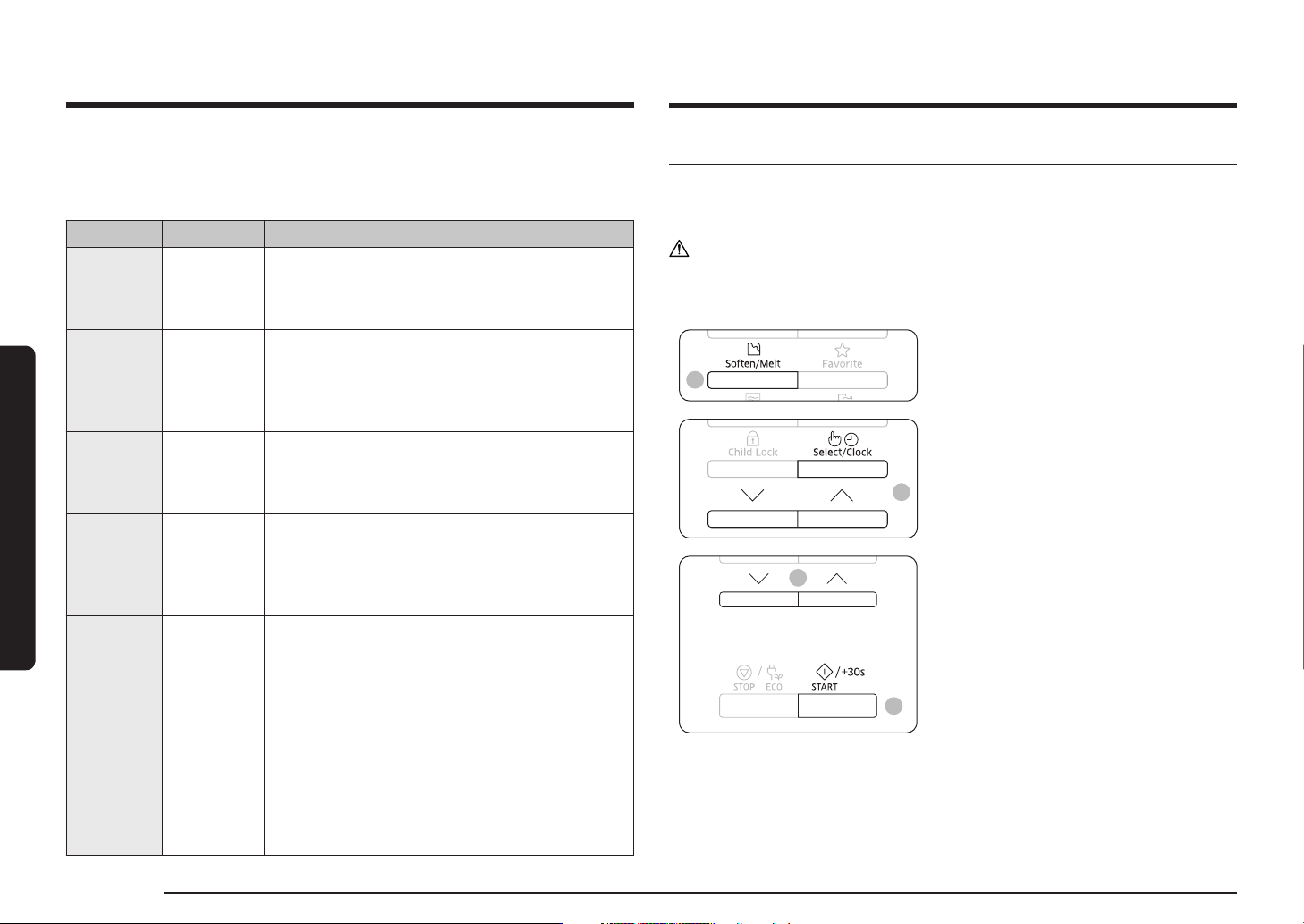
The Soften/Melt features has 4 pre-programmed cooking times. You do not need
to set either the cooking times or the power level. You can adjust the number of
servings by pressing the Up or Down button.
CAUTION
Use only containers that are microwave safe.
First, place the food in the centre of the turntable and close the door.
1
1. Press the Soften/Melt button.
2
2. Select the type of food that you are
cooking by pressing the Up or Down
button. And then press the Select/Clock
button.
4
3
3. Select the size of the serving by
pressing the Up or Down button.
(Refer to the table on the side.)
4. Press the START/+30s button.
The food is cooked according to the
preprogrammed setting selected.
1) The oven beeps 4 times.
2) The end reminder signal will beep
3 times (once every minute).
3) The current time is displayed again.
English 17
Oven use
Using the Favorite features
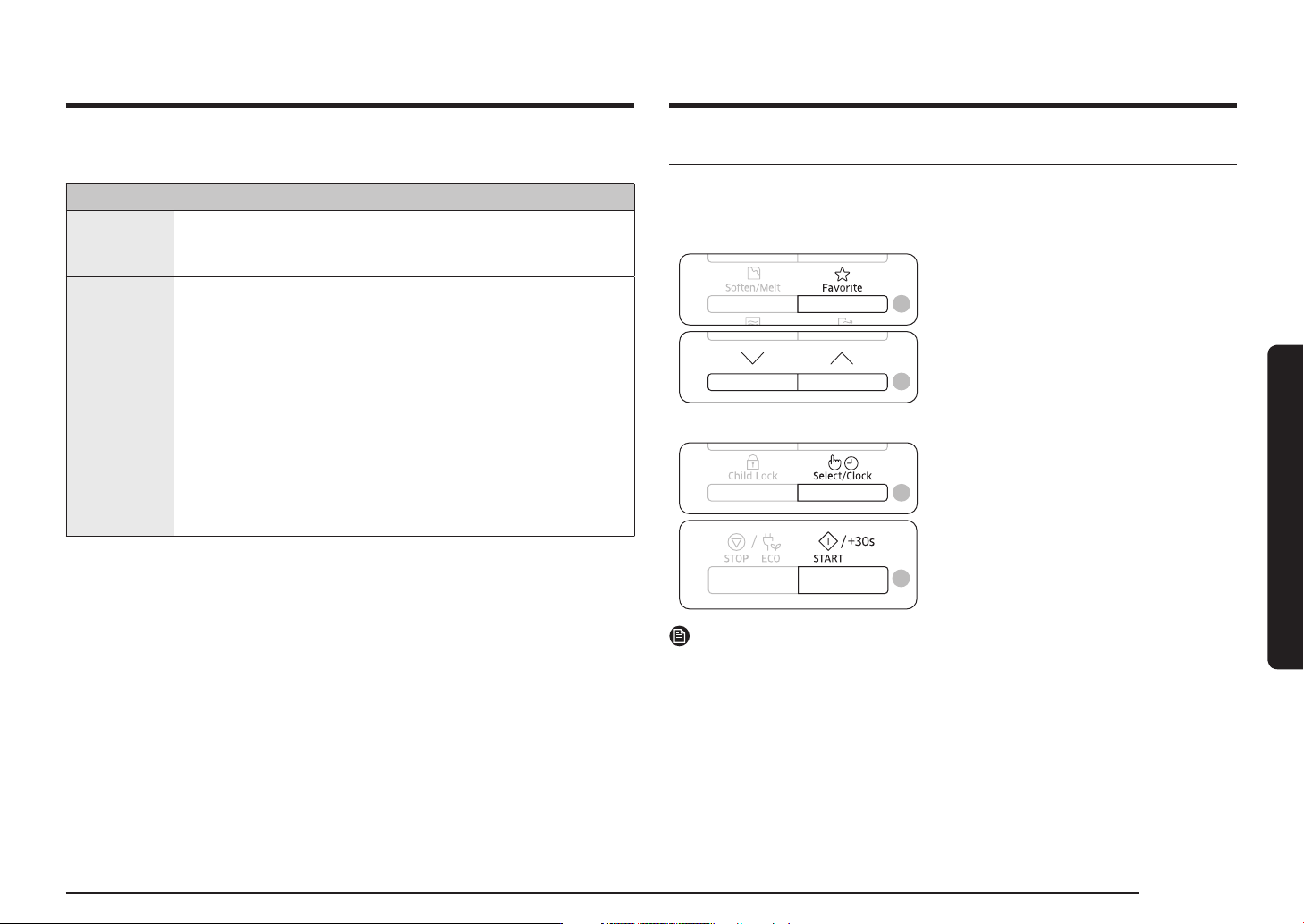
If you often cook or reheat the same types of dishes, you can store the cooking
times and power levels in the oven’s memory, so that you do not have to reset
them each order.
You can store two different setting.
2
2
1. Set your cooking programme as usual
(cooking time and power level) see
Cooking/Reheating page again if
necessary.
2. Press Favorite button, then select the
program that you want to save by
pressing the Up or Down button.
P1 : First setting
P2 : Second setting
3
3
3. Press the Select/Clock button to
finish the setting. Or, press the
START/+30s button to start the program
immediately.
Your setting are now stored in the
oven’s memory.
NOTE
Example :
If you want to store Microwave mode, Power 600 W and 3 minutes on P1.
1. Press the Microwave button.
2. Set the power 600 W by pressing the Up or Down button. And then
press the Select/Clock button.
3. Set the cooking time 3 minutes by pressing the Up or Down button.
4. Press Favorite button, then select the P1.
5. Press the Select/Clock or START/+30s button to finish the setting.
The following table presents the Soften/Melt programmes, quantities and appropriate
instructions. Those programmes are running with microwave energy only.
Code/Food Serving Size Instructions
1
Melt Butter
50 g
100 g
Cut butter into 3 or 4 pieces and Put them on
small glass bowl. Melt uncovered. Stir after
cooking. Stand for 1-2 minutes.
2
Melt Dark
Chocolate
50 g
100 g
Grate dark chocolate and put in small glass bowl.
Melt uncovered. Stir after melting. Stand for
1-2 minutes.
3
Melt Sugar
25 g
50 g
Put sugar on small glass bowl. Add 10 ml water
for 25 g and add 20 ml water for 50 g.
Melt uncovered. Take out carefully, use oven
gloves! Use spoon or fork and pour caramel
decorations on baking paper. Let stand for
10 minutes until dry and remove from paper.
4
Soften Butter
50 g
100 g
Cut butter into 3 or 4 pieces and Put them in
small glass bowl. Soften uncovered. Stand for
1-2 minutes.
18 English
Oven use
Oven use
Using the Child Lock features
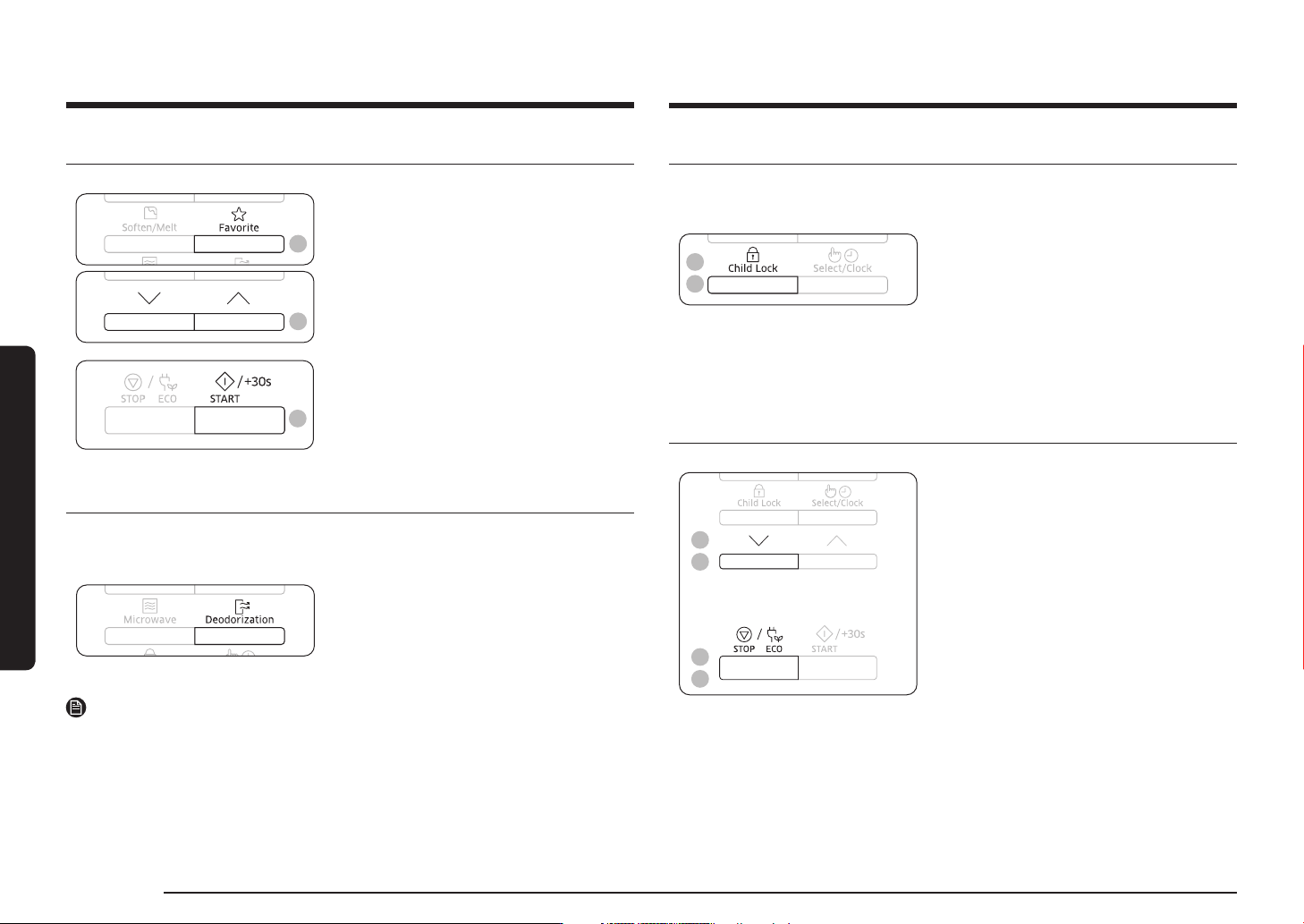
Your microwave oven is fitted with a special child lock programme, which enables
the oven to be locked so that children or anyone unfamiliar with it cannot operate
it accidentally.
2
1
1. Press the Child Lock button for
3 seconds.
• The oven is locked (no functions can
be selected).
• The display shows L.
2. To unlock the oven, press the Child Lock
button for 3 seconds.
The oven can be used normally.
Switching the beeper off
You can switch the beeper off whenever you want.
2
2
1
1
1. Press the Down and STOP/ECO button at
the same time.
The oven does not beep to indicate the
end of a function.
2. To switch the beeper back on, press the
Down and STOP/ECO button again at the
same time.
The oven operates normally.
To use the Favorite setting
First, place the food in the centre of the turntable and close the door.
1
1
1. Press Favorite button, then select the
program by pressing the Up or Down
button.
P1 : First setting
P2 : Second setting
2
2. Press the START/+30s button.
The food is cooked as requested.
Using the Deodorization features
Use this features after cooking odorous food or when there is a lot of smoke in the
oven interior.
First clean the oven interior.
Press the Deodorization button after
you have finished cleaning. As soon as
you press the Deodorization button, the
operation will start automatically. when it
has finished, the oven beeps four times.
NOTE
• The deodorization time has been specified as 5 minutes. It increases by 30
seconds whenever the START/+30s button is pressed.
• The maximum deodorization time is 15 minutes.