O_03._DE68_04547E_03_IB_FULL_MW3500K_MS23K3513AK_SP_EN_061025.pdf - 第7页
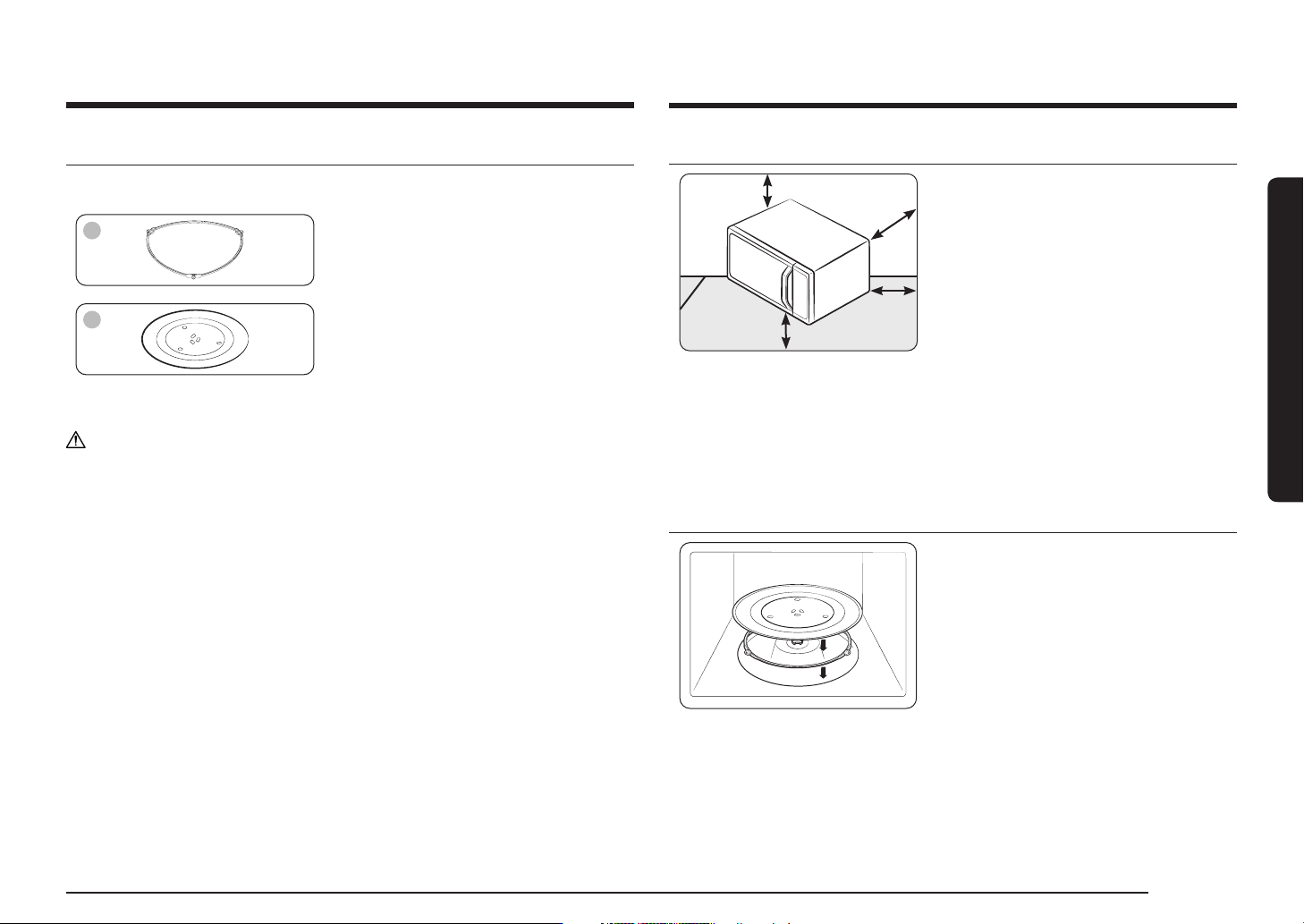
English 7 Installation Installation sit e 10 cm 10 cm behind behind 20 cm 20 cm ab ove ab ove 10 cm on 10 cm on the side the side 85 cm of the 85 cm of the floor floor • Select a flat, lev el surface appro x. 85 cm above…
6 English
Safety instructions
Safety instructions
Install the oven in compliance with the clearances in this manual.
Use caution when connecting other electrical appliances to sockets near the oven.
Do not use this appliance for other purposes than cooking.
Drying of clothing and heating of warming pads, slippers, sponges, damp cloth and
similar may lead to risk of injury, ignition or fire.
Use this appliance only for its intended use as described in the manual.
Do not put corrosive chemicals or vapors in or on this appliance.
This type of oven is specifically designed to heat, cook, or dry food.
It is not designed for industrial or laboratory use.
Microwave operation precautions
Failure to observe the following safety precautions may result in harmful exposure
to microwave energy.
• Do not operate the oven with the door open. Do not tamper with the safety
interlocks (door latches). Do not insert anything into the safety interlock holes.
• Do not place any object between the oven door and front face or allow food
or cleaner residue to accumulate on sealing surfaces. Keep the door and door
sealing surfaces clean by wiping with a damp cloth and then with a soft, dry
cloth after each use.
• Do not operate the oven if it is damaged. Only operate after it has been
repaired by a qualified technician.
Important: the oven door must close properly. The door must not be bent; the
door hinges must not be broken or loose; the door seals and sealing surfaces
must not be damaged.
• All adjustments or repairs must be done by a qualified technician.
Limited warranty
Samsung will charge a repair fee for replacing an accessory or repairing a cosmetic
defect if the damage to the unit or accessory was caused by the customer. Items
this stipulation covers include:
• Door, handles, out-panel, or control panel that are dented, scratched, or broken.
• A broken or missing tray, guide roller, coupler, or wire rack.
Use this oven only for its intended purpose as described in this instruction manual.
Warnings and Important Safety Instructions in this manual do not cover all
possible conditions and situations that may occur. It is your responsibility to use
common sense, caution, and care when installing, maintaining, and operating your
oven.
Because these following operating instructions cover various models, the
characteristics of your microwave oven may differ slightly from those described in
this manual and not all warning signs may be applicable. If you have any questions
or concerns, contact a local Samsung service centre or find help and information
online at www.samsung.com.
Use this oven for heating food only. It is intended for domestic use only. Do not
heat any type of textiles or cushions filled with grains. The manufacturer cannot
be held liable for damage caused by improper or incorrect use of the oven.
To avoid deterioration of the oven surface and hazardous situations, always keep
the oven clean and well maintained.
English 7
Installation
Installation site
10 cm 10 cm
behindbehind
20 cm 20 cm
aboveabove
10 cm on 10 cm on
the sidethe side
85 cm of the 85 cm of the
floorfloor
• Select a flat, level surface approx.
85 cm above the floor. The surface must
support the weight of the oven.
• Secure room for ventilation, at least
10 cm from the rear wall and both
sides, and 20 cm from above.
• Do not install the oven in hot or damp
surroundings, such as next to other
microwave ovens or radiators.
• Conform to the power supply
specifications of this oven. Use only
approved extension cables if you need
to use.
• Wipe the interior and the door seal with
a damp cloth before using your oven for
the first time.
Turntable
Remove all packing materials inside the
oven. Install the roller ring and turntable.
Check that the turntable rotates freely.
Installation
Accessories
Depending on the model that you have purchased, you are supplied with several
accessories that can be used in a variety of ways.
01
01 Roller ring, to be placed in the centre of
the oven.
The roller ring supports the turntable.
02
02 Turntable, to be placed on the roller
ring with the centre fitting to the
coupler.
The turntable serves as the main
cooking surface; it can be easily
removed for cleaning.
CAUTION
DO NOT operate the microwave oven without the roller ring and turntable.
8 English
Maintenance
Maintenance
Cleaning
Clean the oven regularly to prevent impurities from building up on or inside the
oven. Also pay special attention to the door, door sealing, and turntable and roller
ring (applicable models only).
If the door won’t open or close smoothly, first check if the door seals have built up
impurities. Use a soft cloth in soapy water to clean both the inner and outer sides
of the oven. Rinse and dry well.
To remove stubborn impurities with bad smells from inside the oven
1. With an empty oven, put a cup of diluted lemon juice on the centre of the
turntable.
2. Heat the oven for 10 minutes at max power.
3. When the cycle is complete, wait until the oven cools down. Then, open the
door and clean the cooking chamber.
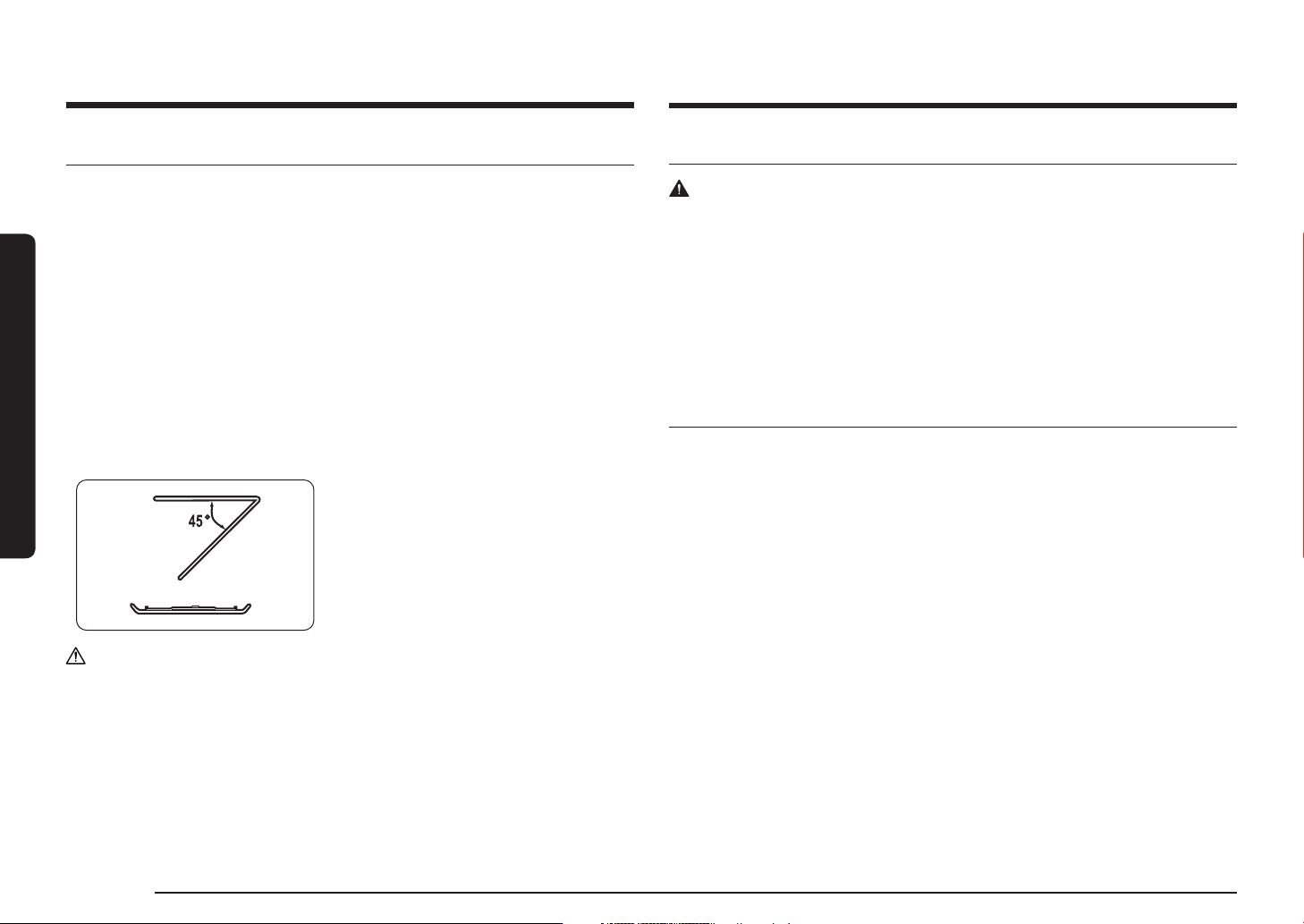
To clean inside swing-heater models
To clean the upper area of the cooking
chamber, lower the top heating element by
45° as shown. This will help clean the upper
area. When done, reposition the top heating
element.
CAUTION
• Keep the door and door sealing clean and ensure the door opens and closes
smoothly. Otherwise, the oven’s lifecycle may be shortened.
• Take caution not to spill water into the oven vents.
• Do not use any abrasive or chemical substances for cleaning.
• After each use of the oven, use a mild detergent to clean the cooking chamber
after waiting for the oven to cool down.
Replacement (repair)
WARNING
This oven has no user-removable parts inside. Do not try to replace or repair the
oven yourself.
• If you encounter a problem with hinges, sealing, and/or the door, contact a
qualified technician or a local Samsung service centre for technical assistance.
• If you want to replace the light bulb, contact a local Samsung service centre. Do
not replace it yourself.
• If you encounter a problem with the outer housing of the oven, first unplug the
power cord from the power source, and then contact a local Samsung service
centre.
Care against an extended period of disuse
• If you don’t use the oven for an extended period of time, unplug the power
cord and move the oven to a dry, dust-free location. Dust and moisture that
builds up inside the oven may affect the performance of the oven.