O_03._DE68_04547E_03_IB_FULL_MW3500K_MS23K3513AK_SP_EN_061025.pdf - 第24页
24 English T echnical specifications T echnical specifications SAMSUNG striv es to impro ve its pr oducts at all times. Both the design specifications and these user instructions ar e thus subject to change without no ti…
English 23
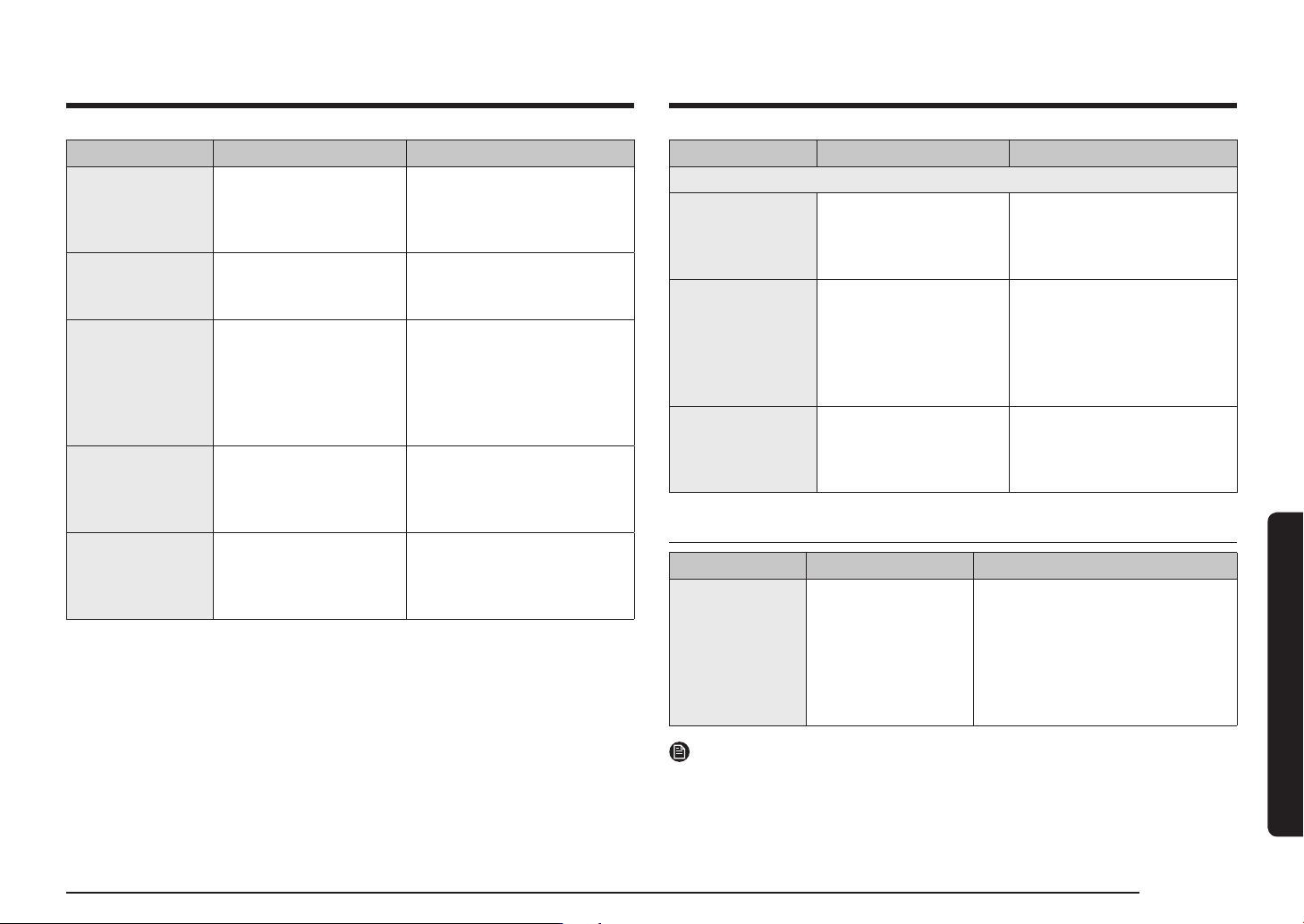
Troubleshooting and information code
Problem Cause Action
When power is
connected, the
oven immediately
starts to work.
The door is not properly
closed.
Close the door and check
again.
There is electricity
coming from the
oven.
The power or power
socket is not properly
grounded.
Make sure the power and
power socket are properly
grounded.
1. Water drips.
2. Steam emits
through a door
crack.
3. Water remains
in the oven.
There may be water or
steam in some cases
depending on the food.
This is not an oven
malfunction.
Let the oven cool and then
wipe with a dry dish towel.
The brightness
inside the oven
varies.
Brightness changes
depending on power
output changes according
to function.
Power output changes during
cooking are not malfunctions.
This is not an oven
malfunction.
Cooking is
finished, but the
cooling fan is still
running.
To ventilate the oven, the
cooling fan continues to
run for about 3 minutes
after cooking is complete.
This is not an oven
malfunction.
Problem Cause Action
Turntable
While turning, the
turntable comes
out of place or
stops turning.
There is no roller ring,
or the roller ring is not
properly in place.
Install the roller ring and then
try again.
The turn table
drags while
turning.
The roller ring is not
properly in place, there
is too much food, or the
container is too large and
touches the inside of the
microwave.
Adjust the amount of food and
do not use containers that are
too large.
The turn table
rattles while
turning and is
noisy.
Food residue is stuck to
the bottom of the oven.
Remove any food residue
stuck to the bottom of the
oven.
Information code
Information code CAUSE Action
C-d0
Control buttons
are pressed over
10 seconds.
Clean the keys and check if there
is water on the surface around
key. If it occurs again, turn off the
microwave oven over 30 seconds
and try setting again. If it appears
again, call your local SAMSUNG
Customer Care Centre.
NOTE
If the suggested solution does not solve the problem, contact your local SAMSUNG
Customer Care Centre.
24 English
Technical specifications
Technical specifications
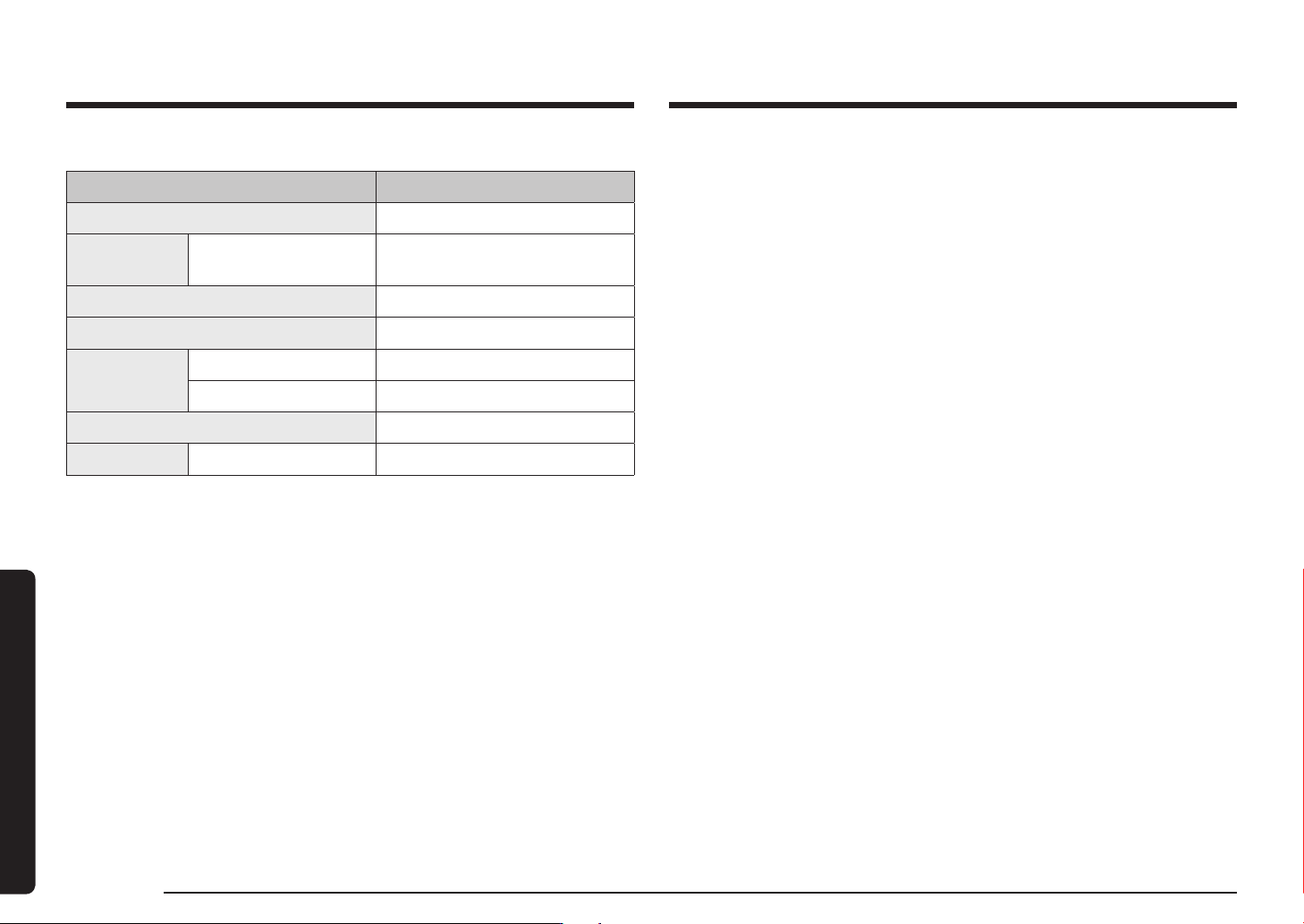
SAMSUNG strives to improve its products at all times. Both the design specifications
and these user instructions are thus subject to change without notice.
Model MS23K3513**
Power source 230 V
~
50 Hz AC
Power
consumption
Microwave 1150 W
Output power 100 W / 800 W - 6 levels (IEC-705)
Operating frequency 2450 MHz
Dimensions
(W x H x D)
Outside (Include Handle) 489 x 275 x 374 mm
Oven cavity 330 x 211 x 324 mm
Volume 23 liter
Weight Net 12.0 kg approx.
Memo
Memo