00198574-01_Process_Foundation_DEK_Micron_EN.pdf - 第21页
4 Process Hardware 4.4 Print Material Process Foundation DEK Micron-Series 12/2017 21 Environment ● Most print materials decrease in viscosity (become more liquid) when they get hotter (though solder paste may dry out an…
4 Process Hardware
4.4 Print Material
20 Process Foundation DEK Micron-Series 12/2017
4.4 Print Material
There are many types of material that can be screen-printed and many varieties and different
manufactures of each type. Materials include solder paste, fluxes, ink, adhesive, silver epoxy and
encapsulation. Basically, any materials that exhibit the correct viscosity can be screen-printed. This
course cannot go into specific details about each material type but can offer general guidelines and
good working practices based on the following factors:
Safe Use
●
Avoid any activities that may transfer the material to your mouth (wash your hands before
eating, drinking etc.)
●
Avoid direct contact with your skin
●
Wear gloves
Quality
Affected by:
●
Environment
●
Age
●
Storage conditions
●
Contamination (i.e. IPA)
●
Handling (i.e. stirring, kneading, gathering up tramlines)
Material Loading
●
Start with enough material to ensure a rolling motion during the print stroke
– Too little: material will not fall from squeegee
– To much: material characteristics will change over time, reducing performance
●
Approximately 15mm diameter for solder paste
●
Add small quantities of material regularly.
Maintaining Print Performance
●
Many print materials – such as solder paste – decrease in viscosity (become more liquid)
when they are stirred, and during printing
●
Some increase in viscosity (get thicker) when stationary
●
If this kind of material has been inactive for some time, use the ‘knead’ function
●
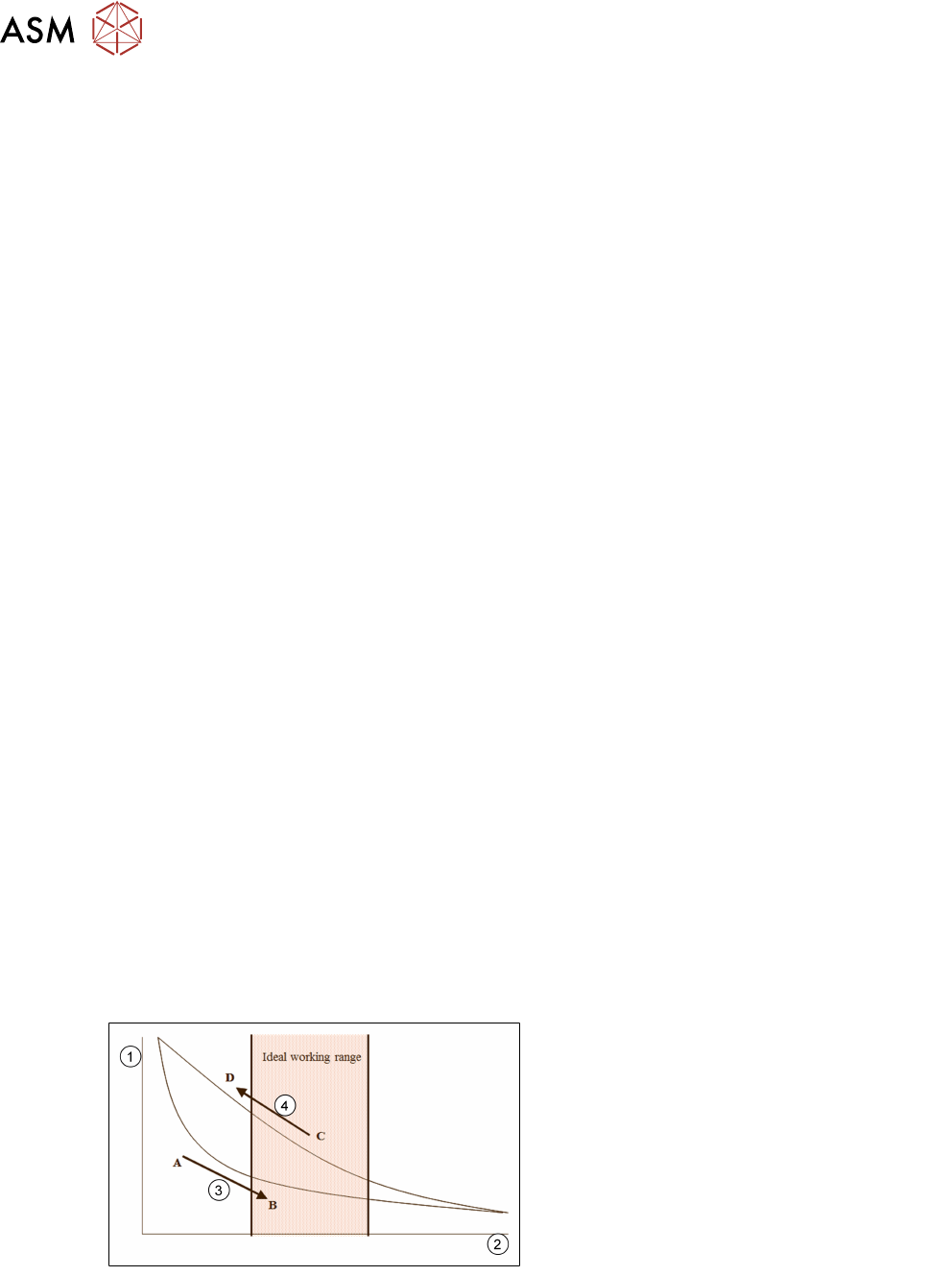
Keep within the optimum operating range as indicated in the chart below
Maintaining print performance:
1. Viscosity
2. Print strokes/ min
3. To go from A-B (i.e. to reach working
viscosity) may take several print strokes
4. To go from C-D (i.e. from working to non-
working) may only take a few minutes of
paste inactivity
4 Process Hardware
4.4 Print Material
Process Foundation DEK Micron-Series 12/2017 21
Environment
●
Most print materials decrease in viscosity (become more liquid) when they get hotter (though
solder paste may dry out and eventually become thicker)
●
Most increase in viscosity (get thicker) when they get colder
●
Minimise temperature fluctuations (keep covers closed, use an environment control module
(ECM), locate machine away from sources of heat, direct sunlight, etc.)
●
Some materials are also sensitive to changes in humidity. Water-soluble pastes, for instance,
tend to absorb water if humidity is high, decreasing their viscosity and degrading their later
performance in the reflow oven
Temperature:
●
Affects paste viscosity
●
Keep comfortably cool (22 - 24°C typical)
Humidity:
●
Too low may dry out paste
●
Too high may cause water absorption, particularly in aqueous pastes
●
Keep to mid-range (40-50% typical)…
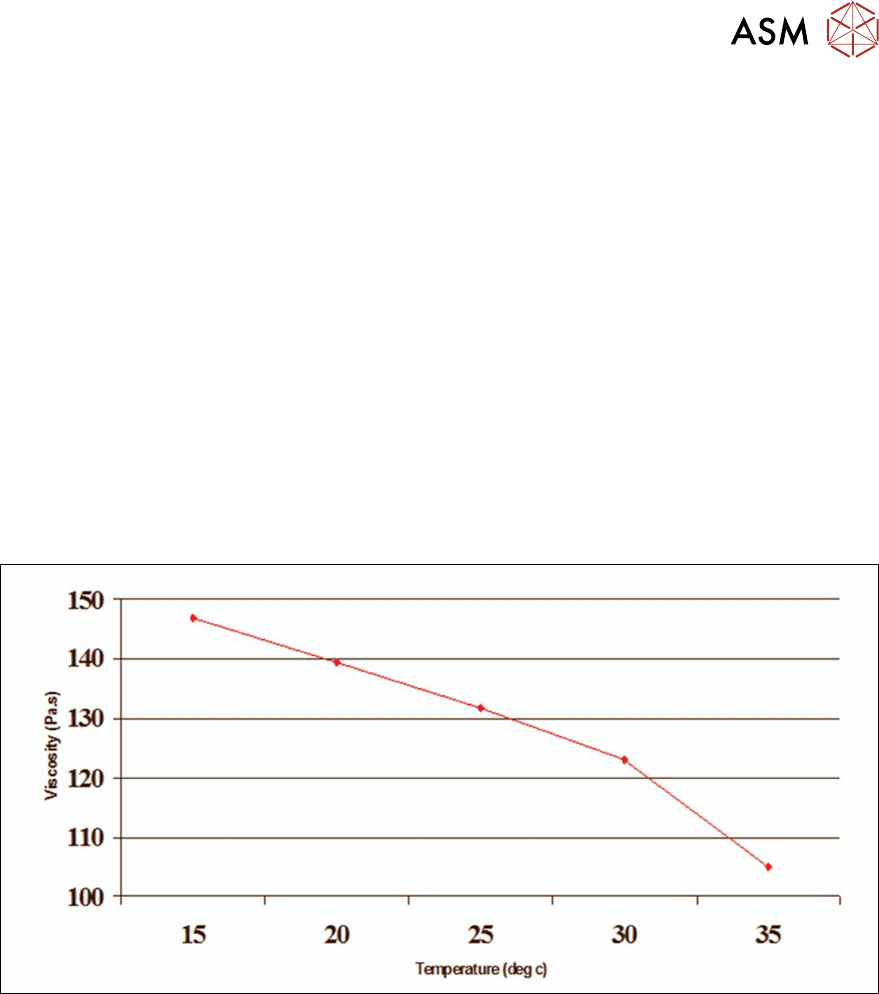
In this example a change of room temperature from 20°C to 30°C reduced the materials viscosity
by some 10 – 15%, resulting in poorer print definition.
4 Process Hardware
4.4 Print Material
22 Process Foundation DEK Micron-Series 12/2017
Using Print Material (Squeegee)
4.4.1 Re-using Print Material
●
Only re-use print material if there have been no printing problems
●
Discard old material or dry material around the edges or on the squeegees / wiper blades
●
Store good material in a sealed container overnight
●
Do not mix used and new material in the same container
●
The exact procedure for re-using a material will depend on its type and quality as well as
economic considerations
Storage
●
Store material in order of age and use FIFO (first in, first out) procedures
●
Store as per manufacturers instructions
●
Refrigeration may be required for long periods
●
Storing at room temperature is OK for short periods and may cause fewer problems then
failing to normalise material taken from a refrigerator
●
Minimise temperature fluctuations during storage
●
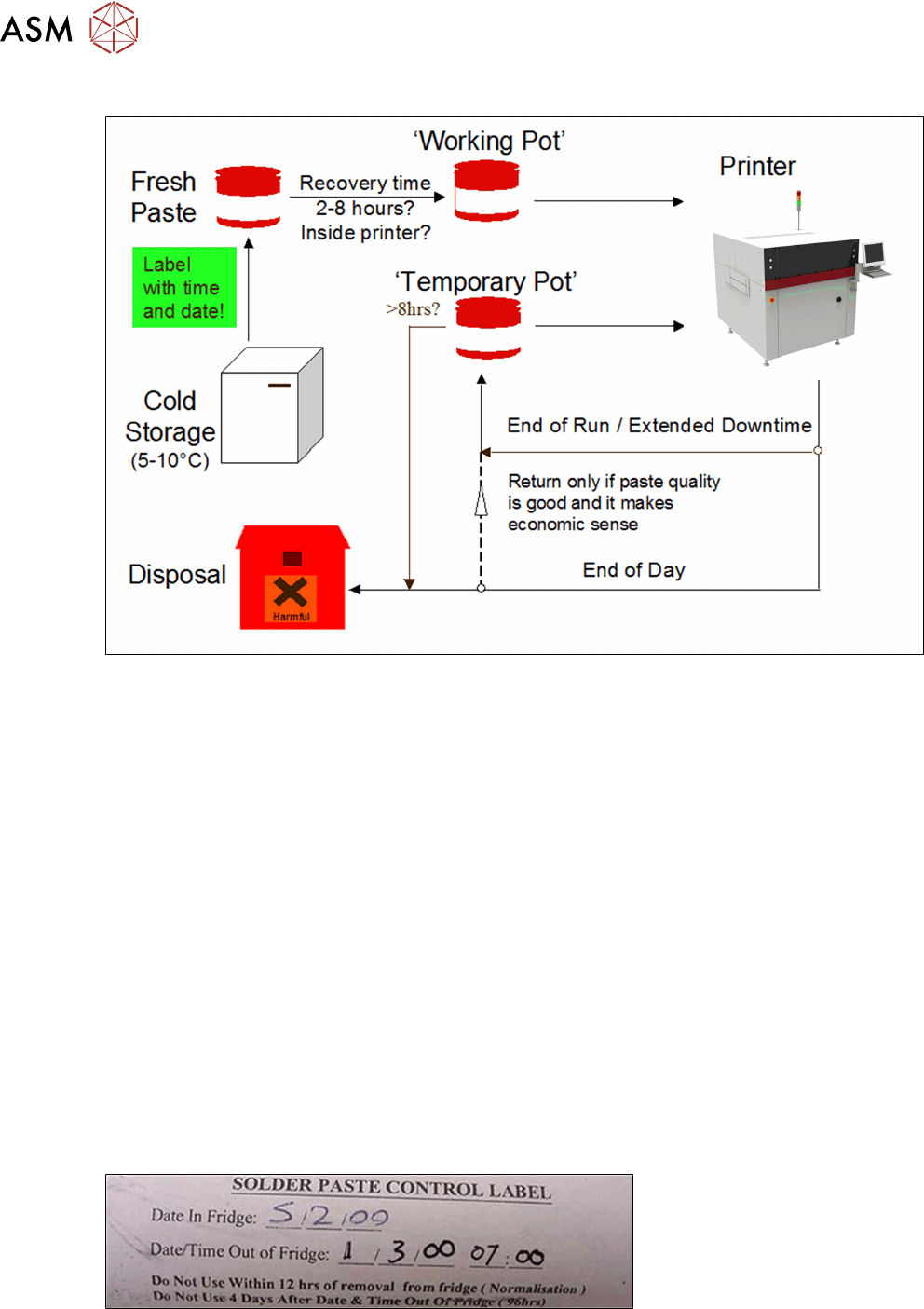
Label material clearly showing the date and time taken out of storage
Example: