00198574-01_Process_Foundation_DEK_Micron_EN.pdf - 第26页
4 Process Hardware 4.5 Squeegees 26 Process Foundation DEK Micron-Series 12/2017 Wear and damage ● The blade edges must be flat and even. Worn or damaged blades must be replaced as they could damage the stencil surface a…
4 Process Hardware
4.5 Squeegees
Process Foundation DEK Micron-Series 12/2017 25
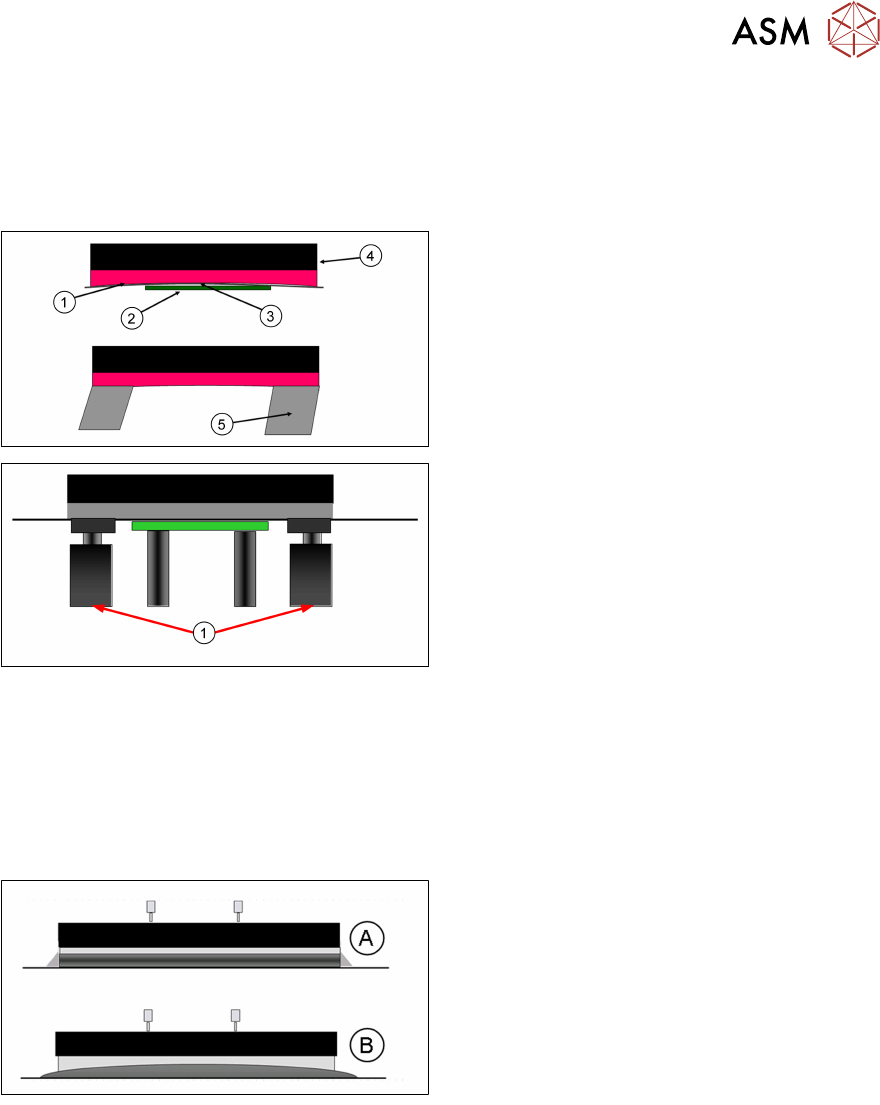
Squeegees Length
Should be selected to be the next standard size up from the length of the board being printed.
Ideally, there would be no more than 10-15mm extra on each side of the board. Excessively long
squeegees can cause pressure problems and drying material on the stencil surface.
Choose the closest length to the board size
1. Stencil
2. Board
3. Gap
4. Squeegee
5. Dry paste
1. Stencil Support Blocks
If your specified squeegee is too large…
Use stencil support blocks.
Paste Deflectors
These are highly recommended when printing solder paste. They ensure that the paste is
contained within the squeegee length, thus eliminating tramlines and ensuring an even paste roll
diameter.
Without deflectors, paste tends to escape from the edges of the blade and paste can dry at the
sides of the stencil image. If the paste roll diameter varies across the width of the squeegee so will
the pressure.
A With:
Clean stencil and even pressure across
full squeegee length
B Without:
Paste trails and uneven pressure across
squeegee length
Correct Fitting of Deflectors
Paste deflectors must be fitted low enough to minimise tramlines, but too low could result in serious
stencil damage. The easiest way to set the height is to stop the machine mid-way through a print
stroke and adjust the deflector to be 0.25mm above the stencil, using a feeler gauge. Remember
that changing squeegee pressure will change the deflector’s position relative to the stencil.
Storage
●
The edges of metal squeegee blades are very easy to damage if stored carelessly
●
Store in a designated clean area where the chance of damage is minimised
●
Use a rack or padded box, or store in the ASM Printer Caddy
Clean After use
●
Clean regularly to prevent dry material on the edge of the blades, behind the paste deflectors,
in the clamped areas and on mounting screw threads
●
No material should be visible on a cleaned squeegee
4 Process Hardware
4.5 Squeegees
26 Process Foundation DEK Micron-Series 12/2017
Wear and damage
●
The blade edges must be flat and even. Worn or damaged blades must be replaced as they
could damage the stencil surface and lead to print defects
●
It is worth considering that during an average squeegee’s lifetime, it will be driven under
pressure some 8-10 km over a stencil with apertures!
Squeegee Performance
●
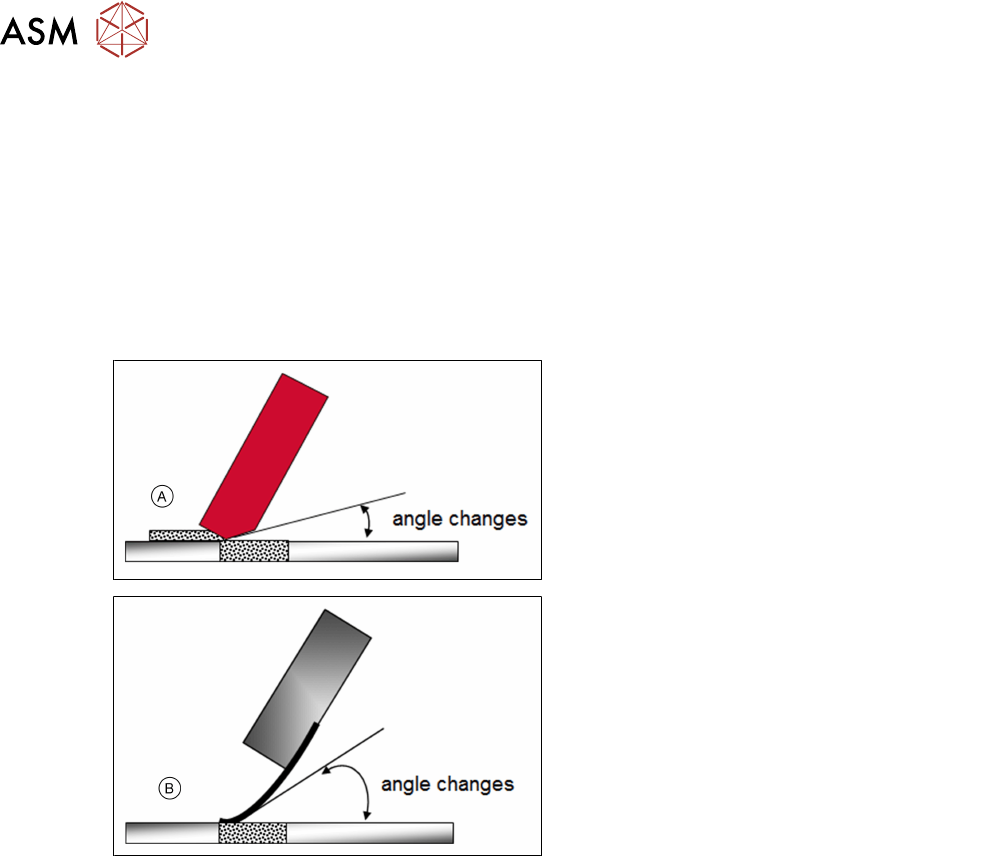
Avoid high squeegee pressures as this can damage the squeegee / stencil and change the
attack angle of the squeegee blade
●
Calibrate squeegee heights when changing lengths, angles or blade material
Angle Changes:
A. Blade wear
B. Excess Print Pressure
Exercise
Given a set of squeegees and paste deflectors follow the guideline above to fit the deflectors at the
correct height.
Room for Your Sketches and Notes
Process Foundation DEK Micron-Series 12/2017 27
Room for Your Sketches and Notes