00198574-01_Process_Foundation_DEK_Micron_EN.pdf - 第58页
8 Troubleshooting and Process Review 8.2 Determine Causes of Machine Error Messages 58 Process Foundation DEK Micron-Series 12/2017 8.2 Determine Causes of Machine Error Messages Exercise For each of the machine error me…
8 Troubleshooting and Process Review
8.1 Identify Causes of Print Defects
Process Foundation DEK Micron-Series 12/2017 57
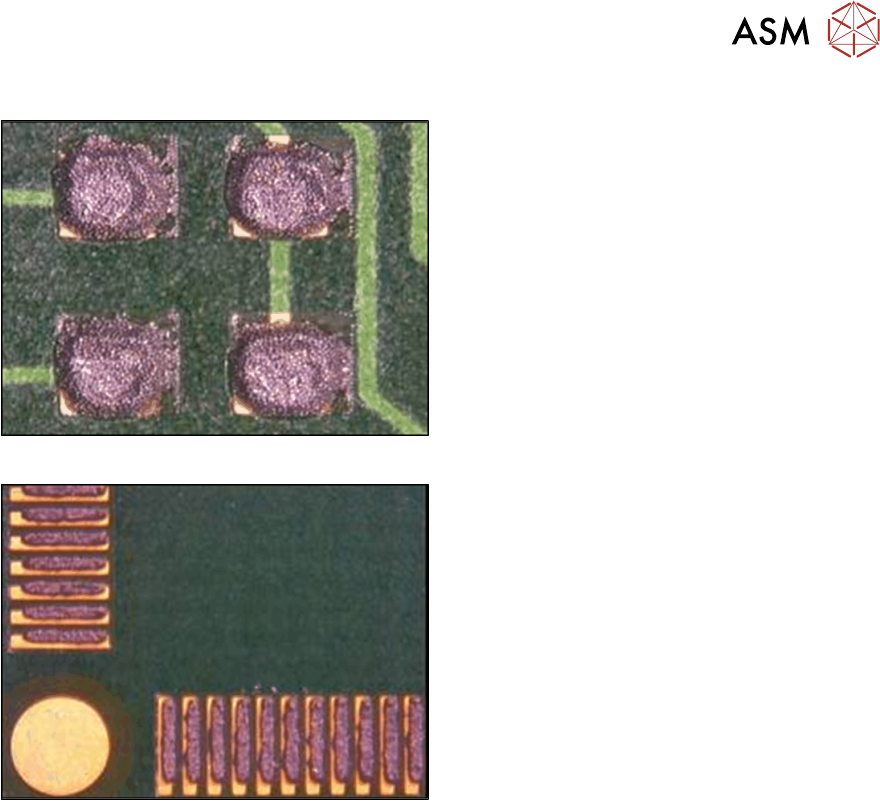
Excessive Paste
Causes:
………………………………………………………
………………………………………………………
………………………………………………………
………………………………………………………
………………………………………………………
………………………………………………………
………………………………………………………
………………………………………………………
………………………………………………………
………………………………………………………
Misalignment
Causes:
………………………………………………………
………………………………………………………
………………………………………………………
………………………………………………………
………………………………………………………
………………………………………………………
………………………………………………………
………………………………………………………
………………………………………………………
………………………………………………………
Best Working Practices
●
Keep reference material near the printer showing good and bad prints
●
Supply troubleshooting guides or flowcharts to aid process recovery
●
Record print failures to aid troubleshooting and fault analysis
●
Have clearly defined escalation procedures
8 Troubleshooting and Process Review
8.2 Determine Causes of Machine Error Messages
58 Process Foundation DEK Micron-Series 12/2017
8.2 Determine Causes of Machine Error Messages
Exercise
For each of the machine error messages shown below, identify the possible product file design
and/ or maintenance causes. Assume that squeegees have been used in these examples.
Note: Depending on the software version the exact wording of these messages may vary
slightly.
Fiducial not Found
………………………………………………………………………………………………………………
………………………………………………………………………………………………………………
………………………………………………………………………………………………………………
………………………………………………………………………………………………………………
Squeegee Pressure Error
………………………………………………………………………………………………………………
………………………………………………………………………………………………………………
………………………………………………………………………………………………………………
………………………………………………………………………………………………………………
Rail Lifted Error
………………………………………………………………………………………………………………
………………………………………………………………………………………………………………
………………………………………………………………………………………………………………
………………………………………………………………………………………………………………
Alignment Close to Limit/ Out of Range
TIP: Refer to the values for X Forward, X rear and Y actuator values in the product file. High
values for these parameters may indicate a stencil or board positioning problem.
………………………………………………………………………………………………………………
………………………………………………………………………………………………………………
………………………………………………………………………………………………………………
………………………………………………………………………………………………………………
Board Detected at Stop
………………………………………………………………………………………………………………
………………………………………………………………………………………………………………
………………………………………………………………………………………………………………
………………………………………………………………………………………………………………
Board Stuck in Rails
………………………………………………………………………………………………………………
………………………………………………………………………………………………………………
………………………………………………………………………………………………………………
………………………………………………………………………………………………………………

8 Troubleshooting and Process Review
8.3 Review a Screen Print Process using the Checklist
Process Foundation DEK Micron-Series 12/2017 59
8.3 Review a Screen Print Process using the Checklist
Introduction
A regular review of the process will identify any problems and ensure that new processes are
maintained following the correct guidelines and with attention to the criterial success factors.
Process Maintenance Checklist
The checklist included in the following pages is split into sections, which cover each of the critical
success factors.
The checklist can be used in two ways:
1. As a reminder of the critical success factors when setting up a new product
2. As a troubleshooting guide if a process is out of control
Exercise
Given a DEK printer with a process already set up, follow the checklist and identify any aspects of
the process maintenance that are not satisfactory.