Printer 710_810 v8 Adjustable Screen Mount.pdf - 第3页
ADJUSTA BLE SCREEN MOUN T (ASM) OVERVIEW Chapter Issue 7 Oct 06 Technical Reference Manual 12.3 There are three methods for housing and secur ing the screen in the machine, the fi rst is a fi xed wid th system an d is de…
ADJUSTABLE SCREEN MOUNT (ASM)
OVERVIEW
12.2 Technical Reference Manual Chapter Issue 7 Oct 06
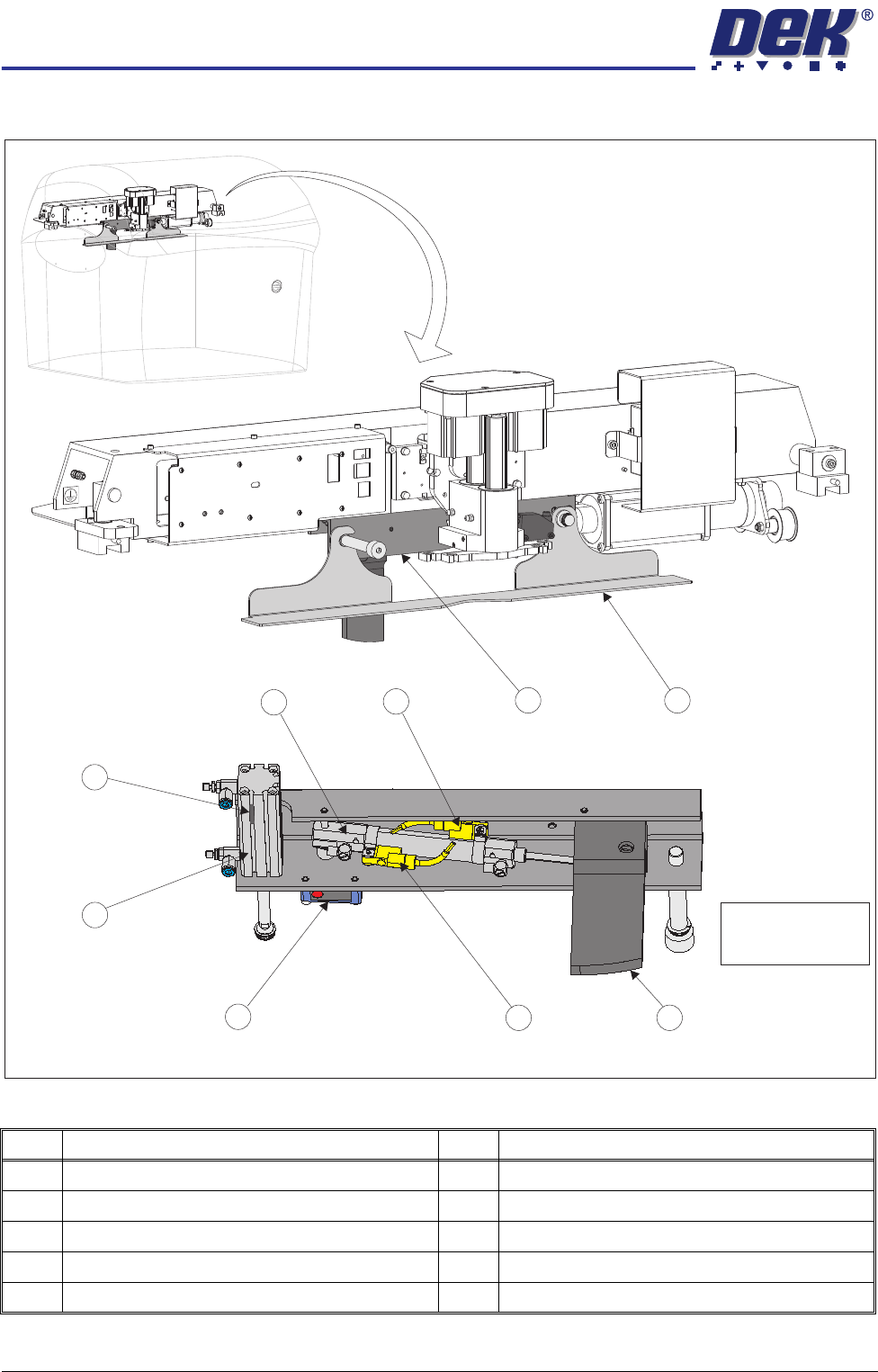
Figure 12-2 Auto Screen Loader Overview
Item Description Item Description
1 Squeegee Drip Tray Mechanism 6 Squeegee Drip Tray Actuator
2 Squeegee Drip Tray 7 Drip Tray Retracted Sensor
3 Auto Screen Loader Lever 8 Auto Screen Loader Actuator
4 Auto Screen Loader Actuator Retracted Sensor 9 Auto Screen Loader Actuator Extended Sensor
5 Screen Position Sensor
1 2
3
4
5
6
7
8
9
View on Rear Underside of Squeegee Drip Tray Mechanism
NOTE
Squeegee drip tray
removed for clarity.

ADJUSTABLE SCREEN MOUNT (ASM)
OVERVIEW
Chapter Issue 7 Oct 06 Technical Reference Manual 12.3
There are three methods for housing and securing the screen in the machine,
the first is a fixed width system and is described in the Cast C Chase chapter,
the second is also a fixed width system and is described in the Machined C
Chase chapter, the third is an adjustable width system and is described in this
chapter.
The ASM module provides a receptacle for the screen, which is clamped in the
correct position for printing operations. The module width can be easily
adjusted by an operator to accommodate screens from the standard 29 inches
square through to 12 inches square with 250mm belt support plates and board
clamps fitted or 29 inches square through to 23 inches square with 500mm belt
support plates and board clamps fitted. The screen image can be front or centre
justified.
The pneumatic push buttons located on the inside of the front left and right hand
web assemblies are operated, releasing all four web assemblies on the front
and rear rail assembly guide shafts. Releasing the web assemblies allows the
user to adjust the position of the left and right hand chase rail assemblies, to
accommodate for the appropriate size screen.
The screen is loaded from the front of the machine and slid into the machine
along the top of stencil support plates. Three screen location leaf springs,
located in the right hand chase rail assembly, ensure that the screen is held in
the correct location for printing, against the screen guide strips on the left hand
chase rail assembly.
The ASM is a floating assembly mounted on a bearing set. The screen is
clamped in the ASM using pneumatically activated flaps that clamp the screen
to the screen support plates.
The ASM is positioned to align the screen to the correct printing position. During
printing the ASM is pneumatically clamped to the left and right printhead
assemblies, to maintain the aligned position, by the screen alignment module
(for further details refer to the Screen Alignment Module chapter in this manual).
A screen at centre, through beam opto (long throw type), sensor consisting of
a transmitter and a receiver (Tx/Rx) is used to detect the presence of a screen
in the ASM.
There are two methods used for achieving correct position of the screen within
the ASM:
• Screen Depth Adjuster
• Auto Screen Loader
NOTE
Only one of the above items would be fitted to the machine at any one time.
Screen Depth
Adjuster
The screen depth adjuster is set by the operator prior to loading the screen. The
screen is loaded manually into the chase until it reaches the stop at the end of
the screen depth adjuster.
NOTE
For further information on setting the screen depth adjuster, refer to Screen
Depth Adjuster in the Adjustments and Settings section of this chapter.

ADJUSTABLE SCREEN MOUNT (ASM)
OVERVIEW
12.4 Technical Reference Manual Chapter Issue 7 Oct 06
Auto Screen
Loader
The auto screen loader accurately positions the screen in the chase. The auto
screen loader is incorporated into the squeegee drip tray mechanism which is
secured beneath the print carriage, therefore the drive is provided by the print
carriage drive system.
Initially the screen is manually loaded and the front printhead cover/shutter is
closed. When Screen Change is selected on the MMI, the auto screen loader
is driven forward by the print carriage to locate the rear edge of the screen.
Once located, the auto screen loader is driven further forward allowing the auto
screen loader lever to clear the inner face of the rear frame of the screen. The
auto screen loader lever is driven down and the print carriage is reversed pulling
the screen to the rear of the chase. The auto screen loader lever is retracted
and the screen change mechanism is driven rearwards allowing the auto screen
loader lever to clear the rear face of the screen. The auto screen loader lever
is lowered and the print carriage is driven forwards, pushing the screen to the
correct position. Once the screen is registered in the correct position for
printing, the auto screen loader lever is retracted and the screen is secured in
position.