Printer 710_810 v8 Adjustable Screen Mount.pdf - 第5页
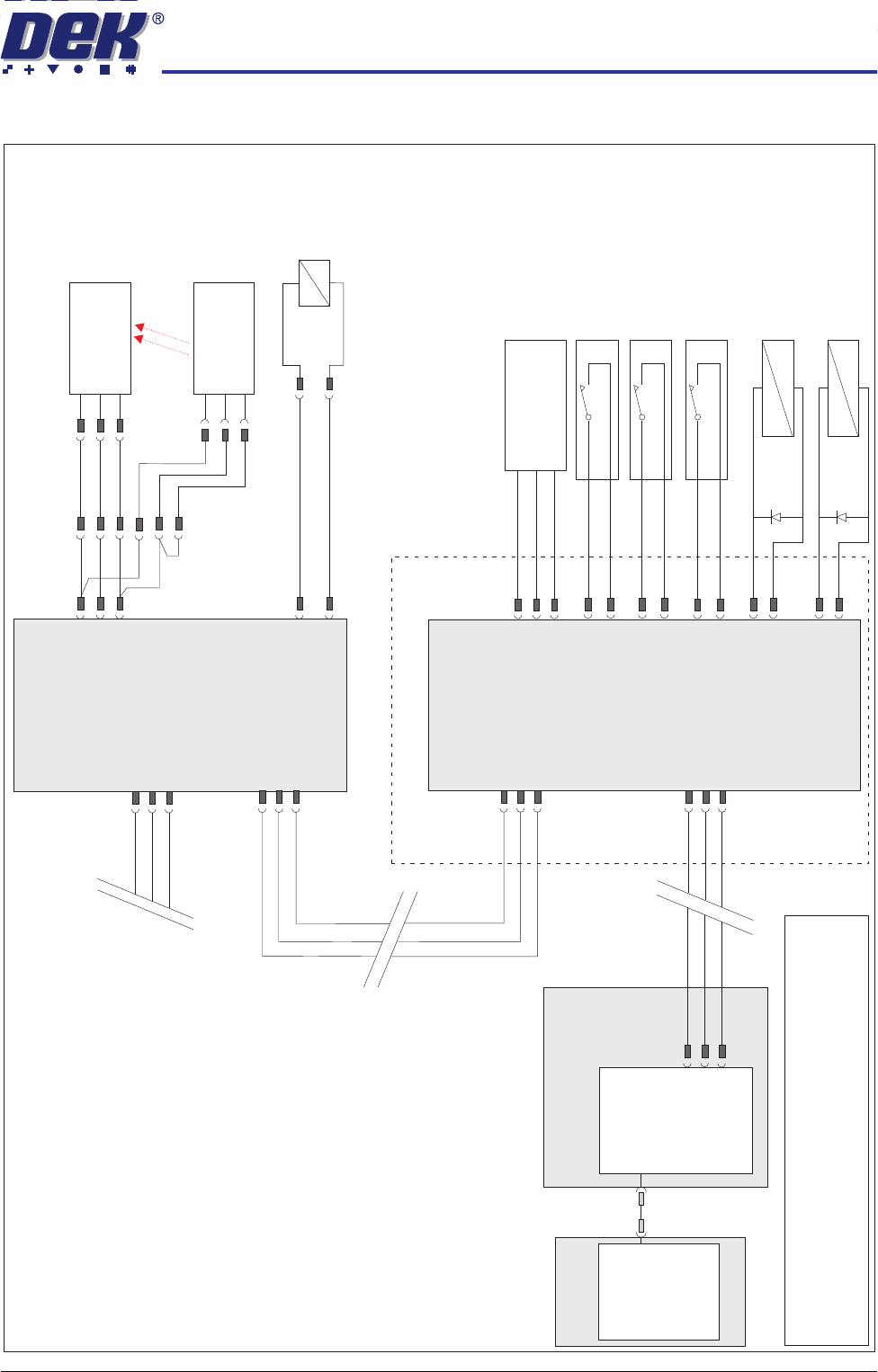
ADJUSTA BLE SCREEN MOUN T (ASM) ELECTRIC AL SCHE MATIC Chapter Issue 7 Oct 06 Technical Reference Manual 12.5 ELECTRICAL SCHEMA TIC CAN In Main Machine I/O Node 2 N2PL10 1 2 3 DIG IN 3 Screen at Centre Through Beam Opto …

ADJUSTABLE SCREEN MOUNT (ASM)
OVERVIEW
12.4 Technical Reference Manual Chapter Issue 7 Oct 06
Auto Screen
Loader
The auto screen loader accurately positions the screen in the chase. The auto
screen loader is incorporated into the squeegee drip tray mechanism which is
secured beneath the print carriage, therefore the drive is provided by the print
carriage drive system.
Initially the screen is manually loaded and the front printhead cover/shutter is
closed. When Screen Change is selected on the MMI, the auto screen loader
is driven forward by the print carriage to locate the rear edge of the screen.
Once located, the auto screen loader is driven further forward allowing the auto
screen loader lever to clear the inner face of the rear frame of the screen. The
auto screen loader lever is driven down and the print carriage is reversed pulling
the screen to the rear of the chase. The auto screen loader lever is retracted
and the screen change mechanism is driven rearwards allowing the auto screen
loader lever to clear the rear face of the screen. The auto screen loader lever
is lowered and the print carriage is driven forwards, pushing the screen to the
correct position. Once the screen is registered in the correct position for
printing, the auto screen loader lever is retracted and the screen is secured in
position.
ADJUSTABLE SCREEN MOUNT (ASM)
ELECTRICAL SCHEMATIC
Chapter Issue 7 Oct 06 Technical Reference Manual 12.5
ELECTRICAL SCHEMATIC
CAN In
Main Machine
I/O Node 2
N2PL10
1
2
3
DIG IN 3
Screen at Centre
Through Beam Opto
13SE07
Rx
+12V
Sig
0V
13PL18
1
2
3
Print Carriage
Print Carriage I/O
Node 3
NOTE
The breaks in the CAN Bus chain reflect that additional
I/O Nodes may be fitted, refer to Machine Control chapter
for the complete CAN Bus chain.
Screen Stop
Actuator
9SOL29
N3PL8
DIG OUT 7
Drip Tray Actuator
9SOL28
N3PL8
DIG OUT 6
Drip Tray Actuator
Retracted 13SE14
N3PL9
DIG IN 6
Screen Stop
Actuator Retracted
13SE13
N3PL7
DIG IN 5
Screen Position
13SE11
+12V
Signal
0V
N3PL5
DIG IN 3
Screen Stop
Actuator Extended
13SE12
N3PL7
DIG IN 4
N3SK3
CAN
Out
N3SK2
CAN
In
CAN Bus
M36 Machine
Control Enclosure
PC
USB
Motherboard
NextMove ES
(I/O Node 1)
1
2
4
CAN_H
CAN_L
CAN GND
M36PL35
CAN Out
N2SK2
7
2
3
N2SK3
7
2
3
16SK07
Screen
Clamps
16SOL07
DIG OUT 8
N2PL4
0V
2
15
+
-
13PL01
1
2
3
4
5
6
Tx
+12V
Mode
0V
13SK19
1
2
3
ADJUSTABLE SCREEN MOUNT (ASM)
ADJUSTMENTS AND SETTINGS
12.6 Technical Reference Manual Chapter Issue 7 Oct 06
ADJUSTMENTS AND SETTINGS
Screen Depth
Adjuster
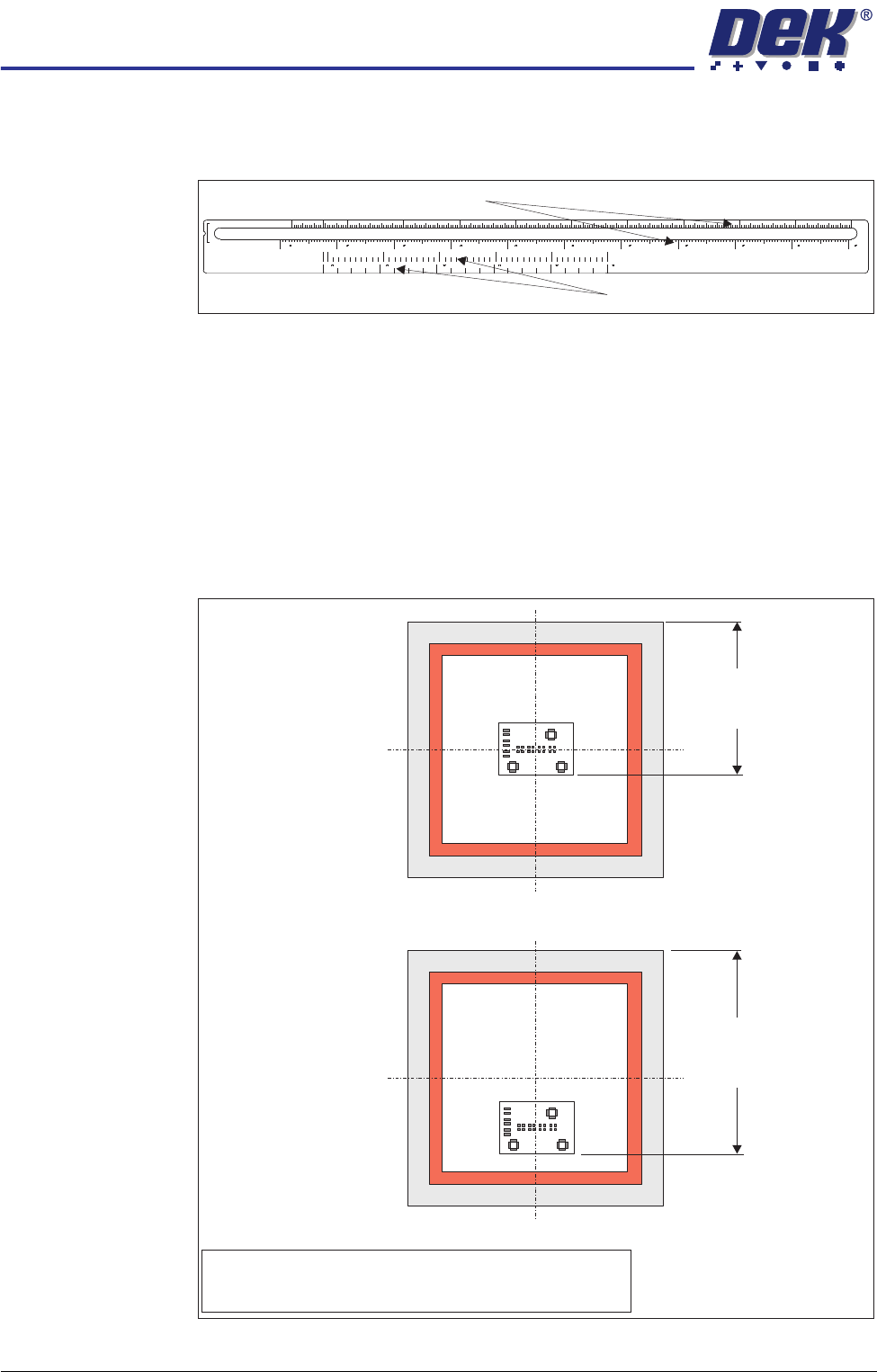
The screen depth adjuster has two scales as follows:
The rear of stencil to front of image scale, marked on the top of the screen depth
adjuster, can be used for either centre justified or front justified stencils. The
scale has both imperial and metric units as follows:
• Metric - 150mm to 650mm
• Imperial - 6” to 26”
When using this scale the screen depth adjuster is set to the rear of stencil to
front of image value. The figure below shows this measurement for both centre
and front justified stencils
Figure 12-3 Rear of Stencil to Front of Image Measurement
REAR OF STENCIL
TO FRONT OF IMAGE
CENTRE JUSTIFIED IMAGE SIZE
650
622 600 550 500 450 400 350 300 250 200 150
68101214161820222426
508 500 400 300 200
100 0
048121620
Rear of Stencil to Front of Image Scale
Centre Justified Image Size Scale
Front Justified
Rear of Stencil
to
Front of Image
Centre Justified
NOTE
Rear of stencil to front of image is measured from the rear
face of the screen frame to the front edge of the image.
Rear of Stencil
to
Front of Image