00196500-04_IM_SSW_703_02_SP1_DE EN.pdf - 第26页
Installation Manual, Station Software Version 703.02 SP1 07/2010 Edition 4.3 Network configuration Machine computer Vision computer 10Base-T or 100Ba se-T cross-over cable 100Base-T cross-over cable Private network betwe…

Installation Manual, Station Software Version 703.02 SP1 07/2010 Edition
25 of 58
4.2.3 Machine/Vision computer (in one-computer operation)
Name
SIMATIC Box PC 627B
CPU / clock frequency
Core 2 Duo T7400 / 2,16 GHz
RAM
1 GB
Harddisk
Yes
External DVD drive
Yes
Internal DVD drive
No
Serial interfaces
1
USB interfaces and
external USB hub
Yes
Network
2x 100 MBit
Table 4-5: Machine/Vision computer hardware of SIPLACE SX-series
Name
SIMATIC Box PC 827B
CPU / clock frequency
Core 2 Duo T7400 / 2,16 GHz
RAM
2 GB
Harddisk
Yes
External DVD drive
No
Internal DVD drive
Yes
Serial interfaces
1
USB interfaces
Yes
External USB hub
No
Network
2x 100 MBit
Table 4-6: Machine/Vision computer hardware of SIPLACE X-series
Installation Manual, Station Software Version 703.02 SP1 07/2010 Edition
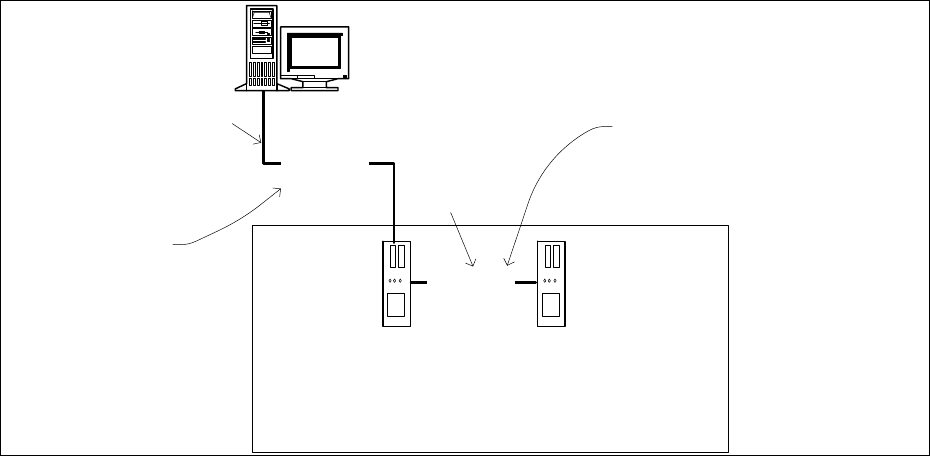
4.3 Network configuration
Machine
computer
Vision computer
10Base-T
or 100Base-T
cross-over cable
100Base-T
cross-over cable
Private network between
machine computer and Vision
computer
SIPLACE LAN
or
customer LAN
SIPLACE Pro
Twisted pair TP
(100 Mbit/s)
Twisted pair TP
(10 or 100 Mbit/s)
Fig. 4-5: Network connections between the machine and SIPLACE Pro
In two-computer operation a separate private network (100 Mbit/s) is set up between the machine
computer and the Vision computer via a subnet mask.
Fixed IP addresses for the machine computer and the Vision computer can thus be assigned for all
SIPLACE machines. These IP addresses are not known outside the private network, for instance in the
SIPLACE LAN or customer LAN.
These IP addresses need not be further configured by the operator while the station software is being
installed.
26 of 58
Installation Manual, Station Software Version 703.02 SP1 07/2010 Edition
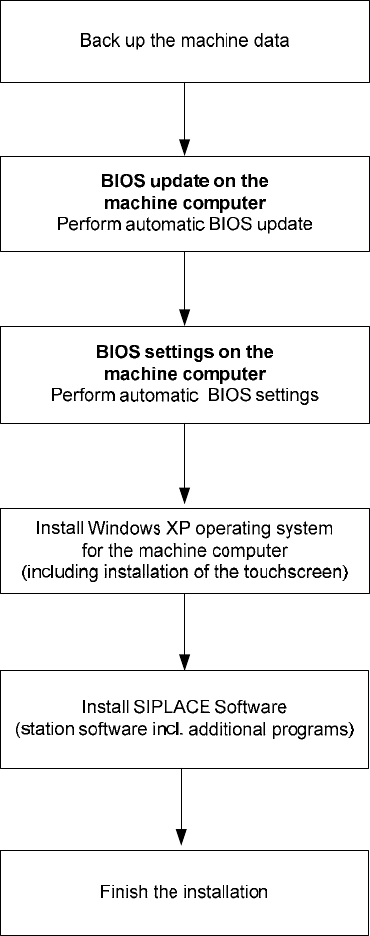
5 Installing the machine computer
5.1 Installation sequence
See section 5.2.
See section 5.2.
See separate Installation Manual for details on installing the
Windows XP operating system (item no. 00196151-xx)
For details on calibrating the touchscreen, see section 5.3.3.
See sections 5.3 and 5.4.
See section 5.4.7.
27 of 58