00195987-02_VB_SWS_Software_2.1_DE_EN.pdf - 第22页
SIPLACE S W S Software 2.1 / Ve rsions beschreibun g / Vers ion Description Ausgabe F ehler! Unb ekannter Nam e für Dokum ent - Eigens 22 10 Sco pe of Deliver y The operati ng system and the softwar e (control a nd opera…
SIPLACE SWS Software 2.1 /
Versionsbeschreibung / Version Description Ausgabe Fehler! Unbekannter Name für Dokument-
Eigens
21
9 Brief Description
The SIPLACE SWS software 2.1 is the control and operating software for the SIPLACE Wafer
System of the SIPLACE CA placement machines.

SIPLACE SWS Software 2.1 /
Versionsbeschreibung / Version Description Ausgabe Fehler! Unbekannter Name für Dokument-
Eigens
22
10 Scope of Delivery
The operating system and the software (control and operating software) for the SIPLACE Wafer
System (SWS) is preinstalled and will be supplied with the SWS module.
PLEASE NOTE
For more information about the scope of delivery for the SWS software, refer to the
"SIPLACE SWS Software 2.1 Installation Manual [Item no: 00195988-02].
10.1 Basic Documents
• "Installation Manual" SWS software 2.1 [00195988-02]
• "Software Manual" SWS software 2.1 [00195986-02]
• This "Version Description" SWS software 2.1 [00195987-02]
• User Manual SIPLACE CA [00195940-02]
10.2 Languages
The SIPLACE SWS software is available in the following languages:
• German
• English
SIPLACE SWS Software 2.1 /
Versionsbeschreibung / Version Description Ausgabe Fehler! Unbekannter Name für Dokument-
Eigens
23
11 Key Information for Users of SWS Software 1.2
to 2.x
The software developers have paid close attention to ensuring that existing users can easily
familiarize themselves with the new 2.x version. To help you get started with the new version, the
key modifications are summarized below.
11.1 New Operating Concept – New User Interface
The operating concept of the SWS software has been adjusted to the operating concept of the
station software version 70x.
In previous versions, the SWS software had a function-based menu, which has now been changed
to give a task-oriented structure.
Icons, buttons and views are highlighted in various colors to show, for example, when user action is
required.
The default entry element for operation of the SWS software is the touchscreen. All functions can
be used with the help of this touchscreen. The keyboard and mouse pad are also still available.
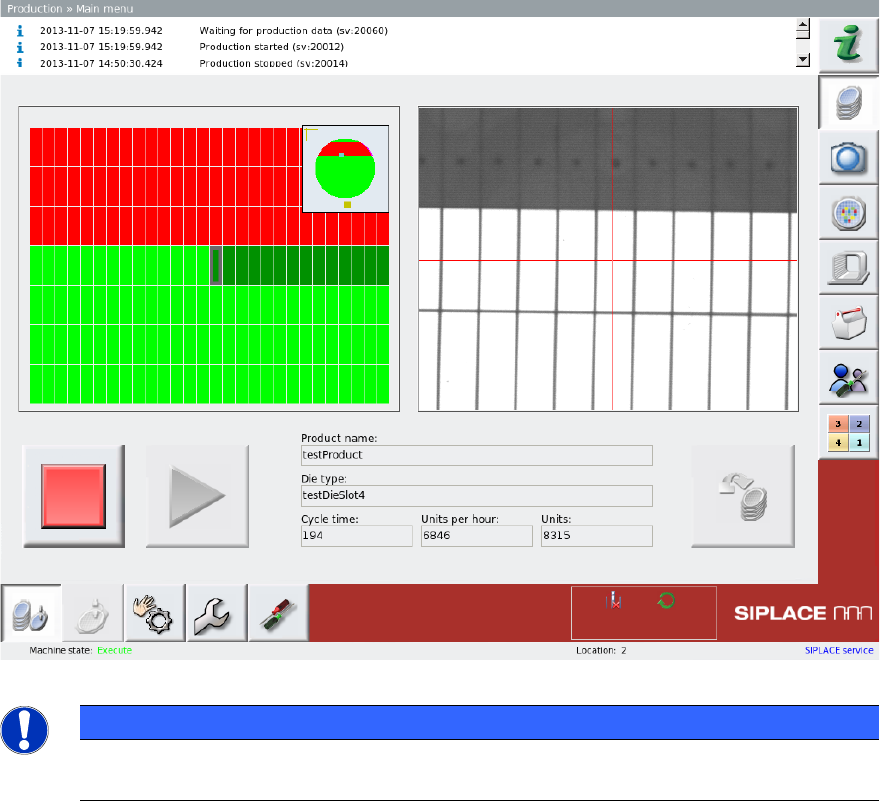
The following diagram shows the main view for production.
Figure 3-1: Example - Main menu
PLEASE NOTE
For more information about operation of the SWS software, refer to the "SIPLACE SWS
Software 2.1 Software Manual [Item no: 00195986-01].