00195987-02_VB_SWS_Software_2.1_DE_EN.pdf - 第32页
SIPLACE S W S Software 2.1 / Versions beschreibun g / Version Des cription Ausgabe Feh ler! Unb ekannter Nam e für Dokum ent - Eigens 32 15 Restrict ions 15.1 GUI Does Not React Sometim es, the GUI m ay cease to react wh…

SIPLACE SWS Software 2.1 /
Versionsbeschreibung / Version Description Ausgabe Fehler! Unbekannter Name für Dokument-
Eigens
31
14 Errors Fixed
The following table contains a selection of errors which have been fixed in version 2.1:
Error code
Error description
D1-71690101
D1-96484758
The SWS sporadically stopped the production run for no apparent reason.
D16974-2804
In multi-die mode, one or more wafer maps are not reported back to the wafer
server on magazine changeover (sporadic error).
D16974-2668
While referencing partially processed wafers with the wafer map, there is a
sporadic error in which the processing path cannot be successfully calculated.
D1-97123701
Error refilling the wafers which were previously reported as empty to the station
software version 7.0x.
D1-97893212
In the Process menu of the GUI, incorrect magazine rack numbers are shown
for the wafer loaded or the wafer to be edited.
D1-97893262
The camera image is not refreshed in the GUI.
SIPLACE SWS Software 2.1 /
Versionsbeschreibung / Version Description Ausgabe Fehler! Unbekannter Name für Dokument-
Eigens
32
15 Restrictions
15.1 GUI Does Not React
Sometimes, the GUI may cease to react when used. This occurs sporadically when switching
windows on which camera images are shown.
Solution:
Press the ESC button to refresh the window.
SIPLACE SWS Software 2.1 /
Versionsbeschreibung / Version Description Ausgabe Fehler! Unbekannter Name für Dokument-
Eigens
33
15.2 When Deleting a Magazine Type, No Check Whether
Magazine is still Assigned to Products.
When a magazine type is deleted, no check is performed to see whether the magazine type was
still assigned to products. If products are loaded at a later time, although their magazines no longer
exist, you will be unable to initialize the SWS. You will be unable to load any other products or
assign a valid magazine type to the current product.
Solution:
Terminal open (ctrl + alt + x) and log in as launch
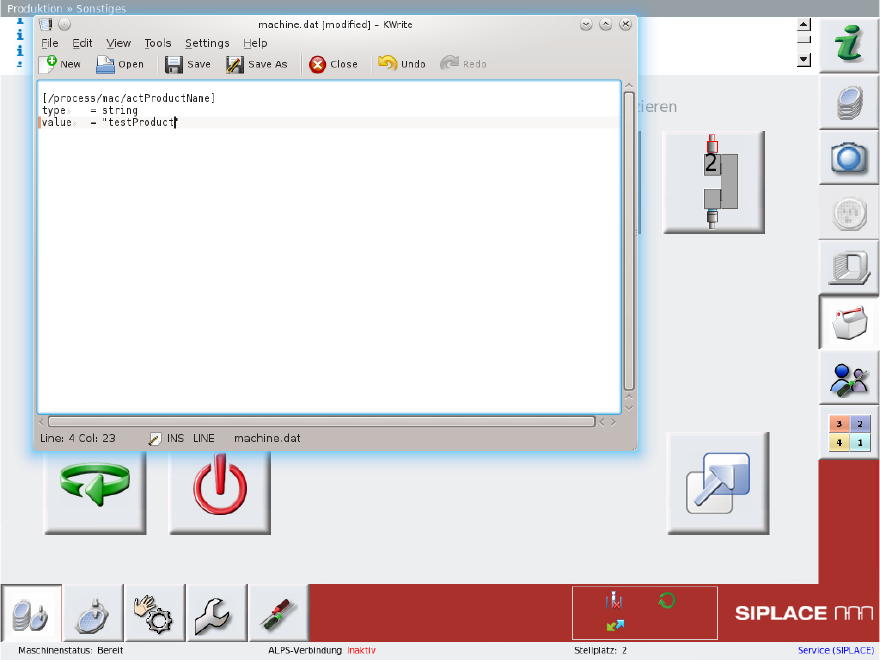
Edit file /asm/wf/config/process/machine.dat:
kwrite /asm/wf/config/process/machine.dat
The following window will be shown:
Enter the name of a valid product as the value [/process/mac/actProductName]. (e.g. value
= "testProduct").
Saver the file and close kwrite.
Terminate the SWS software:
killall machine gui gembox
Restart the SWS software
ctrl + alt + q