00195987-02_VB_SWS_Software_2.1_DE_EN.pdf - 第24页
SIPLACE S W S Software 2.1 / Ve rsions beschreibun g / Vers ion Description Ausgabe F ehler! Unb ekannter Nam e für Dokum ent - Eigens 24 11.2 User Classification – Ne w Operator Levels The operator levels ha ve been ch …
SIPLACE SWS Software 2.1 /
Versionsbeschreibung / Version Description Ausgabe Fehler! Unbekannter Name für Dokument-
Eigens
23
11 Key Information for Users of SWS Software 1.2
to 2.x
The software developers have paid close attention to ensuring that existing users can easily
familiarize themselves with the new 2.x version. To help you get started with the new version, the
key modifications are summarized below.
11.1 New Operating Concept – New User Interface
The operating concept of the SWS software has been adjusted to the operating concept of the
station software version 70x.
In previous versions, the SWS software had a function-based menu, which has now been changed
to give a task-oriented structure.
Icons, buttons and views are highlighted in various colors to show, for example, when user action is
required.
The default entry element for operation of the SWS software is the touchscreen. All functions can
be used with the help of this touchscreen. The keyboard and mouse pad are also still available.
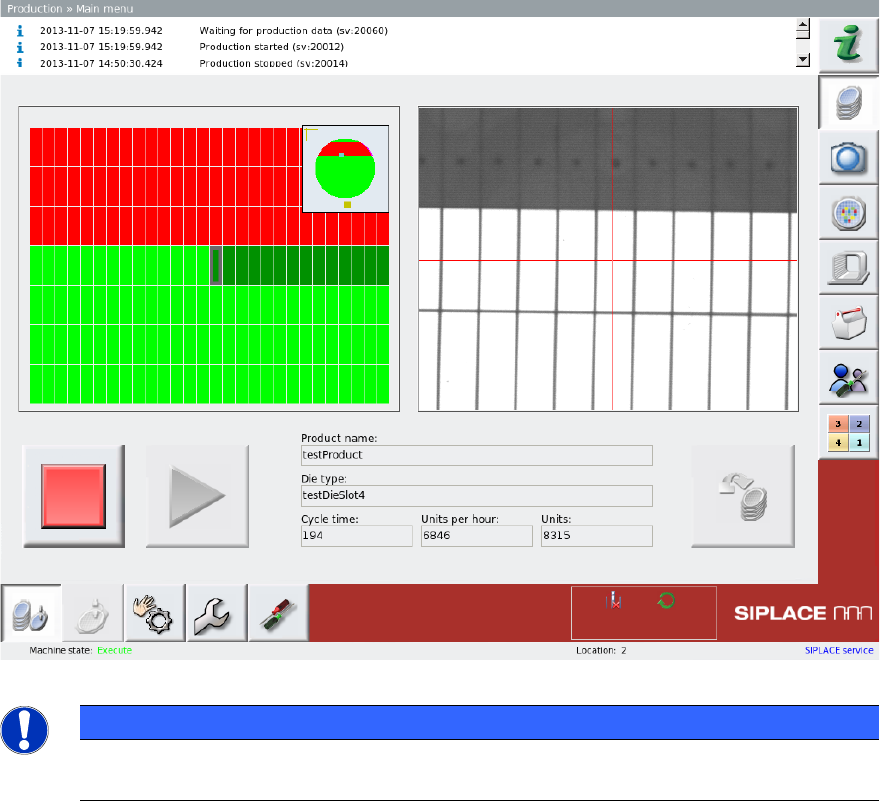
The following diagram shows the main view for production.
Figure 3-1: Example - Main menu
PLEASE NOTE
For more information about operation of the SWS software, refer to the "SIPLACE SWS
Software 2.1 Software Manual [Item no: 00195986-01].

SIPLACE SWS Software 2.1 /
Versionsbeschreibung / Version Description Ausgabe Fehler! Unbekannter Name für Dokument-
Eigens
24
11.2 User Classification – New Operator Levels
The operator levels have been changed in the SWS control software 2.0. There are 4 different
operator levels:
– Production
– Advanced production
– Service (customer)
– Service (SIPLACE)
PLEASE NOTE
For details about the user classification and about changing the operator levels, refer to
the "SIPLACE SWS Software 2.1 Software Manual [Item no.: 00195986-01].
SIPLACE SWS Software 2.1 /
Versionsbeschreibung / Version Description Ausgabe Fehler! Unbekannter Name für Dokument-
Eigens
25
12 SWS Software 2.0 Features
The SWS software 2.0 includes all the functions of the SWS software 1. 2. The key new features of
the SWS software 2.0 are listed below.
12.1 LAN Connection to Station Software 707
In addition to the connection via CAN with the station software 605 SP5, the SWS software
supports a connection to machines via LAN with station software 707.
12.2 Managing 2 Different Transfer Positions
In combination with the station software 707 and the SWS software 2.0, 2 different transfer
positions are managed for operation with 2 nozzles. This enables you to set the transfer position
per nozzle.
12.3 Operation with 2 Nozzles
The SWS software supports operation with 2 nozzles.
12.4 Frame-Offset Compensation for Start Dies
The SWS software supports the frame-offset compensation during teaching for start dies or
reference points with static starting position.
12.5 Wafer Edge Recognition for Square Wafers
The SWS software supports wafer edge recognition of square wafers and ellipses.