00194585-05_Installation_Manual_EDM_EN.pdf - 第23页
Installation Manual SIPLACE EDM Version 1.1 SP2 Issue 12/2006 4.4 Upgrading from EDM 1.0 to EDM 1.1 SP2 4.4.1 Conditions / downw ard compatibility Changes to the SIPLACE Pro data and event model m ean that it is not poss…
Installation Manual, SIPLACE EDM Version 1.1 SP2 Issue 12/2006
4.3.5 Finishing the installation
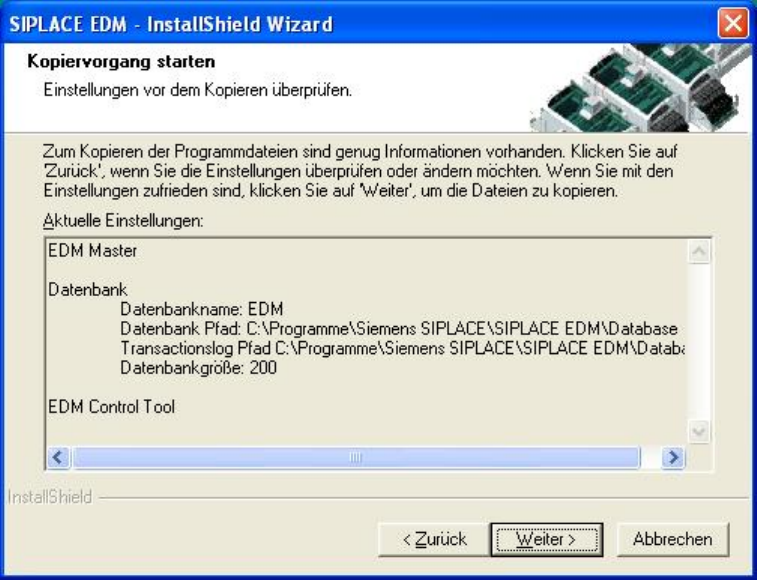
Preparation for the installation is now complete, and the files for SIPLACE EDM can be copied now
and configuration can be carried out. The screen lists the activities which need to be carried out (see
Figure 11) for installation of a master server.
Figure 11 Starting the installation
22 of 65

Installation Manual SIPLACE EDM Version 1.1 SP2 Issue 12/2006
4.4 Upgrading from EDM 1.0 to EDM 1.1 SP2
4.4.1 Conditions / downward compatibility
Changes to the SIPLACE Pro data and event model mean that it is not possible to mix EDM 1.0 and
EDM 1.1 SP2 components.
During an upgrade, the master server, all line servers and all clearing pools must therefore be
converted to EDM 1.1 SP2 (and thus to SIPLACE Pro 3.2 SP1).
EDM 1.0 templates can also be used with EDM 1.1 SP2, as can EDM 1.0 workflows which do not
use EDM 1.0 VDM blob functions. If a customized workflow is in use which makes use of EDM 1.0
VDM blob functions, you have two choices:
1. Convert the workflow to the new VDM blob functions of EDM. This method is recommended.
2. Deactivate the new blob functions (5.2.3.32) and activation of the EDM 1.0 blob functions
(5.2.3.34 Customer configuration).
4.4.2 Simultaneous upgrade over all lines
Where possible, production on all the lines to be upgraded should be suspended for the duration of
the upgrade. As soon as all the components have been converted to Version 1.1 SP2, production
can be restarted. The upgrade operation is carried out as follows:
1. Interrupt production on all the lines to be upgraded.
2. Transfer all notifications from the line servers to the master server.
3. Accept/reject all notifications in the clearing pool.
4. Close all EDM 1.0 components.
5. Install SIPLACE Pro and than EDM line server on all lines.
6. Install SIPLACE Pro and than EDM master server on the master server.
CAUTION:
During this step, any notifications still in the clearing pool are lost. You must ensure
that steps 2 and 3 are carried out properly.
7. Resume production.
Simultaneous upgrade across all the lines is preferred to a gradual upgrade of individual lines
(insofar as this is possible).
23 of 65

Installation Manual, SIPLACE EDM Version 1.1 SP2 Issue 12/2006
4.4.3 Gradual upgrade of individual lines / compatibility mode
If it is not possible to perform a simultaneous upgrade across all the lines, EDM provides a
“compatibility mode” which permits restricted operation of an EDM line server in conjunction with an
EDM 1.0 master server for the duration of the upgrade. This compatibility mode must not be used
for long-term mixed operation of an EDM line server with an EDM 1.0 master server.
In compatibility mode, it is still possible for an EDM line server to pull data from the master server. It
is not, however, possible to send notifications to the master server. All the notifications which arise
during compatibility mode are saved, and can be transferred to an EDM master server when
compatibility mode is terminated.
Gradual upgrading of individual lines is carried out as follows:
1. Interrupt production on one of the lines to be upgraded.
2. Transfer all notifications from the line server of this line to the master server.
3. Install SIPLACE Pro on the line server of this line.
4. Install the EDM line server on the line server of this line. Set the “CompatibilityMode” flag in
EDM.config (see 5.2.3 Configuration file) to “true”.
5. Resume production on this line.
6. Repeat steps 1-5 for the other lines to be upgraded.
7. Shut down the master server.
8. Accept/reject all notifications in the clearing pool.
9. Install SIPLACE Pro and the EDM master server on the master server.
CAUTION:
During this step, any notifications still in the clearing pool are lost. You must ensure
that step 8 is carried out properly.
10. Start the master server.
11. Deactivate compatibility mode on the individual lines and restart the line servers.
24 of 65