00197214_IM_SupportMediaV1.13_EN.pdf - 第11页
Support Media V1.13 04/2012 Edition 11 Release R30 R40 SuP40 R50 Support Media V1.8 V1.9 V1.11 V1.12 V1.13 SQL 2008 SP 1 Express X X SQL 2008 SP 1 Express Update X X X X SQL 2008 SP 2 Express Update X X X SQL 2008 SP 3 E…

Support Media V1.13 04/2012 Edition
10
3.3 New DVD Content
CAUTION
Legal changes regarding Microsoft components
Due to legal changes it is not possible anymore to redistribute all Microsoft components
as in the former versions of the Support Media. This new legal situation implicates, that
the customer has to take care about downloading the required installation packages and
install it through customer responsibilities.
Table of packages in Support Media versions ( X = contained in Support Media ; - = possibly
required but removed due to redistribution restrictions; * = removed but downloaded automatically if
required)
Release R30 R40 SuP40 R50
Support Media V1.8 V1.9 V1.11 V1.12 V1.13
Internet Explorer 6 SP 1 X X
Sun JRE 1.5.0.05 X X
Sun JRE 1.5.0.11 X X
Net Framework 1.1 X X *
.Net Framework 1.1 SP 1 X X *
AppSight BlackBox 7.1 (replaced by 7.1.01) X X
SQL 2000 SP 4 Update X X
SIPLACE MSDE 2000 SP 4 X X
SQL 2005 SP 1 Express X X *
SQL 2005 SP 1 Express Update X X *
SQL 2005 SP 2 Express Update X X *
SQL 2005 SP 3 Express X X X
SQL 2005 SP 3 Express Update X X X
SQL 2005 SP 4 Express Update X X

Support Media V1.13 04/2012 Edition
11
Release R30 R40 SuP40 R50
Support Media V1.8 V1.9 V1.11 V1.12 V1.13
SQL 2008 SP 1 Express X X
SQL 2008 SP 1 Express Update X X X X
SQL 2008 SP 2 Express Update X X X
SQL 2008 SP 3 Express Update X X X
SQL 2008 R2 Express with Tools X *
SQL 2008 R2 SP 1 Express with Tools X
SQL 2008 R2 SP 1 Express Update X
SQL Server 2005 SP 1 Update X X *
SQL Server 2005 SP 2 Update X X *
SQL Server 2005 SP 3 Update X X *
SQL Server 2005 SP 4 Update X *
SQL Server 2008 SP 1 Update X X X X -
SQL Server 2008 SP 2 Update X X *
SQL Server 2008 SP 3 Update *
SQL Server 2008 R2 SP 1 Update *
Windows Imaging Component *
Active Sync 3.7.1 X X X X -
Active Sync 4.5 X X X X -
Windows Mobile Device Center 6.1 X X X X -
WinHlp32 Hotfix for Vista/W2008 X X X X -
PowerShell V1 for XP/W2003/Vista X X X X *
Support Media V1.13 04/2012 Edition
12
3.4 Download of required but not distributed Software
Due to the fact, that not all required software packages from other vendors can be redistributed by
ASM Assembly Systems, Support Media Prerequisite Analyzer offers multiple ways of downloading
and installing missing software components.
CAUTION
Legal changes regarding redistribution
The redistribution right is affecting the delivery through digital media like DVD as well as
manual delivery through ASM Assembly Systems personnel.
The following chapter describes the available options exemplarily.
3.4.1 Download options of Prerequisite Analyzer
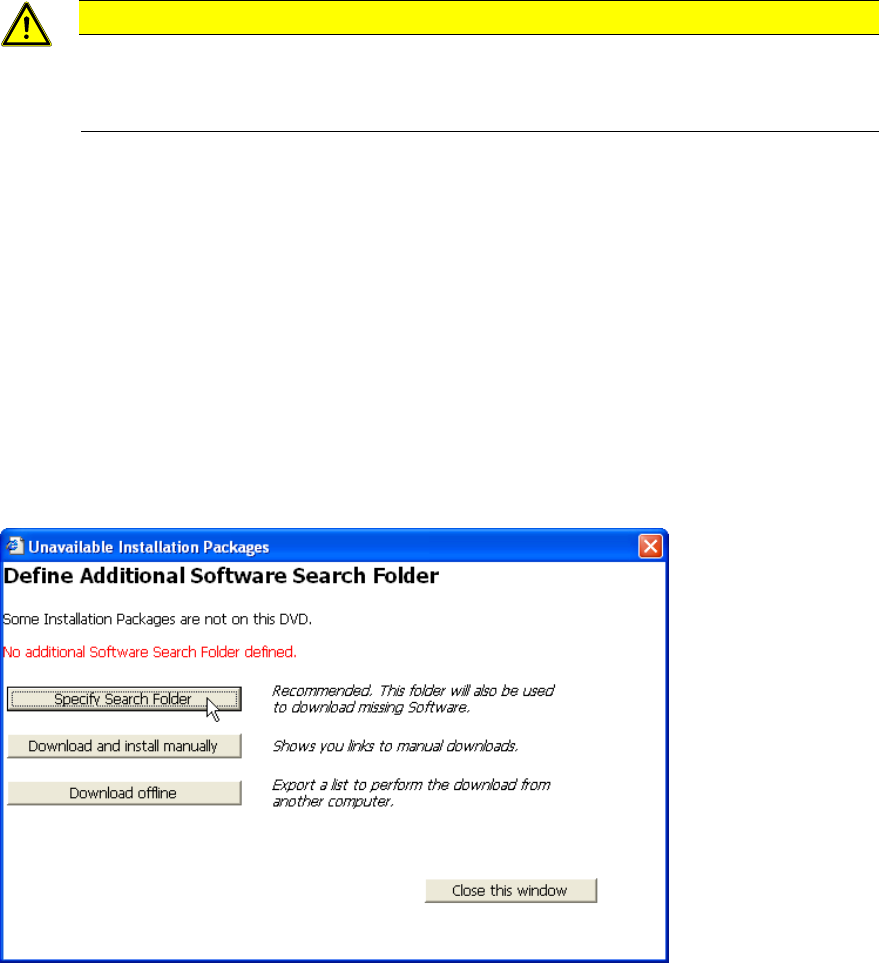
In Prerequisite Analyzer on the Pending Actions Summary page, before installation of Prerequisites
takes place, the media will be checked for the availability of all required Software packages. If at
least one of the required packages is missing, you will get one of the following two dialogs, with the
options sorted by relevance. In this chapter, we give you a basic overview of the options available.
Figure 3-1: Unavailable Installation Packages – No Additional Software Search Folder defined
► Click the Specify Search Folder button to select a (local) folder to search for missing Software
packages.
► Click the button Download and install manually to show the list of missing Software Packages
together with information and links for manual download and installation.
► Click the button Download offline if you don’t have web- access from your computer and want
to download the missing packages using another computer with web- access.