0197787-01_UM_HeadVerification_708_EN.pdf - 第8页
SIPLACE Head V erification User Manual Edition 01/2015 8 2 Head Verification Instructions and Procedure 2.1 Authorizatio n To enable the "Hea d Verification" m enu in the stat ion software, you nee d to be logg…

SIPLACE Head Verification
User Manual Edition 01/2015
7
1 Description of Head Verification
The new "Head Verification" option from SIPLACE supports verification of placement head functions
both inside (online) and outside (offline) the machine.
The Online Head Verification option is available from station software 708.0. It allows you
to directly check the placement head functionality and state in the machine.
The Offline Head Verification option requires use of the Headcare Station (HCS) II V2.2.
Placement heads can be fitted to the HCS II outside the machine and their functionality and
state checked.
There are various test and measurement procedures available for the verification, which can be
executed individually or as a whole, allowing specially trained technicians to check the placement
heads.
The following placement heads can currently be verified:
CPP online & offline
CP20P online & offline
CP20A online & offline
TH offline
DLM currently not implemented
At the end of the verification, the results are collected in a test report which can then be saved as a
PDF file.
These results provide feedback about the technical state, enabling the operator to take measures to
assure or enhance the technical availability of the SIPLACE placement machines.
Execution of additional maintenance
Replacement of wear/spare parts
Replacement of head
The placement heads are checked according to the following criteria:
State of vacuum or placement circuit and corresponding parts
Ease of movement of DP and Z axis bearings
Wear of bearings/tolerances
Component sensor check
Z light barrier check
Positioning accuracy of DP drives
Nozzle seat check
The head verification on the HCS II also allows you to check the vacuum system with the aid of an
external vacuum sensor and to check the placement force with the help of an external force sensor.
The tests and measurements described in this manual refer to the head verification with station
software 708 in the machine (online)!
SIPLACE Head Verification
User Manual Edition 01/2015
8
2 Head Verification Instructions and Procedure
2.1 Authorization
To enable the "Head Verification" menu in the station software, you need to be logged in as
Machine Service
SIPLACE Service
Only these two user levels allow you to perform head verification measurements!
2.2 "Head Verification" Menu
The "Head Verification" menu is shown with the following button on the GUI:
This button is only shown if you are logged in with an authorized user level!
2.2.1 Selection of Head
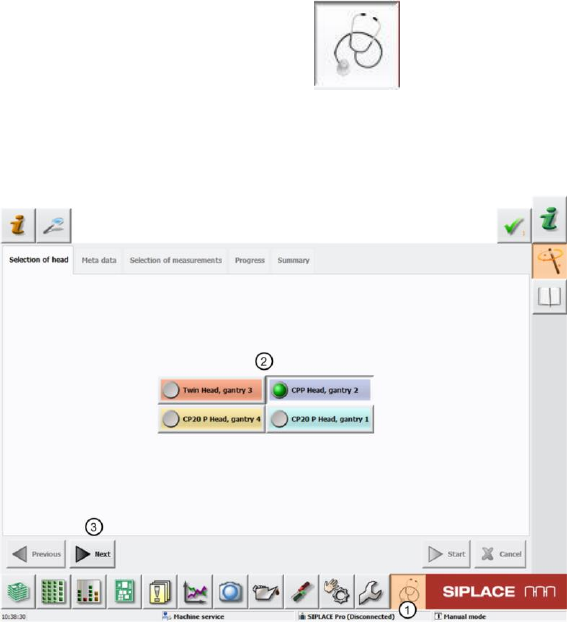
Figure 1: Selection of head type
First start the "Head Verification" menu by clicking on the "Head Verification" button (1).
You then need to select the head to be analyzed with the head verification option (2). In our example,
the CPP head at gantry 2 was selected.
Click "Next" (3) to access the next menu item "Meta Data".
Only one head at a gantry can be selected at one time. Parallel measurement is not currently possible.
SIPLACE Head Verification
User Manual Edition 01/2015
9
2.2.2 Meta Data
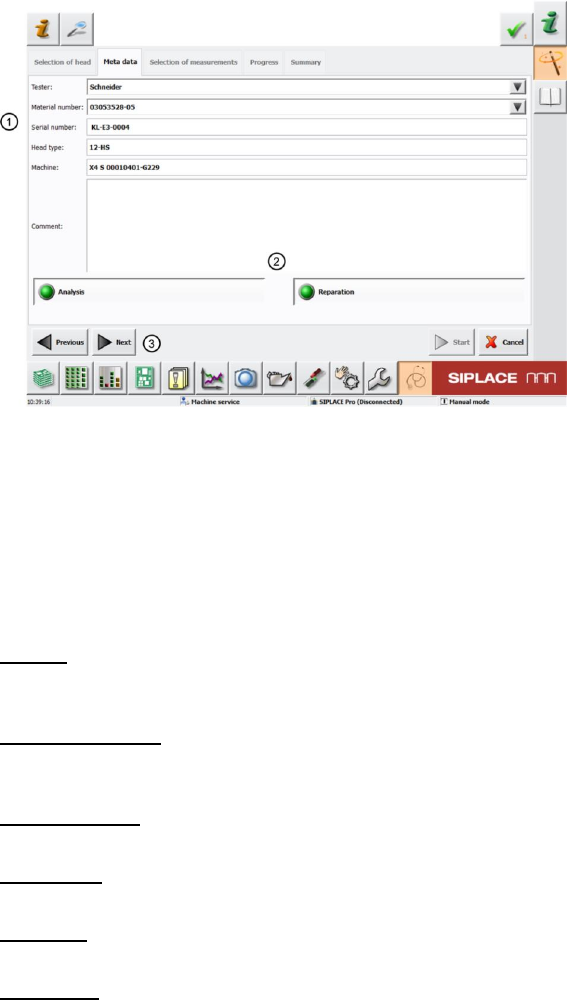
Figure 2: Meta Data
The following head data needs to be entered here so that the measurement is correctly recorded and
a results log with all required data about the head measured can be generated after the measurement.
If this check is conducted before head maintenance, the results log can be supplied with the head to
help the service personnel prepare the necessary steps and directly work on/replace the head parts
affected.
Please enter the following information here (1):
Tester:
Name the person performing head verification. All previous testers can be selected from the scroll-
down menu (black arrow).
Material number:
The material number of the head to be measured is read out of the EEPROM. All previous material
numbers can be selected from the scroll-down menu.
Serial number:
The serial number is automatically read out of the EEPROM.
Head type:
This is automatically entered, based on your selection of the head type (chapter 4.2.1)
Machine:
The machine number stored in the machine data is automatically entered here.
Comment:
The tester can enter comments about the measurement here, to help document the head
verification.
The two menu items "Analysis" and "Reparation" (2) remain selected.
Now click "Next" (3) to access the next menu item "Selection of measurements".