0197787-01_UM_HeadVerification_708_EN.pdf - 第9页
SIPLACE Head V erification User Manual Edition 01/2015 9 2.2.2 Meta Data Figure 2: Meta D ata The following head da ta needs to be e ntered here so t hat the measurem ent is correc tly recorded and a results log with a l…
SIPLACE Head Verification
User Manual Edition 01/2015
8
2 Head Verification Instructions and Procedure
2.1 Authorization
To enable the "Head Verification" menu in the station software, you need to be logged in as
Machine Service
SIPLACE Service
Only these two user levels allow you to perform head verification measurements!
2.2 "Head Verification" Menu
The "Head Verification" menu is shown with the following button on the GUI:
This button is only shown if you are logged in with an authorized user level!
2.2.1 Selection of Head
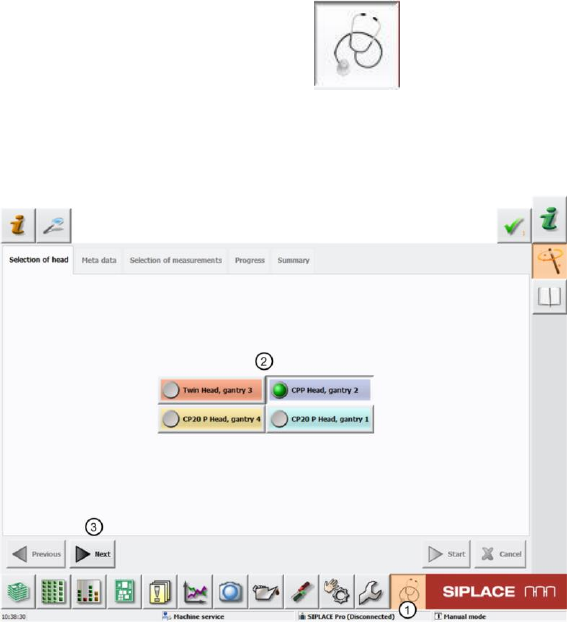
Figure 1: Selection of head type
First start the "Head Verification" menu by clicking on the "Head Verification" button (1).
You then need to select the head to be analyzed with the head verification option (2). In our example,
the CPP head at gantry 2 was selected.
Click "Next" (3) to access the next menu item "Meta Data".
Only one head at a gantry can be selected at one time. Parallel measurement is not currently possible.
SIPLACE Head Verification
User Manual Edition 01/2015
9
2.2.2 Meta Data
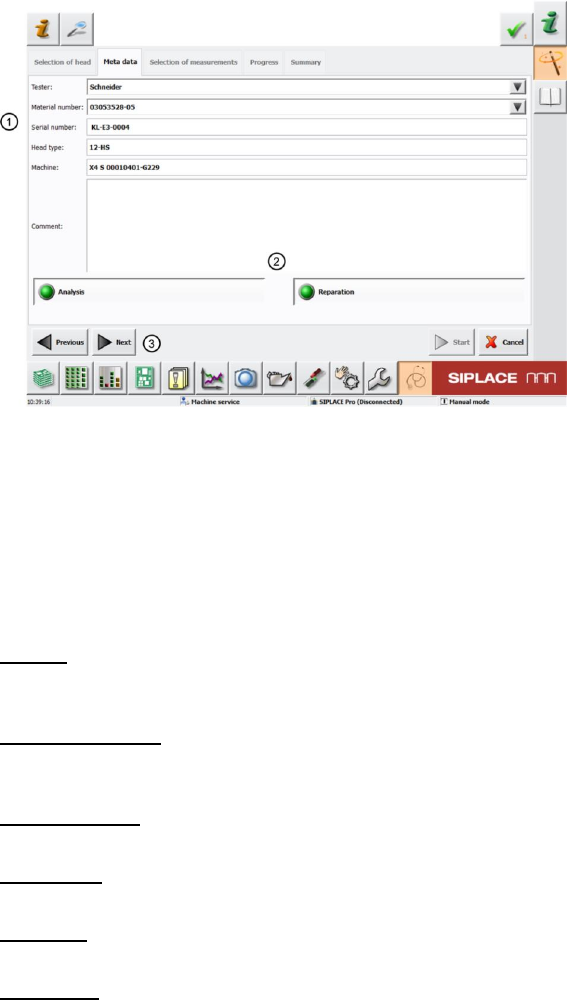
Figure 2: Meta Data
The following head data needs to be entered here so that the measurement is correctly recorded and
a results log with all required data about the head measured can be generated after the measurement.
If this check is conducted before head maintenance, the results log can be supplied with the head to
help the service personnel prepare the necessary steps and directly work on/replace the head parts
affected.
Please enter the following information here (1):
Tester:
Name the person performing head verification. All previous testers can be selected from the scroll-
down menu (black arrow).
Material number:
The material number of the head to be measured is read out of the EEPROM. All previous material
numbers can be selected from the scroll-down menu.
Serial number:
The serial number is automatically read out of the EEPROM.
Head type:
This is automatically entered, based on your selection of the head type (chapter 4.2.1)
Machine:
The machine number stored in the machine data is automatically entered here.
Comment:
The tester can enter comments about the measurement here, to help document the head
verification.
The two menu items "Analysis" and "Reparation" (2) remain selected.
Now click "Next" (3) to access the next menu item "Selection of measurements".
SIPLACE Head Verification
User Manual Edition 01/2015
10
2.2.3 Selection of Measurements
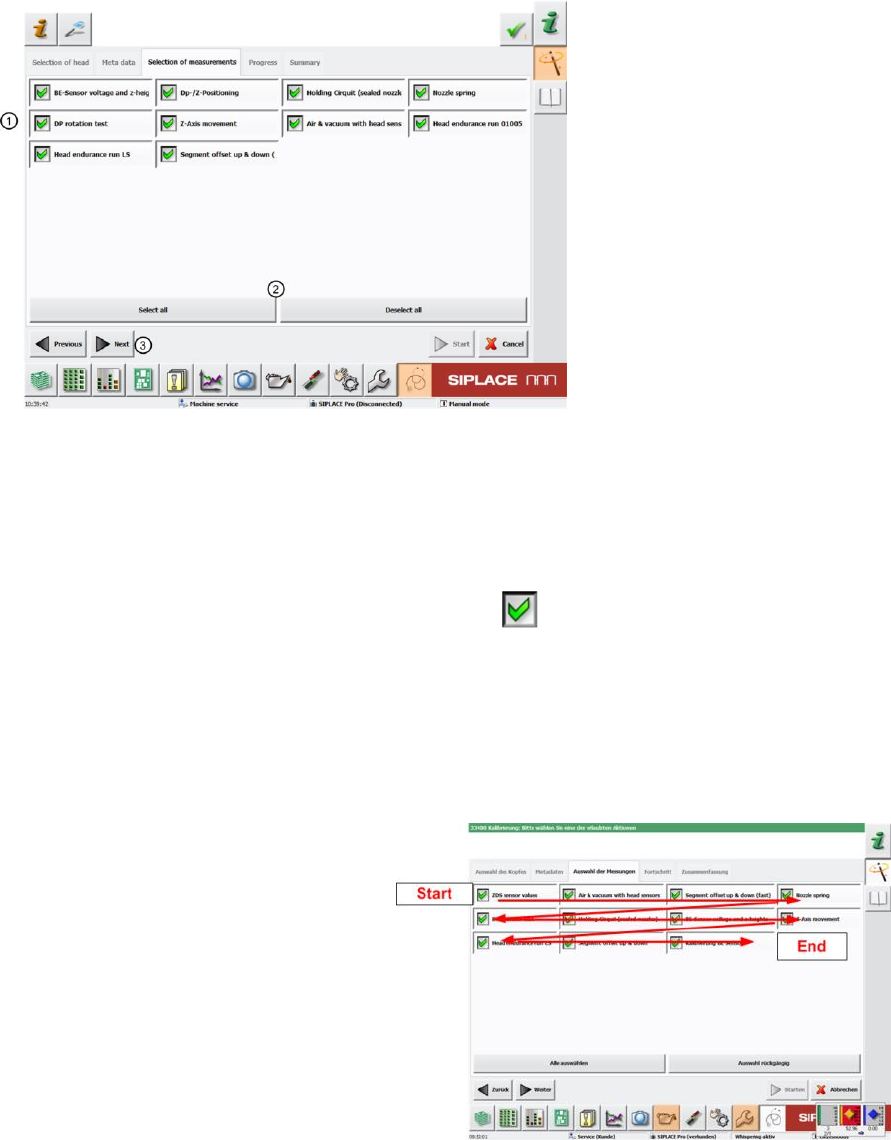
Figure 3: Selection of measurements using example of CPP
The "Selection of Measurements" shows all head verification measurements which are possible for the
previously selected head type.
Our example shows all possible measurements for a CPP head.
The "Selection of Measurements" menu provides an overview of all individual measurements (1).
The green tick marks those which have been enabled.
Individual measurements can be selected separately by ticking or unticking.
You can also enable or disable all measurements at once with the following buttons (2)
"Select all" all measurements enabled or "Deselect all" all measurements disabled.
All measurements are enabled as a default!
In general, we recommend performing a complete head verification with all measurements as this is
the only way to gain a reliable conclusion about the overall state of the head.
The measurements are then conducted
"row for row” from top left to bottom right.
Then click "Next" (3),